







About Show Biome In Name
From ModrinthShows the current biome a player is in next to its name
Show Biome In Name (SBIN)
<picture> <source media="(prefers-color-scheme: light)" srcset="https://raw.githubusercontent.com/Mqxx/GitHub-Markdown/main/blockquotes/badge/light-theme/tip.svg">  </picture>
Questions or issues? -> discord server | _or create an issue on github_
The biome a player is in will be displayed next to the players name.
Guides
<picture> <source media="(prefers-color-scheme: light)" srcset="https://raw.githubusercontent.com/Mqxx/GitHub-Markdown/main/blockquotes/badge/light-theme/tip.svg"> </picture>
If something doesn't work, feel free to join the discord server
How to Install a Datapack in Singleplayer
At the Creation of a World
How to install a datapack in singleplayer
- Open Minecraft
Launch the game.
- Create a New World
Navigate to "More" and click on "Data Packs".
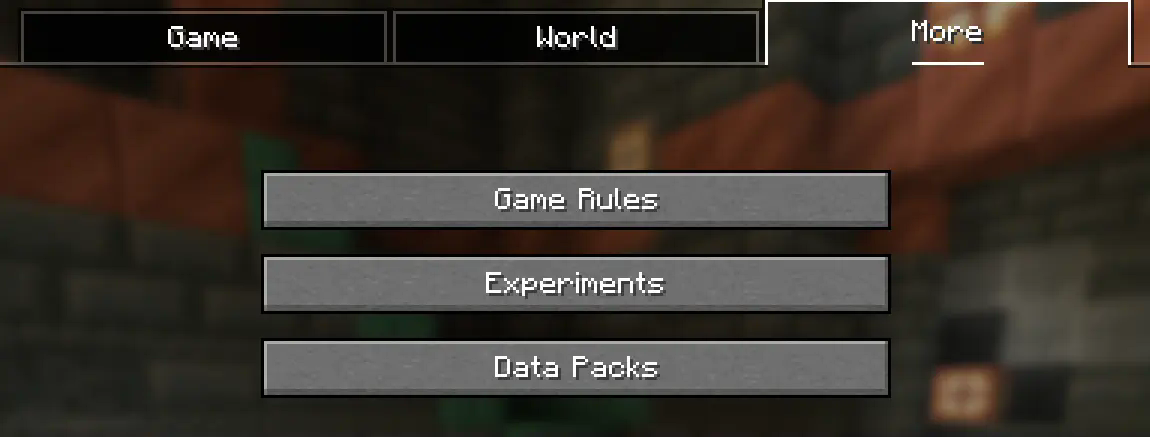
- Add the Datapack
Drag the datapack (a .zip file or directory) into the Minecraft window.
- A confirmation screen will appear. Click "Yes".
- Activate the Datapack
Move the datapack to the right-hand side of the screen by clicking the triangle on its icon (visible when hovering over it).
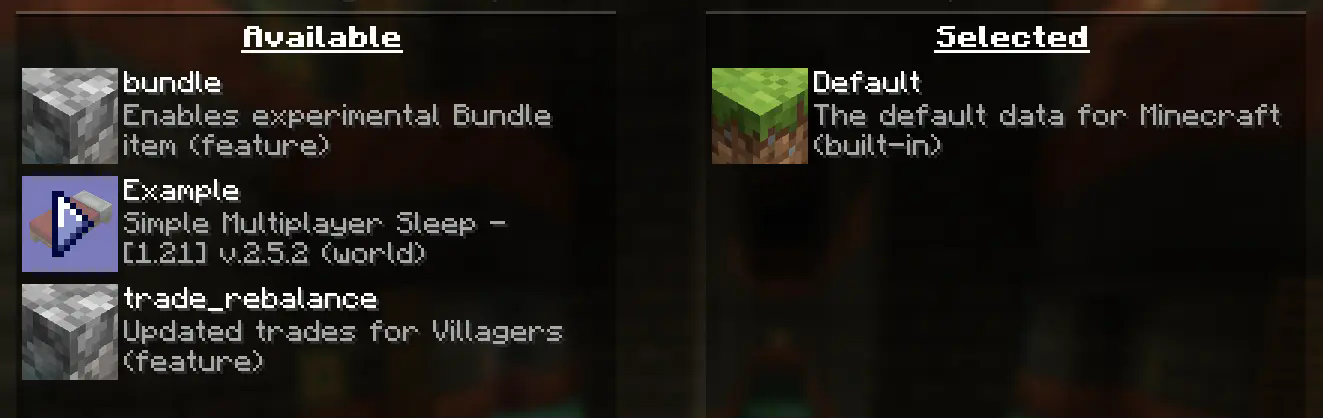
- Complete World Creation
- Click "Done" at the bottom of the screen.
- Continue creating your world and click "Create New World".
⚠️ IMPORTANT ⚠️
The datapack only works if cheats are enabled.
You can verify the datapack is active by typing: /datapack list enabled
This command should list an entry named [file/<your datapack file/directory name>].
In an Existing World
How to Install a Datapack in an Existing Singleplayer World
- Open Minecraft
Launch the game.
- Select Your World
- Choose the world you want to install the datapack for.
- Click "Edit", then "Open World Folder".
- Add the Datapack
- Open the folder named
datapacks. - Place the datapack into this folder. It should be a
.zipfile or a directory.
- Reload the World
- If you are in the world during installation, type
/reloadin the chat or press F3 + T to reload resources.
(Make sure cheats are enabled.)
⚠️ IMPORTANT ⚠️
The datapack only works if cheats are enabled.
You can verify the datapack is active by typing: /datapack list enabled
How to Enable Cheats Permanently After World Creation
If you encounter this issue, here is a step by step guide on how to enable Cheats/Admincommands permanently after you have already created a Minecraft world.
⚠️ Before you begin, you should save and backup your world in case something goes wrong. (I will not take any responsibility for any corrupt worlds. Do this at your own risk!) But don't worry this works without any problems. If you don't want to change this permanently check out this guide.
1. You need NBTExplorer
> NBTExplorer is an open-source NBT editor for all common sources of NBT data. It's mainly intended for editing Minecraft game data.
2. Open NBTExplorer and open your Minecraft world, where you want to enable Cheats/Admincommands.

3. Navigate to:
<Your Minecraft World>level.datDataallowCommands

4. Click on "Edit Tag Value"

5. Change the Value from 0 to 1 and click "OK"

6. Now click on "Save All Modified Tags"

That's it. You are done. You can now join your world and check if you have permission to change your gamemode, for example.
How to Enable Cheats Temporarily After World Creation
Enabling Cheats Temporarily After World Creation
If you encounter this issue, here is a step-by-step guide on how to enable Cheats/Admin commands temporarily after you have already created a Minecraft world.
- Join Your World
Open your single-player world and press "Escape".
- Open to LAN
Click on "Open to LAN".
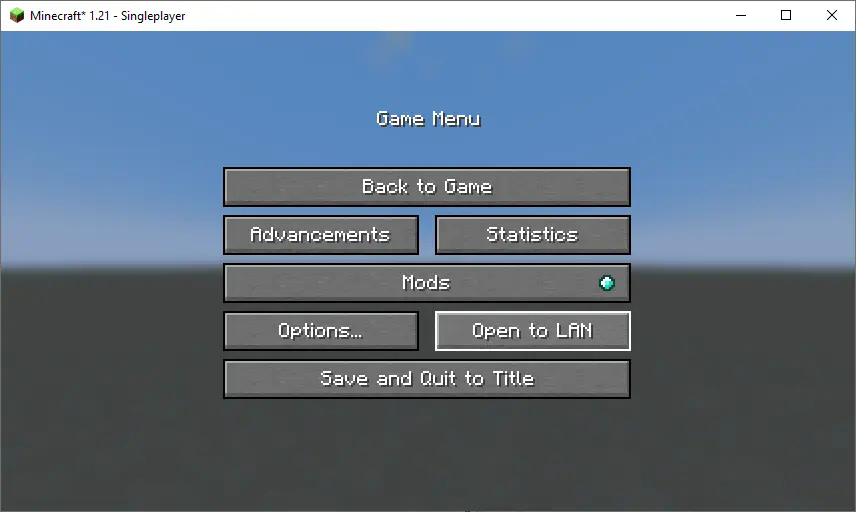
- Allow Commands
Set "Allow Commands" to ON.
Highlights
From source dataGame versions
Supports 5 Minecraft versions, the newest being 1.21.4.
Loaders
Runs on Data pack, Fabric, Forge, NeoForge and Quilt.
Footprint
Rated a light load on a server.
Show Biome In Name on Nxeon
From our catalogue- One-click install
- Supported on Nxeon Minecraft servers. We download it from Modrinth, place it, and restart the server.
- Server side
- Required on the server
- Server type needed
- Data pack, Fabric, Forge, NeoForge, Quilt
- Server load
- light
- Smallest plan we suggest
- Minecraft — 1.5 GB (2 GB RAM). This follows our own load rating above, not a benchmark.
- Latest build
- v.1.0.0+mod, released 2024-12-04
Game versions by loader
| Loader | Game versions | Newest |
|---|---|---|
| Data pack | 1.21 to 1.21.4 (5 versions) | 1.21.4 |
| Fabric | 1.21 to 1.21.4 (5 versions) | 1.21.4 |
| Forge | 1.21 to 1.21.4 (5 versions) | 1.21.4 |
| NeoForge | 1.21 to 1.21.4 (5 versions) | 1.21.4 |
| Quilt | 1.21 to 1.21.4 (5 versions) | 1.21.4 |
From 5 recorded builds of Show Biome In Name.
Recent builds
| Build | Released | Game versions | Loaders |
|---|---|---|---|
| v.1.0.0+mod | 2024-12-04 | 1.21 to 1.21.4 (5 versions) | Fabric, Forge, NeoForge, Quilt |
| v.1.0.0+mod | 2024-08-09 | 1.21 to 1.21.1 (2 versions) | Fabric, Forge, Quilt |
| v.1.0.0 | 2024-08-09 | 1.21 to 1.21.4 (5 versions) | Data pack |
| v.1.0.0+mod | 2024-08-07 | 1.21 | Fabric, Forge, Quilt |
| v.1.0.0 | 2024-08-07 | 1.21 | Data pack |
Run Show Biome In Name on a Minecraft server
Pick a server or deploy a new one above; it is installed in one click.
What kind of mod it is
From the catalogWorld generation
Changes or adds to how new terrain, biomes and structures are created.
Runs on your server
From source side supportModrinth lists Show Biome In Name as required on the server. Check its Modrinth page to see whether players need it too.
Compatibility
- Game
- Minecraft
- Loaders
- Data packFabricForgeNeoForgeQuilt
- Runs on
- Serverrequired on the server
- Game versions
- 1.21.4 and 4 earlier
Verified at the source
- ✓ModrinthOfficial listing, checked 2026-10-17Open ↗
- ✓AuthorJodek, as published on Modrinth
- ✓LicenseMITFree









