







About SitOnEverything
From ModrinthSit on almost any block or entity with configurable seat positions, vanilla presets, and quick hotkey support.


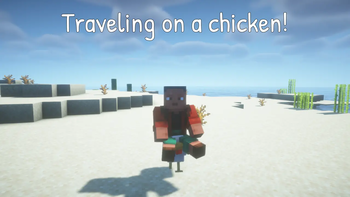
Sit On Everything lets you sit on almost any block or entity. It automatically creates sitting positions for vanilla and modded content, while giving you full control over exact seat positions, allowed targets, and interaction methods.
Install on the server (or in singleplayer) — client installation is optional. Vanilla clients can use /sit and, when enabled by the server, Sneak + Right Click. Installing on the client adds keybinds and Ctrl + Right Click sitting. Modded and unmodded clients and servers can connect to each other.
Dependencies: Fabric needs Fabric API and Architectury API. NeoForge needs Architectury API. Forge needs no additional dependencies.
Free to use in any modpack — public or private, no permission needed.
What it does
- Sit Almost Anywhere — sit on blocks, mobs, players, and content added by other mods.
- No Client Mod Required —
/sitand the optional Sneak + Right Click interaction work entirely server-side. - Automatic Defaults — generates sitting positions for registered blocks and entities automatically, including modded content.
- Precise Seat Positions — configure exact X, Y, and Z offsets for individual blocks and entities.
- Baby Entity Support — configure separate positions for variants such as
minecraft:cow#baby. - Allow / Deny Filters — control exactly what players can sit on using IDs and
*wildcard patterns. - Multiple Sitting Controls — use
/sit, Ctrl + Right Click, a configurable keybind, or an optional server-side Sneak + Right Click gesture.
How to sit
/sit— sits you on the block or entity you are looking at. Works without the mod installed on the client.- Ctrl + Right Click — client-side shortcut. Enabled by default.
- Sit on target keybind — client-side and unbound by default. Assign it under Options → Controls → Sit On Everything.
- Toggle Ctrl + Right Click keybind — client-side and unbound by default. Toggles the Ctrl shortcut without editing the config.
- Sneak + Right Click with empty hands — optional server-side interaction. Disabled by default.
- To stand up — press Sneak, just like dismounting a vanilla entity. If your seat block disappears, you are set down.
Configuration
The mod uses two JSON files in your config/ folder. They are upgraded automatically when needed while keeping your existing edits.
Client Config
config/sitoneverything-client.json — client-side sitting shortcuts:
hotkeySittingEnabled— enables the dedicated sitting keybind. Default:true.ctrlRightClickSittingEnabled— enables Ctrl + Right Click. Default:true.
If this file can't be read (for example a missing comma after a hand edit), it is left untouched so you can fix it, and defaults apply for that session only.
Server / Common Config
config/sitoneverything.json — seat positions, permission filters, and server-side interactions:
blocks— sitting positions for blocks.entities— sitting positions for entities, including baby variants.allow/deny— which targets players are allowed to sit on.sneakRightClickSitting— enables server-side Sneak + Right Click sitting.
Invalid seat offsets count as missing, and the default position applies.
Choosing what players can sit on
The blocks and entities sections are generated from the game's registries on launch. New blocks and entities — including ones added by other mods — receive entries automatically, while your changes to existing entries are preserved.
Deleting an entry does not disable sitting on that target. Missing entries can be generated again on the next launch. Use the allow and deny sections to control what can actually be used as a seat.
Both sections accept exact IDs and * wildcard patterns. deny always takes priority.
"allow": {
  "blocks": ["*_stairs", "*_slab", "*_carpet"],
  "entities": ["minecraft:player"]
},
"deny": {
  "blocks": ["minecraft:oak_stairs"],
  "entities": []
}
An empty allow list allows everything that is not denied. A non-empty allow list permits only matching targets.
Baby variants follow the rules of their adult entity unless a pattern specifically targets the baby key.
Sitting without a client mod
The /sit command works entirely on the server, so players do not need the mod installed locally.
Servers can also enable a vanilla-compatible sitting interaction:
"sneakRightClickSitting": trueWhen enabled, sneaking and right-clicking a block with both hands empty attempts to sit the player without requiring a client mod or command.
This option is disabled by default because Sneak + Right Click is also used for normal Minecraft interactions. Blocks with block entities, such as chests, barrels, furnaces, beds, and lecterns, are skipped automatically. Some interactive blocks without block entities — including crafting tables, anvils, grindstones, looms, and stonecutters — can still conflict with this gesture.
For that reason, it is recommended to use sneakRightClickSitting together with an allow list containing the blocks you actually want to use as seats.
Configuration examples
Simple centered block height
"blocks": {
  "minecraft:stone": -0.6
}
Precise block position
"blocks": {
  "minecraft:oak_stairs": {
    "x": 0.5,
    "y": -0.72,
    "z": 0.62
  }
}
Entity and baby variant
Highlights
From source dataGame versions
Supports 9 Minecraft versions, the newest being 26.3.
Loaders
Runs on Fabric, Forge and NeoForge.
Footprint
Rated a light load on a server.
SitOnEverything on Nxeon
From our catalogue- One-click install
- Supported on Nxeon Minecraft servers. We download it from Modrinth, place it, and restart the server.
- Server side
- Required on the server
- Server type needed
- Fabric, Forge, NeoForge
- Server load
- light
- Smallest plan we suggest
- Minecraft — 1.5 GB (2 GB RAM). This follows our own load rating above, not a benchmark.
- Latest build
- 1.2.0, released 2026-10-23
Game versions by loader
| Loader | Game versions | Newest |
|---|---|---|
| NeoForge | 1.21.1 to 26.3 (6 versions) | 26.3 |
| Fabric | 26.3 | 26.3 |
From 10 recorded builds of SitOnEverything.
Recent builds
| Build | Released | Game versions | Loaders |
|---|---|---|---|
| 1.2.0 | 2026-10-23 | 26.3 | NeoForge |
| 1.2.0 | 2026-10-23 | 26.2 | NeoForge |
| 1.2.0 | 2026-10-23 | 26.1.2 | NeoForge |
| 1.2.0 | 2026-10-23 | 1.21.11 | NeoForge |
| 1.2.0 | 2026-10-23 | 1.21.1 | NeoForge |
| 1.1.1 | 2026-09-18 | 26.3 | NeoForge |
Dependencies
- Required: modrinth project lhGA9TYQ (modrinth, not in our catalogue)
Declared by the newest build that lists any. Required ones are installed with it on one-click installs.
Run SitOnEverything on a Minecraft server
Pick a server or deploy a new one above; it is installed in one click.
What kind of mod it is
From the catalogBuilding & decoration
Blocks, furniture, decorations and building tools.
Runs on your server
From source side supportModrinth lists SitOnEverything as required on the server. Check its Modrinth page to see whether players need it too.
Compatibility
- Game
- Minecraft
- Loaders
- FabricForgeNeoForge
- Runs on
- Serverrequired on the server
- Game versions
- 26.3 and 8 earlier
Verified at the source
- ✓ModrinthOfficial listing, checked 2026-10-23Open ↗
- ✓AuthorNikrecs, as published on Modrinth
- ✓LicenseMITFree









