







About Special Nametags
From ModrinthAdds many new special names, like Jeb_ or Dinnerbone, to give to mobs!
Special NameTags V1.4
> Adds many new special names, like Jeb_ or Dinnerbone, to give to mobs!
This presentation refers to the latest Data Pack release: Version 1.4.x. For previous releases, check the "_Older Versions_" section at the bottom of the page.
📥How to Install
Choose if you want to download the pure Data Pack version or the Mod version and follow the steps accordingly.
Data Pack
- 1) Download the Data Pack
- 2) Chose the world you want to install the Data Pack in and navigate to its "_datapacks_" folder
- 3) Copy the downloaded Data Pack file (Special Nametags) into this folder
- 4) Join the world and run
/reloadcommand
Mod
- 1) Download the Mod
- 2) Navigate to your
modsfolder (for the vanilla launcher the path is.minecraft/mods - 3) Put the downloaded .jar file (Special Nametags) into this folder
- 4) Join the world and run
/reloadcommand
⚠ Mod version is available starting from Minecraft 1.21 and up
📖Features
This Data Pack adds many new special names to give to mobs! (_Like_ Dinnerbone _and_ Jeb_)
How to use
Simply rename a mob with one of the names in the list below, and the corresponding effect will be applied!
Special Names and Effects
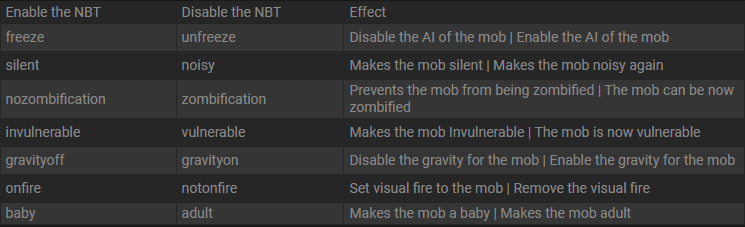
|Special Name Tag|Effect| |--|--| |Speedy Ghast(NEW)|Happy Ghast will have its flying speed increased by 3x (_+200%_)| |Lazy Ghast(NEW)|Happy Ghast flying speed will be restored to default| |freeze|Mob will no longer move and won't suffer any damage| |unfreeze|Mob will move normally and you'll be able to hit it again| |silent|Mob will no longer emit sounds| |noisy|Mob will emit sounds normally| |noname|Mob Custom Name will be removed| |nozombification|Piglin and hoglin will no longer zombificate in the Overworld| |zombification|Piglin and hoglin will be able to zombificate in the Overworld| |invulnerable|Mob will be invulnerable to any non-creative mode damage| |vulnerable|Mob will become vulnerable to any damage source| |gravityoff|Mob will no longer be affected by gravity| |gravityon|Mob will be affected by gravity| |onfire|Mob will visually be set on fire| |notonfire|Mob will no longer have visual fire| |baby|Mob will stay in baby form / Will became baby if is an adult already| |adult|Mob will grow up| |sit|Mob will sit on the ground| |unsit|Mob will stand up|
YouTube Showcase
📤How to Uninstall
Data Pack
To uninstall the Data Pack run the command /function tags-nbt:uninstall. When the uninstallation process is completed a confirmation message will be sent in the chat.
Mod
To uninstall the Mod version you need to run /function tags-nbt:uninstall command. Then you close the game and remove the jar file from your .minecraft/mods folder.
🔗External links


💾Older Versions
Version 1.3 to 1.3.2 (for Minecraft 1.21.4-1.21.8)
Special NameTags
> Adds many new special names, like Jeb_ or Dinnerbone, to give to mobs!
This presentation concerns about the latest release. For older ones, check the "Older Versions" section, at the bottom of the page.
📥How to Install
Choose if you want to download the pure Data Pack version or the Mod version and follow the steps accordingly.
Data Pack
- 1) Download the Data Pack
- 2) Chose the world you want to install the Data Pack in and navigate to its "_datapacks_" folder
- 3) Copy the downloaded Data Pack file (Special Nametags) into this folder
- 4) Join the world and run
/reloadcommand
Mod
- 1) Download the Mod
- 2) Navigate to your
modsfolder (for the vanilla launcher the path is.minecraft/mods - 3) Put the downloaded .jar file (Special Nametags) into this folder
- 4) Join the world and run
/reloadcommand
⚠ Mod version is available starting from Minecraft 1.21 and up
📖Features
This Data Pack adds many new special names to give to mobs! (_Like_ Dinnerbone _and_ Jeb)
How to use
Simply rename a mob with one of the name in the list below, and the corresponding effect will be applied!
Special Names and Effects (1.21.4+)
Highlights
From source dataGame versions
Supports 32 Minecraft versions, the newest being 26.3.
Loaders
Runs on Data pack, Fabric, Forge, NeoForge and Quilt.
Footprint
Rated a light load on a server.
Special Nametags on Nxeon
From our catalogue- One-click install
- Supported on Nxeon Minecraft servers. We download it from Modrinth, place it, and restart the server.
- Server side
- Required on the server
- Server type needed
- Data pack, Fabric, Forge, NeoForge, Quilt
- Server load
- light
- Smallest plan we suggest
- Minecraft — 1.5 GB (2 GB RAM). This follows our own load rating above, not a benchmark.
- Latest build
- 1.4.5-mc26.3+mod, released 2026-09-20
Game versions by loader
| Loader | Game versions | Newest |
|---|---|---|
| Fabric | 1.21.9 to 26.3 (8 versions) | 26.3 |
| Forge | 1.21.9 to 26.3 (8 versions) | 26.3 |
| NeoForge | 1.21.9 to 26.3 (8 versions) | 26.3 |
| Quilt | 1.21.9 to 26.3 (8 versions) | 26.3 |
| Data pack | 26.2 to 26.3 (2 versions) | 26.3 |
From 5 recorded builds of Special Nametags.
Recent builds
| Build | Released | Game versions | Loaders |
|---|---|---|---|
| 1.4.5-mc26.3+mod | 2026-09-20 | 26.3 | Fabric, Forge, NeoForge, Quilt |
| 1.4.5-mc26.3 | 2026-09-20 | 26.3 | Data pack |
| 1.4.4-mc26.2+mod | 2026-06-28 | 26.2 | Fabric, Forge, NeoForge, Quilt |
| 1.4.4-mc26.2 | 2026-06-28 | 26.2 | Data pack |
| 1.4.4+mc1.21.9-26.1.x+mod | 2026-04-19 | 1.21.9 to 26.1.2 (6 versions) | Fabric, Forge, NeoForge, Quilt |
Run Special Nametags on a Minecraft server
Pick a server or deploy a new one above; it is installed in one click.
What kind of mod it is
From the catalogCreatures & NPCs
Adds or changes creatures, NPCs and how they behave.
Runs on your server
From source side supportModrinth lists Special Nametags as required on the server. Check its Modrinth page to see whether players need it too.
Compatibility
- Game
- Minecraft
- Loaders
- Data packFabricForgeNeoForgeQuilt
- Runs on
- Serverrequired on the server
- Game versions
- 26.3 and 31 earlier
Verified at the source
- ✓ModrinthOfficial listing, checked 2026-10-16Open ↗
- ✓AuthorNico4play, as published on Modrinth
- ✓LicenseLicenseRef-All-Rights-ReservedFree









