






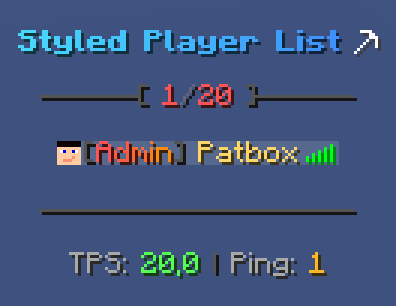
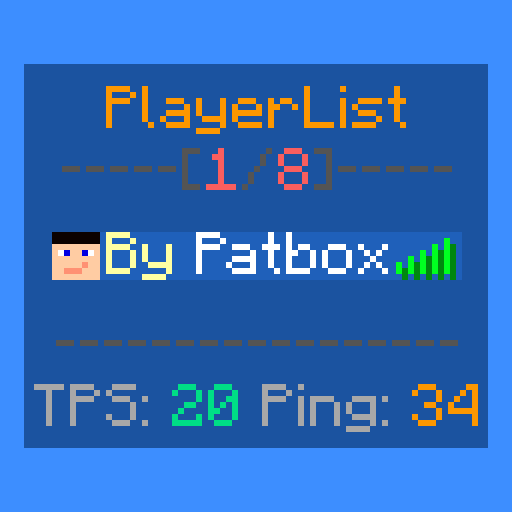
About Styled Player List
From ModrinthThis mod allows server owners to change player list look!

Styled Player List
It's a simple mod that allows server owners to style their player list as they like! With full permission/requirement support, placeholder api support, multiple styles and player list name overrides.
This mod works only on Fabric and Quilt!
If you have any questions, you can ask them on my Discord
Also check out my other mods and project, as you might find them useful!

Commands (and permissions):
/styledplayerlist- Main command (styledplayerlist.main, available by default)/styledplayerlist reload- Reloads configuration and styles (requiresstyledplayerlist.reload)/styledplayerlist switch <style>or/plstyle <style>- Changes selected style (styledplayerlist.switch, available by default)/styledplayerlist switchothers <players> <style>- Changes selected style of players (styledplayerlist.switch.others)
Configuration:
You can find config file in ./config/styledplayerlist/. Some config options allow for dynamic predicates (marked as {/* PREDICATE */}). See this page for more details. Formatting uses PlaceholderAPI's Text Parser for which docs you can find here.
{
  // Config version, do not change. Used only for updating from one version to another
  "config_version": 2,
  // Allows selecting id of default player list style
  "default_style": "default",
  // Allows changing messages sent by this mods commands.
  "messages": {
    "switch": "Your player list style has been changed to: <gold>${style}</gold>",
    "unknown": "<red>This style doesn't exist!</red>",
    "no_permission": "<red>You don't have required permissions!</red>"
  },
  // Modifies how player name is displayed
  "player": {
    // Toggles this feature.
    "modify_name": false,
    // Hides player name from player list. Doesn't have any effect on commands, suggestions or entity visibility!
    "hidden": false,
    // Disables this formatting, forcing it to use vanilla one.
    "passthrough": false,
    // Default format of player name
    "format": "%player:displayname%",
    // Enables sending updates when player sends a message
    "update_on_chat_message": false,
    // Enables sending updates every provided amount of ticks. -1 disables it
    "update_tick_time": -1,
    // Custom styles
    "styles": [
      {
        // Requirement of style, used for applying
        "require": {/* PREDICATE */},
        // Applied formatting, same as one above
        "format": "...",
        // Optional. Disables this formatting, forcing it to use vanilla one.
        "passthrough": false,
        // Optional, hides player name from player list. Doesn't have any effect on commands, suggestions or entity visibility!
        "hidden": false
      }
    ]
  },
  // Makes player list show in singleplayer without lan enabled
  "client_show_in_singleplayer": true
}
Styles:
This mod allows having multiple styles, that can be selected by players (just put them in ./config/styledplayerlist/styles/ and use /styledplayerlist reload command)
{
  // Predicate required for usage of this style, required by player
  "require": {/* PREDICATE */},
  // Style name used for display
  "style_name": "Default",
  // Time between updates of the style in ticks. 20 is 1 second. Used for formatting and placeholders
  "update_tick_time": 20,
  // Header of player list style, using simple/static definition (works in "list_footer" too). Allows formatting
  "list_header": [
    "...",
    "..."
  ],
  // Footer of player list style, using animated definition (works in "list_header" too). Allows formatting
  "list_footer": {
    // Number of changes required to change into next frame. This means it updates every (change_rate * update_tick_time) ticks
    "change_rate": 1,
    // Frames of displayed text. There is no limit for amount of them
    "values": [
      [
        "<red>..."
      ],
      [
        "<blue>..."
      ]
    ],
  },
  // Makes this style hidden from autocompletion, without changing requirements
  "hidden_in_commands": false
}
Build in placeholders:
For supported placeholders list, see Placeholder API's wiki
Highlights
From source dataGame versions
Supports 52 Minecraft versions, the newest being 26.3.
Loaders
Runs on Fabric and Quilt.
Footprint
Rated a light load on a server.
What kind of mod it is
From the catalogGameplay & overhauls
New mechanics, content and overhauls that change how the game plays.
Runs on your server
From source side supportModrinth lists Styled Player List as required on the server. Check its Modrinth page to see whether players need it too.
Compatibility
- Game
- Minecraft
- Loaders
- FabricQuilt
- Runs on
- Serverrequired on the server
- Game versions
- 26.3 and 51 earlier
Verified at the source
- ✓ModrinthOfficial listing, checked 2026-10-01Open ↗
- ✓AuthorPatbox, as published on Modrinth
- ✓LicenseLGPL-3.0-onlyFree








