






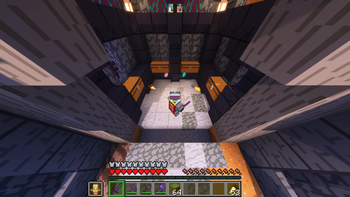

About Terrastorage
From ModrinthBrings Terraria's amazing storage features to Minecraft!


Terrastorage
🟡 IMPORTANT: Known Compatibility Issues
Version 1.3.0 and 1.3.1 significantly improved compatibility with other storage mods:
- 🟢 Sophisticated Storage & Backpacks: Compatibility is mostly stable now - there's still a minor issue with sorting and one with item favoriting, but I didn't run into anything that could cause item duplication or item loss.
- 🔴 Traveler's Backpack: Still has issues that can result in item loss, or at least in items temporarily disappearing. I'd recommend holding off on using Terrastorage alongside it for now.
Thanks for your patience!
Terrastorage is a customizable server and client-side mod that brings the amazing storage options from Terraria to Minecraft, including the incredibly useful Quick Stack To Nearby Chests feature. It currently supports Fabric and Quilt.
Note that Terrastorage needs to be installed on both the client and server to work properly. With that out of the way, let's dive into the feature showcase:
Features

Loot and Deposit All:
- Loot All - Transfers all items from the storage to the player's inventory.
- Deposit All - Transfers all items from the player's inventory to the storage.
⏺️ Items are first stacked with existing ones in the opposite inventory before being moved to an empty slot.
⏺️ Favorite items will not be affected by Deposit All.

Quick Stack and Restock:
- Quick Stack - Transfers items from the player's inventory to the storage using one of two modes:
- Smart Deposit - Similar to Fill Up, but also moves all matching items into empty slots, creating new stacks as needed.
- Fill Up - Adds items to existing stacks until they reach their maximum capacity, keeping empty slots in the receiving inventory unaffected.
- Restock - Transfers items from the storage into existing stacks in the player's inventory.
⏺️ Favorite items will not be affected by Quick Stack.
✳️ The Quick Stack mode can be configured through the Storage Quick Stack Mode option in the Options Screen.

Item Favoriting:
- Item Favoriting - You can favorite items in your inventory by holding the modifier key for Item Favoriting (Left Alt by default) and left-clicking them.
✳️ The modifier key is customizable via the controls menu.
⏺️ Favorite items are protected from being:
- Thrown out of the inventory.
- Shift-pressed to a different inventory.
- Swapped from the hotbar to a different inventory during a hotbar keybind press.
- Deleted in the creative inventory screen.
- Moved by Deposit All or Sort Inventory.
- Modified by Quick Stack or Quick Stack To Nearby Storages.

Sort Items and Rename:
- Sort Items - Sorts the items in the storage.
- Rename - Renames the storage block.
✳️ The sorting method for both Sort Items and Sort Inventory is controlled by a single configurable setting.
⏺️ Sort Items can also be activated by hovering over a slot and pressing the sort inventory keybind (R by default, customizable in the controls menu).
⏺️ Renamed storage blocks display nametags either above them or on the side facing the player if there’s a block above.

Sort Inventory and Quick Stack To Nearby Storages:
- Sort Inventory - Sorts the items in the player's inventory.
- Quick Stack To Nearby Storages - Finds all nearby storages and performs the Quick Stack operation on each.
✳️ The sorting method for both Sort Items and Sort Inventory is controlled by a single configurable setting.
⏺️ Sort Inventory can also be activated by hovering over a slot and pressing the sort inventory keybind (R by default, customizable in the controls menu).
✳️ By default, the Quick Stack To Nearby Storages feature only considers storages within the player's line of sight, this is configurable.
✳️ The Quick Stack To Nearby Storages feature includes an animation where items fly from the player to the storage. Both the animation length and the time interval between flying items are configurable.
⏺️ Favorite items will not be moved by Sort Inventory or modified by Quick Stack To Nearby Storages.
Customization

Highlights
From source dataGame versions
Supports 21 Minecraft versions, the newest being 26.3.
Loaders
Runs on Fabric and Quilt.
Footprint
Rated a light load on a server.
What kind of mod it is
From the catalogGameplay & overhauls
New mechanics, content and overhauls that change how the game plays.
Runs on your server
From source side supportModrinth lists Terrastorage as required on the server. Check its Modrinth page to see whether players need it too.
Compatibility
- Game
- Minecraft
- Loaders
- FabricQuilt
- Runs on
- Serverrequired on the server
- Game versions
- 26.3 and 20 earlier
Verified at the source
- ✓ModrinthOfficial listing, checked 2026-10-08Open ↗
- ✓AuthorTimVinci, as published on Modrinth
- ✓LicenseMITFree








