







About TrainCarts
From ModrinthTrains in Minecraft, a full simulator for your train network or theme park
〚 ⤓ Modrinth / ⤓ Spigot / ⤓ Jenkins Dev Builds / Source on GitHub / Javadocs / Discord 〛
About TrainCarts
Trains in Minecraft! Automated metro networks, rollercoasters, gondolas, ski-lifts or amusement park rides. TrainCarts does it all with support for custom models, animations, automation with signs and a large API that supports add-ons that can do even more!
This plugin requires BKCommonLib
Join our discord server for help: https://discord.gg/wvU2rFgSnw
Please do not use very old versions with older versions of Minecraft. The latest release of TrainCarts and BKCommonLib are backwards-compatible with older Minecraft versions.
WIKI
Discover how to use this plugin over at https://wiki.traincarts.net/p/TrainCarts
Custom Trains
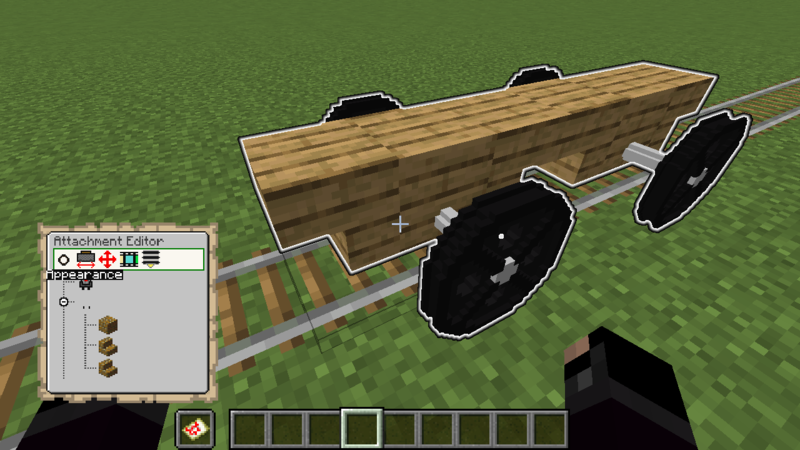
With the Attachment Editor you can customize the appearance of your trains. Create custom cart models in Blockbench and ride inside them in-game. Large models are possible by adding multiple sections of a model as separate (Armorstand) item models. TrainCarts will do the animating for you and move the parts as a whole.
Recommended reading before going into this: Custom Item Models in 1.9 and Up
<iframe width="560" height="315" src="https://www.youtube.com/embed/dkgwe-lCW-Q" allowfullscreen></iframe>
Ingame Map Editor
Animations
For custom ride enthusiasts, trains can be fully animated. This means you can have doors that open and close, carts that spin around, or even create theme park rides like Ferris wheels, spinners and merry-go-rounds!
<iframe width="560" height="315" src="https://www.youtube.com/embed/8Tlc5PO7VzE" allowfullscreen></iframe>
Demo Resource Pack
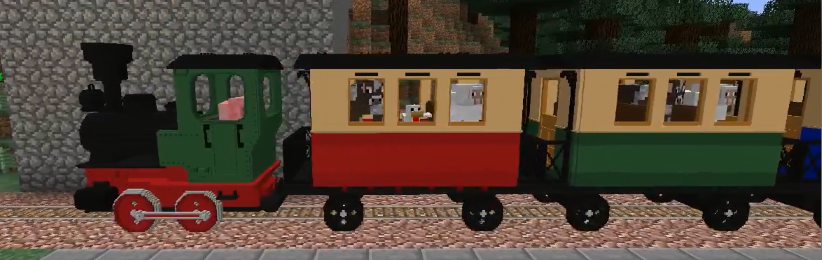
TrainCarts has a demo resource pack that you can download that includes a couple of train and rollercoaster cart models. You can already play around with these without having to delve into Blockbench yourself
The locomotive and carriages were made by Nullblox. Maxi made the different color rollercoaster carts.
You can download the zip file from here or use the server.properties configuration shown on the webpage: packs.traincarts.net
Usage Instructions
Spawn the trains
The new models are bound to durability values of the golden pickaxe. You can spawn these trains using:
- Spawn Sign
- Train Spawn Chest Item:
/train chest [name] - Create it in the attachment editor. You can find the items to use with
/train model search
The following train names can be spawned
- loco - Spawns locomotive without animations
- carr / carg / carb - Spawns red/green/blue carriages without animations
- loco_anim - Spawns locomotive with animated wheels and pistons
- carr_anim / carg_anim / carb_anim - Spawns red/green/blue carriages with animated wheels
- ferris - Animated Ferris wheel, use animation 'spin' to control it (WARNING: VERY LAGGY)
- spinner - Animated spinning ride with 3 controllable animations ('spin', 'turn' and 'arm')
- rolr / rolg / rolb - Rollercoaster carts with 4 seats
***
Saved Train Configurations
Extracting
The pack zip file includes saved train configurations at _assets/traincarts/saved_train_properties/tcdemo.yml_. When the resource pack is configured in _server.properties_ this file is automatically detected by TrainCarts and the trains inside are made available under _/savedtrain list_ and such.
If for some reason this mechanism doesn't work (because you are merging resource packs or such):
- Extract this _tcdemo.yml_ yourself and place it at
plugins/Train_Carts/savedTrainModules/tcdemo.yml - Run
/train globalconfig reload --savedtrainproperties
Normally you don't have to do this.
Physics
Trains don't just follow a line or are limited by Minecraft's own Minecart physics. They are simulated in real-time with gravity physics, rail switching and wheels that track the rails.
<iframe width="560" height="315" src="https://www.youtube.com/embed/XfCjDgMWogU" allowfullscreen></iframe>
New Speed Limits
It is possible to make trains move much faster than the usual 0.4 blocks per tick. Zoom! The default (configurable) maximum speed limit is 5 blocks per tick (300kph!).
Keep Chunks Loaded
Trains can be set to keep chunks loaded. Then they act as moving chunk loaders, keeping themselves and a small area around them loaded and animated. This way they can run autonomously, no matter if no players are nearby.
Waiter
Make trains automatically slow down or stop completely when another train or occupied mutex zone is up ahead. An acceleration and/or deceleration can be set to make trains stop and start realistically to avoid obstacles.
➦Wiki
Highlights
From source dataGame versions
Supports 75 Minecraft versions, the newest being 26.3.
Loaders
Runs on Bukkit, Paper, Purpur and Spigot.
Footprint
Rated a light load on a server.
What kind of mod it is
From the catalogVehicles & ships
Cars, boats, aircraft, ships and other things to drive or fly.
Runs on your server
From source side supportModrinth lists TrainCarts as required on the server. Check its Modrinth page to see whether players need it too.
Compatibility
- Game
- Minecraft
- Loaders
- BukkitPaperPurpurSpigot
- Runs on
- Serverrequired on the server
- Game versions
- 26.3 and 74 earlier
Verified at the source
- ✓ModrinthOfficial listing, checked 2026-10-01Open ↗
- ✓Authorbergerkiller, as published on Modrinth
- ✓LicenseMITFree








