







About HT's TreeChop
From ModrinthTake down trees chop-by-chop instead of block-by-block.
TreeChop
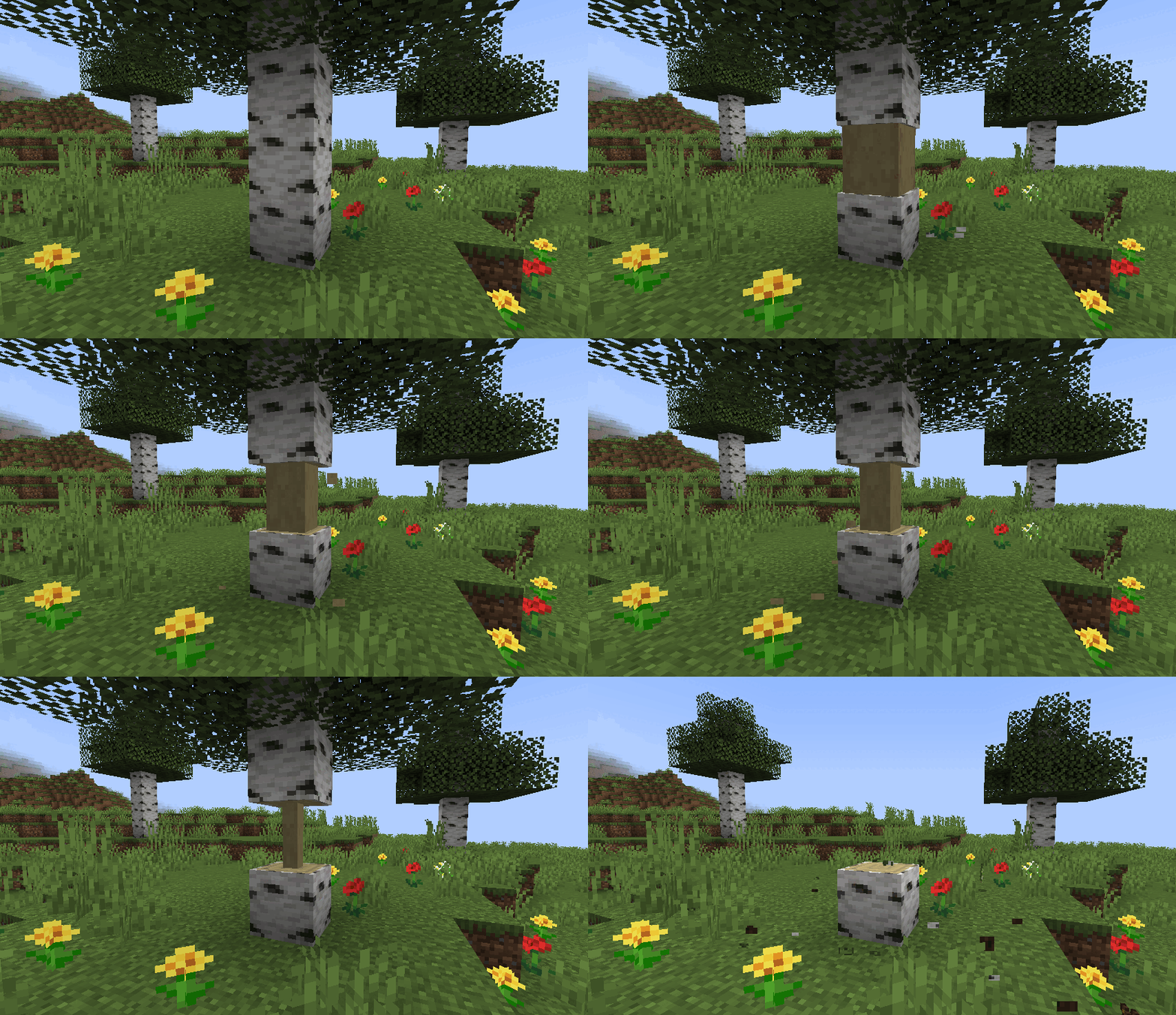
Allows trees to be chopped down by repeatedly breaking a single block. The whole tree will only break after a certain number of chops, and bigger trees require more chops. Inspired by mods like Treecapitator.
Cool features:
- Doesn't get too loud when breaking big trees
- Works on mushrooms and fungi
- Intelligently breaks leaves
- Compatible with most modded trees
Things to consider when lumberjacking:
- Chopping trees doesn't require an axe, but will take a while without one
- Chopping different blocks of the same tree will all contribute to bringing down the tree
- Players can work together to chop down those big trees
- Bigger trees require more total chops, but fewer chops per block*
- Hold "sneak" when breaking a log block to break it normally
_*By default, the number of chops required to fell a tree is computed logarithmically. Some example numbers are below. The number of chops can also be configured to scale linearly with the number of blocks to, for example, require one chop per block, or one chop per tree. More information can be found here._
| Tree blocks | Chops required | | ------------ | ---------------- | | 1 | 1 | | 3 | 3 | | 5 | 4 | | 10 | 7 | | 20 | 12 | | 50 | 19 | |100 | 25 |
Compatibility:
Special support for the following mods:
- (1.18.2) Tinker's Construct: broad axes perform extra chops. All axes perform more chops with "expanded" upgrades.
- (1.18.2+) Silent Gear: saws perform extra chops
- (1.18.2+) Project MMO: chopping grants woodcutting XP
- (1.18.2+) Jade, WTHIT, TheOneProbe: show number of log blocks in trees and the number of chops needed to fell.
Known issues:
- (1.18.2 and earlier) Multi Mine: choppable blocks need to be added to Multi Mine's blacklist. This should be fixed for 1.19+ versions. See #106.
- Some modded trees leave floating blocks when felled. See #44.
_Want to make your mod compatible with TreeChop? See the wiki._
FAQ:
1. How do I turn off chopping?
Press n to open TreeChop's in-game settings, then toggle off the "chopping" setting. A key can also be bound to toggle chopping without opening the settings screen; go to Options > Controls and find the section labeled "HT's TreeChop".
2. How do I keep chopping off and only turn it on while sneaking?
By default, sneaking inverts your current chop setting, so just toggle chopping off (press n to access the settings screen) so that chopping will be enabled by sneaking.
3. How do I keep chopping even when sneaking?
Press n to open TreeChop's in-game settings, then toggle off the "Sneaking inverts chopping" setting.
4. How do I keep from chopping my house down?
There's a setting to disable chopping if the "tree" is not connected to leaves. Press n to open TreeChop's in-game settings, then toggle "trees must have leaves".
5. I started chopping my house down. How do I stop?
If you find yourself chopping a block when you just wanted to break it normally, try breaking the block while sneaking, or toggle off chopping (press n to access the settings screen).
6. I was chopping something and the game crashed! What's up with that?
Probably the item you used to chop the tree doesn't play nice with TreeChop. Go to [your minecraft folder]/config/treechop-common.toml and add the item's registry name to choppingToolsBlacklist, or ask the server owner to, and then maybe let me know about the conflict and I'll try to fix it.
7. Why can't I chop anymore?
Maybe chopping is turned off; press n to open TreeChop's in-game settings, then toggle on the "chopping" setting. If chopping is enabled and changing tools doesn't help, then there might be a conflict with another mod. If you send me a recent log, I'll try to fix it.
8. Why do some trees leave behind floating leaves when felled?
Either a) it's a modded tree and its leaves are not set up properly. Let me know what type of tree is misbehaving, and I'll politely inform the mod owners. b) there are too many leaves! You can increase the max number of leaves by going to [your minecraft folder]/config/treechop-common.toml and increasing maxLeavesBlocks.
9. Why do some trees leave behind floating logs when felled?
Either a) it's a modded tree and is weirdly shaped. Let me know, and I'll try to make TreeChop do a better job of detecting that type of tree. b) the tree is too big! You can increase the max tree size by going to [your minecraft folder]/config/treechop-common.toml and increasing maxTreeBlocks.
10. How do I disable mushroom and fungus chopping?
Go to [your minecraft folder]/config/treechop-common.toml and change blockTagForDetectingLogs = "treechop:choppables" to blockTagForDetectingLogs = "treechop:choppables_except_mushrooms" If you want more control over which blocks can be chopped, you have to make your own datapack and fiddle with the block tags (see https://minecraft.gamepedia.com/Tag for more info).
12. Why am I not seeing the [fill in the blank] feature?
Only the newest version of Minecraft 1.16 is fully supported. Some older versions, especially 1.12.2, lack some of the fancier features.
11. Can I include this in a modpack?
Yes!
Sample configs:
treechop-common.toml
[permissions]

	[permissions.choppingEnabled]
		canBeFalse = true
		canBeTrue = true

	[permissions.fellingEnabled]
		canBeFalse = true
canBeTrue = trueHighlights
From source dataGame versions
Supports 16 Minecraft versions, the newest being 1.21.1.
Loaders
Runs on Fabric, Forge and NeoForge.
Footprint
Rated a light load on a server.
What kind of mod it is
From the catalogBuilding & decoration
Blocks, furniture, decorations and building tools.
Runs on your server
From source side supportModrinth lists HT's TreeChop as required on the server. Check its Modrinth page to see whether players need it too.
Compatibility
- Game
- Minecraft
- Loaders
- FabricForgeNeoForge
- Runs on
- Serverrequired on the server
- Game versions
- 1.21.1 and 15 earlier
Verified at the source
- ✓ModrinthOfficial listing, checked 2026-10-01Open ↗
- ✓Authorhammertater, as published on Modrinth
- ✓LicenseMITFree








