






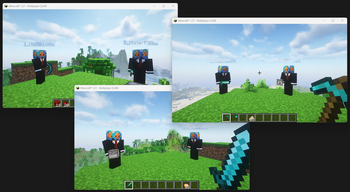

About TwinSession
From ModrinthTwinSession allows multiple connections from the same Minecraft account to a single server or world. Seamlessly manage multiple in-game tasks with different clients, all using one account, without disconnections or additional purchases.
Goal
The Fabric TwinSession mod enables players to connect to a Minecraft server multiple times using the same account.
This functionality is particularly useful for those who want the advantages of multiple sessions, such as managing different in-game tasks simultaneously, without needing to purchase additional Minecraft accounts. When a player connects to the server with the same account for the second time, the mod automatically modifies the player’s username by adding a numerical prefix followed by an underscore (e.g., "1_PlayerName").
Each additional session increments this number (e.g., "2_PlayerName", "3_PlayerName", etc.).
How to Use
> Important note: You can either install this mod as server mod or as a client mod. When installed as a server mod, clients are not required to install this mod as well.
Multiplayer Servers
_When installed on a server environment_
- First Session: Join the server as usual with your Minecraft account.
- Second Session: Open another Minecraft client and join the same server with the same account. The mod will automatically modify your username (e.g., "1_PlayerName") to allow the connection.
- Additional Sessions: Repeat the process to join the server with more clients using the same account. Each additional session will receive a sequentially numbered username (e.g., "2_PlayerName", "3_PlayerName").
Singleplayer (LAN)
_When installed on a client environment_
- Set Up: Start your Minecraft world and select "Open to LAN" from the pause menu.
- Connecting: Follow the same process as in Multiplayer to connect with multiple clients using the same account.
This mod is ideal for players who wish to multitask effectively, such as managing in-game farms or automation, without the need for a separate Minecraft account.
Config
Configuration can be found under /config/twinsession.properties and contains the following settings:
| Property | Description | Type | Default value | |-----------------------|-----------------------------------------------------------------------------------------------|---------|---------------| | maxPlayers | Max amount of re-joins per client. | int | 8 | | autoWhitelist | Automatically whitelist if whitelist is enabled. | boolean | true | | autoOp | Automatically op if original client is also op. | boolean | true | | spawnNearPlayer | Spawn near the player, if false new players will join at world spawn. | boolean | true | | spawnNearPlayerRadius | If spawnNearPlayer is enabled, this will set the radius on how close the player should spawn. | int | 10 | | copyTexture | Copy the texture of the original player. | boolean | true | | prefixWithNumber | Adds a $_ prefix to the username (Highly recommended to keep on true) | boolean | true |
Reporting Issues
If you encounter any bugs or have suggestions for improvements, please create an issue on our GitHub repository. To create an issue:
- Go to the Issues tab of this repository.
- Click on "New Issue".
- Choose between "Bug report" or "Feature request" template.
- Fill out the template with as much detail as possible.
- Submit the issue.
Highlights
From source dataGame versions
Supports 22 Minecraft versions, the newest being 26.1.2.
Loaders
Runs on Fabric.
Footprint
Rated a light load on a server.
What kind of mod it is
From the catalogGameplay & overhauls
New mechanics, content and overhauls that change how the game plays.
Runs on your server
From source side supportModrinth lists TwinSession as required on the server. Check its Modrinth page to see whether players need it too.
Compatibility
- Game
- Minecraft
- Loaders
- Fabric
- Runs on
- Serverrequired on the server
- Game versions
- 26.1.2 and 21 earlier
Verified at the source
- ✓ModrinthOfficial listing, checked 2026-10-01Open ↗
- ✓AuthorMisterFish, as published on Modrinth
- ✓LicenseCC0-1.0Free








