








About Unfinite Freecam
From ModrinthSpectator Freecam with accurate player figures! ✨ (v2: Now with mannequins)
What makes this freecam datapack special?
- A replica player figure spawns while using the Freecam
- v1: Nearly accurate figures with capes. Made out of item displays. Details below
- v2: Using the new Mannequin Entity
- ✔ Survival friendly and works without "Commands" enabled
- ✔ Multiplayer friendly (Must be installed on the server)
- ✔ No resourcepacks, plugins or mods are needed
- ✔ Can be installed as a mod [1.21.9+] (v2.0.1+)
v2 Rework: Mannequins and external support! [1.21.9+]
- Mannequins replicate: Pose/Effects/Attributes/Vehicles/Leashes etc.
- Better Admin Settings Menu with export button
- External Use: Dis- and Reconnecting players from mannequins
<iframe width="560" height="315" src="https://www.youtube-nocookie.com/embed/TOhlmf1nqBI" title="YouTube video player" frameborder="0" allow="accelerometer; autoplay; clipboard-write; encrypted-media; gyroscope; picture-in-picture; web-share" allowfullscreen></iframe>

How to use
- Install (Datapack/Mod) on the Serverside (In Singleplayer your World/Instance is the Server)
- (Enable and reload)
- By default, every player can use:
/trigger unfinite-freecamto enter/exit freecam (No /op needed)
- Admin settings via
/function unfinite-freecam:admin/.settingsand more admin options under admin/...
This project started even before mannequins existed...
<iframe width="560" height="315" src="https://www.youtube-nocookie.com/embed/oi7--y55UeM" title="YouTube video player" frameborder="0" allow="accelerometer; autoplay; clipboard-write; encrypted-media; gyroscope; picture-in-picture; web-share" allowfullscreen></iframe>
More Information on the old version [v1]
- Player figures are display entity based and made out of custom player heads
- These figures are generated with the bdengine.app
- All default skins available as player body + own skins addable!
- Multiple capes selectable
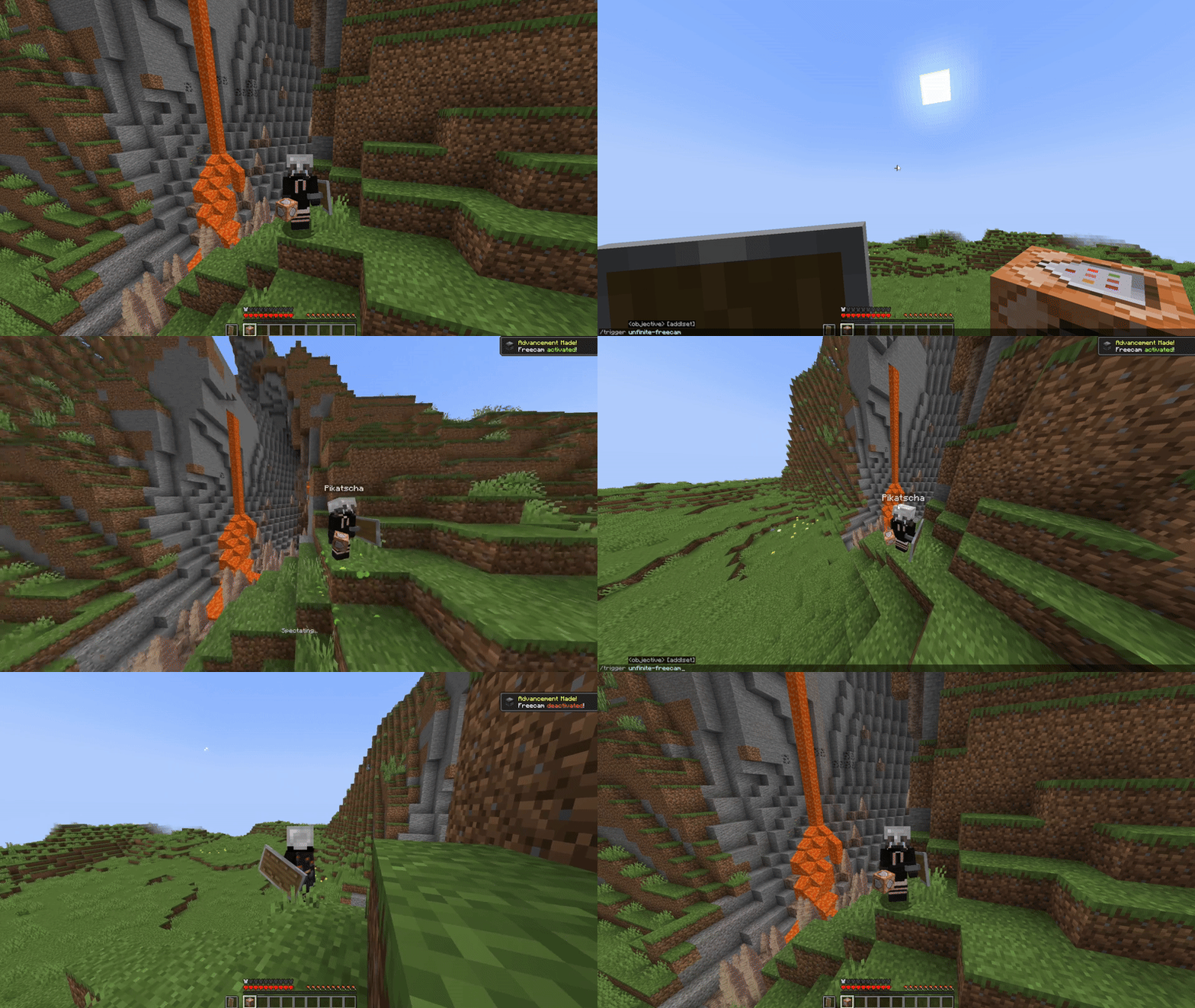
How to use
- Enable and reload the datapack
- By default, every player can use:
/trigger unfinite-freecamto enter/exit freecam/trigger unfinite-freecam-optionsto select a skin and cape [v1 only]
- Admin settings via
/function unfinite-freecam:admin/settings:
- Enable/disable freecam permission
- Enable/disable skin/cape selection
- Manually select skin and cape for an online(!) player [v1 only]
- Enable/disable limited vision underground
- Enable/disable spectating through blocks
- Select freecam range (default: 32 blocks)
- Add own skins into the datapack: [v1 only]
### Creating the player figure
- YouTube Tutorial:
- Make Player Statues in Vanilla Minecraft – by Sister (Realms creator)
_Covers setting up bdengine and creating the player figure_
- Setup bdengine with a Mineskin Account to auto-generate player heads
- Generate a player figure with your IGN or texture file
- Rotate it 180° and lower it until only the head is above floor level
- For all parts, set additional NBT to:
Tags: ["unfinite_freecam_dummy"]- For the head only, set additional NBT to:
Tags: ["head"]- Click "export to Minecraft" and copy the
/summoncommand
### Adding it into the datapack
- Create a new file at:
data/unfinite-freecam/function/system/skin/*namespace*.mcfunction- Paste the
/summoncommand inside the file - Remove the
/at the beginning - Change:
~-0.5 ~ ~-0.5to:
~ ~ ~- Add a new command line to the
.optionsand.select_optionfunctions inside thesystemfolder - Follow the correct structure using your
*namespace*and the next number - Note: You may need to copy the modifyed files, so they are not deleted in case of an update
Highlights
From source dataGame versions
Supports 14 Minecraft versions, the newest being 26.3.
Loaders
Runs on Data pack, Fabric, Forge, NeoForge and Quilt.
Footprint
Rated a light load on a server.
What kind of mod it is
From the catalogGameplay & overhauls
New mechanics, content and overhauls that change how the game plays.
Runs on your server
From source side supportModrinth lists Unfinite Freecam as required on the server. Check its Modrinth page to see whether players need it too.
Compatibility
- Game
- Minecraft
- Loaders
- Data packFabricForgeNeoForgeQuilt
- Runs on
- Serverrequired on the server
- Game versions
- 26.3 and 13 earlier
Verified at the source
- ✓ModrinthOfficial listing, checked 2026-10-01Open ↗
- ✓AuthorPikatscha, as published on Modrinth
- ✓LicenseCC-BY-NC-4.0Free








