







About Video Player
From ModrinthThis mod allows the playback of videos in the user interface (GUI), you can play videos for all connected users.
🎬 Video Player Mod
✨ Revolutionize Your Minecraft Experience! ✨
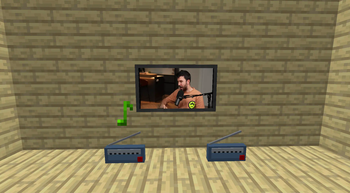
The Video Player Mod lets you play videos, music, and international radio directly within the Minecraft GUI. Whether you're hosting a server or playing solo, this mod brings your favorite content straight to your game!
🔊 Key Features
- 🎵 Music & International Radio: Tune in to your favorite stations or play music directly via URLs.
- 📺 TV in Minecraft: Place TV models and enjoy video playback within the game world.
- 🖥️ Fullscreen Video Playback: Immerse yourself with videos in fullscreen, perfect for sharing content across all connected players.
- 🎶 Background music Immerse yourself with custom sounds or music that can be shared across all connected players.
🛠️ Customizable Commands
/playvideo: Simple and effective. Play videos with basic options like volume and control locks.
/playgovideo: Advanced command with customizable screen modes, positions, and fade effects.
/playmusic: Play music or radio streams with customizable volume and control options.
/stopvideo: Stop the actual videos of the players that you want.
/stopmusic: Stop the actual musics of the players that you want.
📜 How to Use Commands
1. /playvideo <TARGETS/PLAYER> <VOLUME> <URL> [<control_blocked>] [<can_skip>]
This command allows you to play a video for the specified players with customizable options:
- 🎯 TARGETS/PLAYER: Specify the player(s) who will see the video. Example: @a for all players.
- 🔊 VOLUME: Set the volume level (0-100).
- 🌐 URL: The video URL to be played (e.g., YouTube link).
- 🚫 control_blocked: (Optional) Block fast forward/rewind controls. Default is false.
- ⏭️ can_skip: (Optional) Disable SHIFT + ESCAPE to prevent skipping. Default is true.
Example: /playvideo @a 100 https://www.youtube.com/watch?v=C0DPdy98e4c
Plays the video for all players at maximum volume.
2. /playgovideo <TARGETS/PLAYER> <VOLUME> <URL> <MODE> [<control_blocked>] [<can_skip>] [ONLY IN MODE 1 -> <position>] [<option_mode _in option_secs_in option_mode_out option_secs_out>]
This advanced command offers more customization:
- 🎯 TARGETS/PLAYER: Specify the player(s) who will see the video.
- 🔊 VOLUME: Set the volume level (0-100).
- 🌐 URL: The video URL to be played.
- 🖥️ MODE: Choose 0 for fullscreen or 1 for partial screen (under development).
- 🚫 control_blocked: (Optional) Block fast forward/rewind controls.
- ⏭️ can_skip: (Optional) Disable SHIFT + ESCAPE.
- 📍 position: (Mode 1 only) Customize the video position (under development).
- 💨 option_mode & option_secs: Define fade-in and fade-out effects with specified durations.
Example: /playgovideo @a 100 https://www.youtube.com/watch?v=C0DPdy98e4c 0 false true 0 5 1 3
Plays the video in fullscreen with a 5-second fade-in and a 3-second fade-out for all players.
🎮 Intuitive Controls
- 🚪 Close Video: SHIFT + ESCAPE
- ⏩ Forward/Rewind: SHIFT + RIGHT/LEFT ARROW
- ⏯️ Pause: SHIFT + SPACE
- 🔊 Adjust Volume: UP/DOWN ARROW
- 🔇 Mute: M
🎥 Demo & Support
Highlights
From source dataGame versions
Supports 17 Minecraft versions, the newest being 1.20.6.
Loaders
Runs on Fabric and Forge.
Footprint
Rated a light load on a server.
What kind of mod it is
From the catalogQuality of life & UI
Small conveniences, tweaks and interface improvements players notice straight away.
Runs on your server
From source side supportModrinth lists Video Player as required on the server. Check its Modrinth page to see whether players need it too.
Compatibility
- Game
- Minecraft
- Loaders
- FabricForge
- Runs on
- Serverrequired on the server
- Game versions
- 1.20.6 and 16 earlier
Verified at the source
- ✓ModrinthOfficial listing, checked 2026-10-01Open ↗
- ✓AuthorNGoedix, as published on Modrinth
- ✓LicenseLicenseRef-All-Rights-ReservedFree








