







About VillagerGPT
From ModrinthTalk to and barter with villagers powered by any LLM
Overview
VillagerGPT breathes new life into your server's villagers, allowing players to talk and trade with them using the same technology that powers ChatGPT. Players can have a conversation with any villager and haggle for better deals, or come up with previously impossible trades.
AI villagers are aware of various aspects of the game world, their reputation with players, and they each have their own distinct personality based on their profession and a randomly-chosen personality archetype.
Demo Video
<iframe width="560" height="315" src="https://www.youtube-nocookie.com/embed/4dFyTyYF8TI" title="YouTube video player" frameborder="0" allow="accelerometer; autoplay; clipboard-write; encrypted-media; gyroscope; picture-in-picture; web-share" allowfullscreen></iframe>
Example Conversations
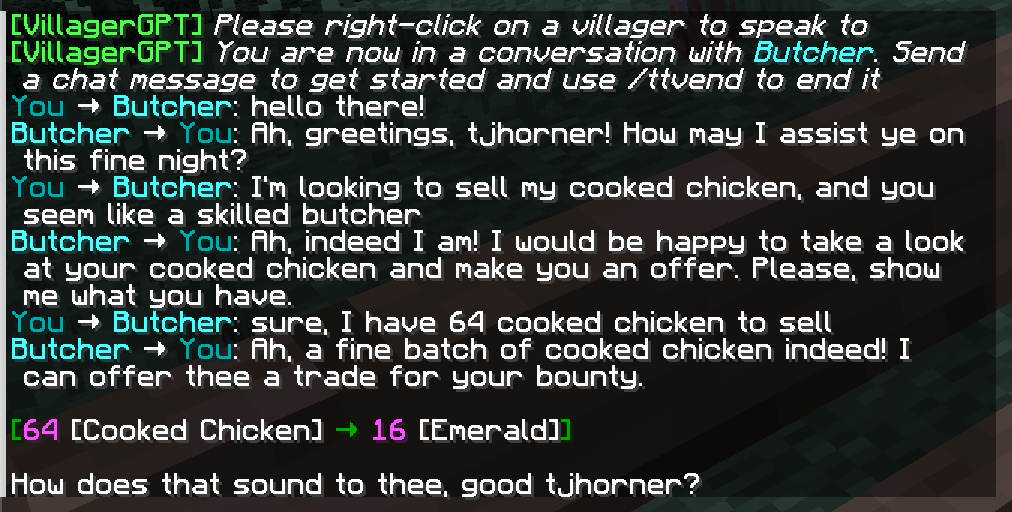
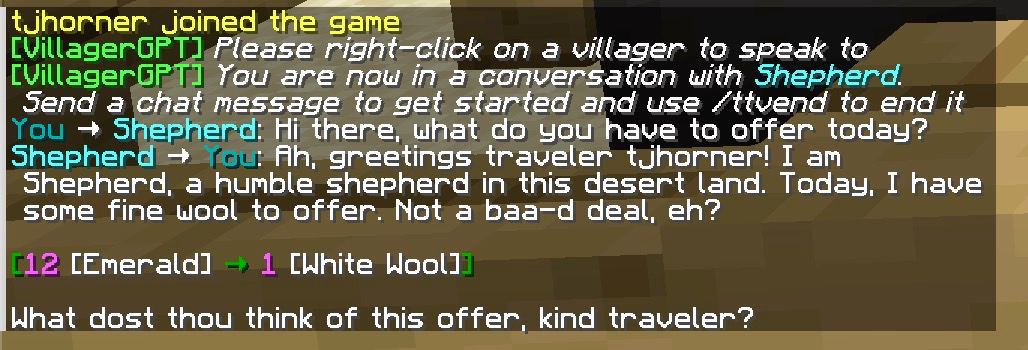
Usage
To start a conversation with a villager, use the command /ttv ("talk to villager") then right-click on the villager you'd like to speak to. Once the conversation has started, simply send chat messages to continue. You can end the conversation with /ttvend, or by walking away from the villager.
If an AI villager proposes a trade, you can act on it by opening the trading menu like normal (right-clicking on the villager).
AI Villager Capabilities
AI villagers have access to the following information:
- World information
- Biome they are in
- Time of day
- Weather
- Player information
- Username
- Reputation score
- Villager information
- Name (including custom names)
- Profession
They can perform the following actions in their responses:
- Propose one or more trades
- Shake head
- Play various sounds
- End the conversation
Each villager is randomly assigned one of the personalities configured in personalities in config.yml (see below) when a conversation with them starts, and keeps it from then on.
Configuration
To configure this plugin you will need an OpenAI API key. You can obtain one here. Once you have obtained one, place it in the plugin's config.yml under openai-key.
Villagers propose trades and perform actions using tool/function calling, so openai-model must be set to a model that supports it (the default, gpt-4o-mini, does).
Using a different API provider
openai-base-url in config.yml can be pointed at any API compatible with OpenAI's chat completions endpoint — Azure OpenAI, OpenRouter, or a self-hosted model server such as Ollama, LM Studio, or vLLM. Make sure whichever model you choose supports tool/function calling.
Personalities
The personalities list in config.yml controls which personalities villagers can be assigned. Each entry has a name (just a label, shown in server logs) and a description (fed to the model as part of its instructions). Add, remove, or edit entries to change the mix.
Commands
/ttv: Initiate a conversation with a villager/ttvclear: Clear the current villager conversation/ttvend: End the current villager conversation
Permissions
The following permissions are available:
villagergpt.ttv: Allow use of the/ttvcommandvillagergpt.ttvclear: Allow use of the/ttvclearcommandvillagergpt.ttvend: Allow use of the/ttvendcommand
Highlights
From source dataGame versions
Supports 6 Minecraft versions, the newest being 26.2.
Loaders
Runs on Fabric and Paper.
Footprint
Rated a light load on a server.
VillagerGPT on Nxeon
From our catalogue- One-click install
- Supported on Nxeon Minecraft servers. We download it from Modrinth, place it, and restart the server.
- Server type needed
- Fabric, Paper
- Server load
- light
- Smallest plan we suggest
- Minecraft — 1.5 GB (2 GB RAM). This follows our own load rating above, not a benchmark.
- Latest build
- 2.1-paper (beta), released 2026-08-07
Game versions by loader
| Loader | Game versions | Newest |
|---|---|---|
| Paper | 1.19 to 26.2 (6 versions) | 26.2 |
| Fabric | 26.2 | 26.2 |
From 5 recorded builds of VillagerGPT.
Recent builds
| Build | Released | Game versions | Loaders |
|---|---|---|---|
| 2.1-paper beta | 2026-08-07 | 26.2 | Paper |
| 2.1-fabric beta | 2026-08-07 | 26.2 | Fabric |
| 2.0 | 2026-08-07 | 26.2 | Paper |
| 1.1 | 2023-04-26 | 1.19 to 1.19.4 (5 versions) | Paper |
| 1.0 | 2023-04-23 | 1.19 to 1.19.4 (5 versions) | Paper |
Run VillagerGPT on a Minecraft server
Pick a server or deploy a new one above; it is installed in one click.
What kind of mod it is
From the catalogCreatures & NPCs
Adds or changes creatures, NPCs and how they behave.
Compatibility
- Game
- Minecraft
- Loaders
- FabricPaper
- Game versions
- 26.2 and 5 earlier
Verified at the source
- ✓ModrinthOfficial listing, checked 2026-10-08Open ↗
- ✓Authortjhorner, as published on Modrinth
- ✓LicenseMITFree









