







About Waypoints
From ModrinthAlways find your way back home with SMP friendly server-side waypoints
Waypoints



Ever had the problem, that you were on a long trip and can't find your base?
You could set a warp with a conventional plugin at your home and simply teleport back. But if you want to keep the survival experience of not being able to teleport like that, this plugin could be just what your server needs!
Direction Indicators
So, instead of just bringing the player back where he started, this plugin shows him the direction he has to walk, so he can explore the world even more. To show the player the direction you can configure multiple direction indicators to guide the player to his destination.
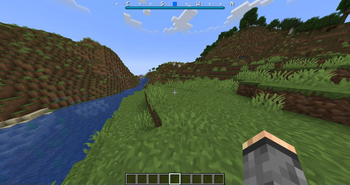
Bossbar Indicator
A compass will be visible at the top of the screen, with a highlighter marking in which direction the waypoint is
Beacon
When the waypoint is in render distance, a beacon beam will appear at the location of the waypoint to make it easier to pinpoint the location of the waypoint.
Hologram
Floating text like in the mods.
Blinking Block
When the player is closer to the waypoint, the beacon will be replaced with a block sequence that will repeat. This is to help him get to the exact location.
Compass
It won't get any simpler than that if the player owns a compass. It will have the waypoint as it's target and points into that direction.
Actionbar Indicator
This is comparable to the compass but doesn't require one. It will show the rough direction with small sections in the action bar of the player. If the player is too far left, the sections in the right will light up and vice versa.
Particles
Particles appear at the feet of the player pointing into the direction of the waypoint
Player tracking
Although disabled by default, when enabled adds a menu to the GUI where the player can choose another player to track. Now the compass, actionbar indicator and particles will help guide the player to the tracked player.
- Players can choose to hide themselves in the menu to others (if enabled)
- Players must show themselves to others in order to track a player (if enabled)
- The player that gets tracked receives a notification who started tracking him (if enabled)
Languages
The plugin is shipping translations for the following languages:
- English
- German
- Italian (by marcotech81)
- Simplified Chinese (by SnowCutieOwO)
- Traditional Chinese (by ItzTheBear)
- Brazilian Portuguese (partial, by gaugt980131gg2)
- Japanese (by Niboshi201)
And if your language is not there, the plugin is fully translatable
Other notable features
- Open the GUI by sneaking and right-clicking with a compass (by default)
- Set custom icons for waypoints and folders by clicking on their icon. The item in your main hand will be used
- Limit the amount of waypoints and folders a player can have
- Customizable teleport prices and price increases the more the player teleports (With Vault support)
- Direction indicators customizable
- Items in GUI fully customizable
- SQLite data storage
Integrations
Videos
DonKolia made a small video series of this plugins functionality where he demonstrates the basic functionality and all the available pointers. It is in Spanish but with English subtitles: Link to playlist
Commands
/waypoints - Opens the GUI
/waypoints select <Name> - Select an additional waypoint
/waypoints deselectAll - Deselect all selected waypoints
/waypoints teleport <Name> - Teleport to waypoints (if allowed)
/waypoints set <Name> - Create a waypoint only the player himself can see
/waypoints setPublic <Name> - Create a waypoint visible for everyone
/waypoints setPermission <Permission> <Name> - Create a waypoint only visible for players with the given permission
/waypoints setTemporary <X> <Y> <Z> - Create a waypoint that is only visible for the time he is online
/waypoints other <Name> - View the waypoints of another player
/waypoints statistics - Look at some rudimentary statistics about the database
/waypoints reload - Reload the configuration. (/reload is not supported)
Scripting
/waypointsscript deselectWaypoint <Player-Name> - Deselect the current waypoints of a player with a command
/waypointsscript selectWaypoint <Player-Name> <Waypoint-UUID> - Set the waypoint selection of a player with a command
/waypointsscript temporaryWaypoint <Player-Name> <X> <Y> <Z> [Beacon-Color] - Create a temporary waypoint for the player
/waypointsscript uuid <Search-Query> - Search for waypoints by their name to get the uuid of them
Permissions
waypoints.command.use* - Allows the player to use the /waypoints command and open the GUI
waypoints.command.other - Allows the player to use the /waypoints other command
waypoints.command.statistics - Allows the player to use the /waypoints statistics command
waypoints.command.reload - Allows the player to use the /waypoints reload command
waypoints.command.scripting - Allows the player to use the /waypointsscript command and get the UUID of waypoints
waypoints.modify.private* - Allows the player to create, alter and delete private waypoints
Highlights
From source dataGame versions
Supports 25 Minecraft versions, the newest being 26.2.
Loaders
Runs on Folia, Paper and Spigot.
Footprint
Rated a light load on a server.
What kind of mod it is
From the catalogGameplay & overhauls
New mechanics, content and overhauls that change how the game plays.
Runs on your server
From source side supportModrinth lists Waypoints as required on the server. Check its Modrinth page to see whether players need it too.
Compatibility
- Game
- Minecraft
- Loaders
- FoliaPaperSpigot
- Runs on
- Serverrequired on the server
- Game versions
- 26.2 and 24 earlier
Verified at the source
- ✓ModrinthOfficial listing, checked 2026-10-01Open ↗
- ✓Authormd5lukas, as published on Modrinth
- ✓LicenseMITFree








