






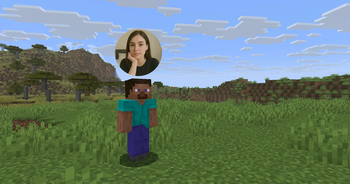

About Webcam
From ModrinthWebcams in Minecraft
Webcam
Mod and plugin that allows players to broadcast their webcams
Downloads
⚠️ Warning
This plugin requires special setup on server to work. If you are a server administrator, please read the section Setup on server first
Features
- High-quality webcam broadcasting
- H.264 video codec
- Video transmission via UDP using custom protocol
- AES encryption
- Bitrate control
- Video resolution control
- Different display shapes
- Display size and position configuration
- Display on player model face
- Display distance limit
- Webcam broadcast and view permissions
- Advanced client configuration (Mod Menu & Cloth Config API required)
- Ability to hide selected players' webcams
- Velocity proxy support
- Compatibility with ReplayMod & Flashback
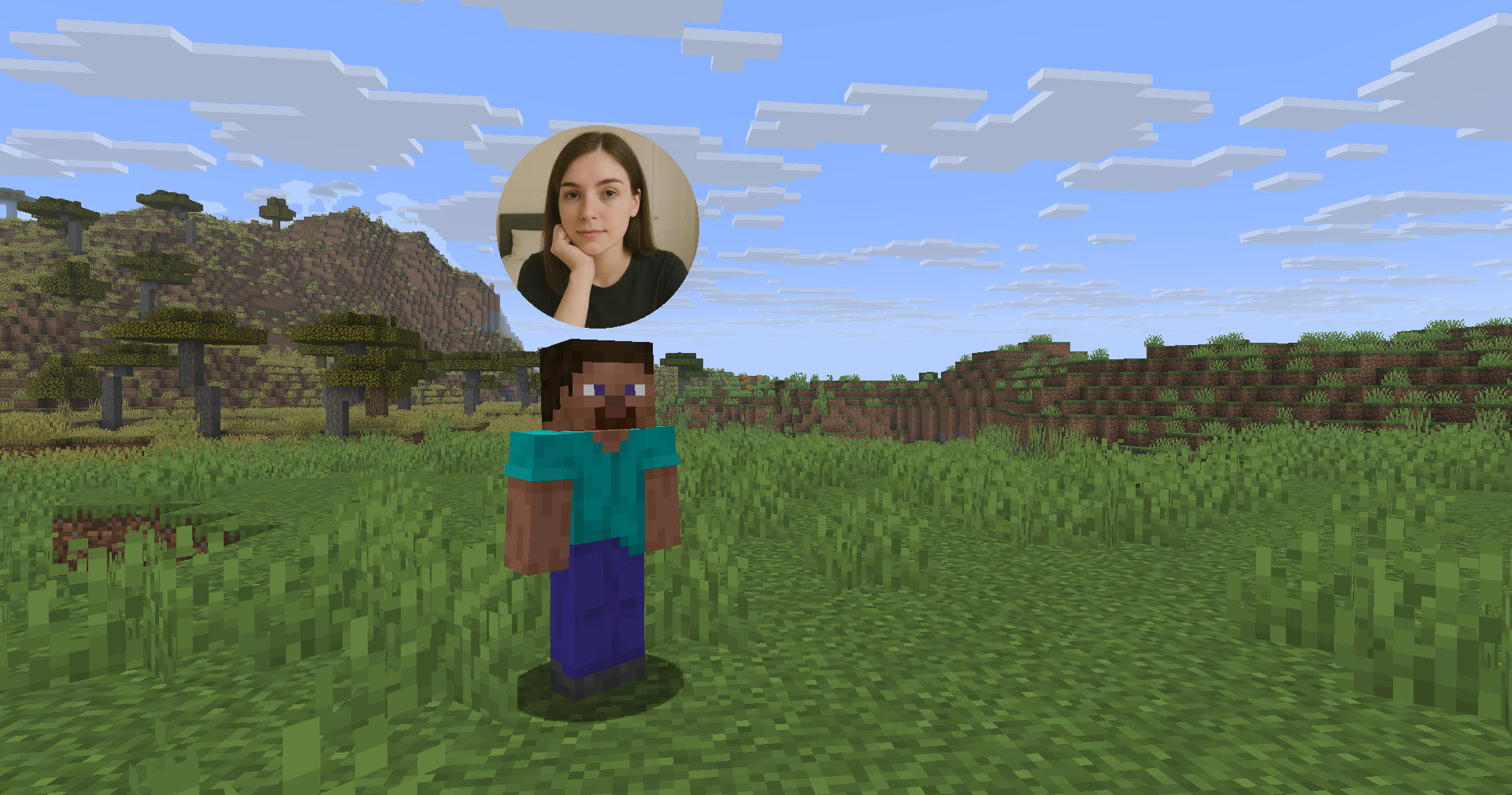
Client Usage
Put the mod in the mods directory (with the Fabric API if you are using Fabric). The settings menu can be opened by hotkey (C by default)
Icons
| Icon | Description | |:--------------------------------------------------------:|--------------------------------| |  | Your webcam is enabled | |
  | Your webcam is disabled | |
  | Connecting to Webcam server | |
  | Not connected to Webcam server |
Encryption
Webcam connection is encrypted, but we don't guarantee the security of it. Use at your own risk!
Setup on server
Webcam plugin uses UDP socket to transfer video packets. So you need to open a UDP port in your server's firewall and panel (if present) to make Webcam server work. This is port 25454/udp by default. You can change the port in server config If you are using Velocity, see Setup on proxy
Server config
Location:
- Fabric / Quilt / NeoForge:
config/webcam/server.json - Bukkit / Spigot / Paper:
plugins/webcam/server.json
Here are the default values with their descriptions:
{
  "port": 25454,                 // Webcam UDP server port. This must not clash with any other used UDP port (like Simple Voice Chat port)
  "bind_address": "",            // Address to bind the Webcam server to. Leave blank to use the wildcard (0.0.0.0) address. F.e. use "127.0.0.1" to accept only local connections
  "host": "",                    // The hostname that clients should use to connect to the Webcam server. Leave blank to use the address, that player is connected to Minecraft with. Can be a simple address or an address with port. This will be ignored, if the server is proxied
  "keep_alive_period": 1000,     // Period of sending keep alive packets is milliseconds
  "permission_check_period": 60, // Period of checking webcam.broadcast and webcam.view permissions in ticks
  "max_display_distance": 100.0, // The distance in blocks from player, in which other players can see his webcam
  "display_on_face": false,      // Whether to display webcam on player model face or above his head
  "display_shape": "round",      // Shape of webcams displayed above players' head. Possible values: "round", "square"
  "display_offset_y": 1.3,       // Y offset of webcams displayed above players' head
  "display_size": 1.2,           // Size of webcams displayed above players' head
  "hide_nicknames": true,        // Whether to hide player's nickname if his webcam is enabled
  "display_self_webcam": true,   // Whether to show the player's webcam to himself
  "synced": {                    // These settings are synchronized with clients
    "image_dimension": 360,      // Side dimension of square webcam images
    "mtu": 1100,                 // Maximum Transmission Unit of packets. You can lower this, if image on webcam starts look glitchy or not arrives at all
    "bitrate": 500               // Target video bitrate (kbps)
  },
  "messages": {                  // Custom transtalions for messages, that are sent to players in different situations. May contain placeholders - %s
    "incompatible_mod_version": "Incompatible Webcam version. Your - %s, server's - %s" // The message that will be sent to player if he has incompatible Webcam mod version. You can set this to empty to disable sending this message
  }
}
Commands
/webcamconfig <field> [new_value]- command to read/update config values. Requireswebcam.command.configpermission or OP.
Permissions
webcam.command.config- permission to modify Webcam server config (default: OP Level)webcam.broadcast- permission to broadcast webcam (default: true)webcam.view- permission to view webcams (default: true)
Setup on proxy
Highlights
From source dataGame versions
Supports 15 Minecraft versions, the newest being 26.3.
Loaders
Runs on Bukkit, Fabric, Folia, NeoForge, Paper, Purpur, Quilt, Spigot and Velocity.
Footprint
Rated a light load on a server.
What kind of mod it is
From the catalogGameplay & overhauls
New mechanics, content and overhauls that change how the game plays.
Runs on your server
From source side supportModrinth lists Webcam as required on the server. Check its Modrinth page to see whether players need it too.
Compatibility
- Game
- Minecraft
- Loaders
- BukkitFabricFoliaNeoForgePaperPurpurQuiltSpigotVelocity
- Runs on
- Serverrequired on the server
- Game versions
- 26.3 and 14 earlier
Verified at the source
- ✓ModrinthOfficial listing, checked 2026-10-01Open ↗
- ✓AuthorDimasKama, as published on Modrinth
- ✓LicenseLicenseRef-NUDL-v1.0Free








