






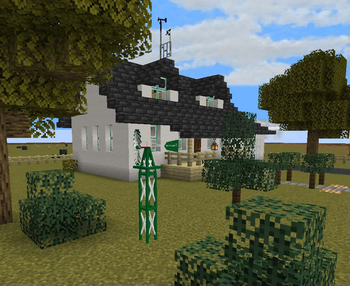

About Elton's Wind meter for PMWeather
From ModrinthAnemometers and equipment for ProtoManly's weather
Intent of the addon

This mod adds equipment for measuring wind speeds in ProtoManly's weather (https://modrinth.com/mod/protomanlys-weather). The mod currently adds:
- A propeller type anemometer

- A propeller type heavy duty anemometer (almost indestructible)

- A cup type anemometer

- A Richards cup type anemometer (almost indestructible)

- A tornado probe (anchor type), with probe reading handheld monitor

- A wind sock

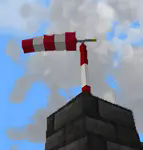
- A garden decoration small replica wind pump
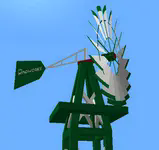
- A wind turbine (cable in the picture is from Ender IO mod)

- A wind rattle
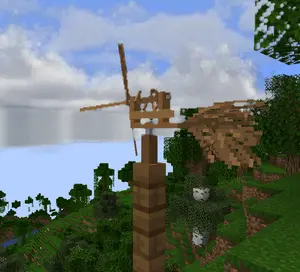
- A metal wind vane
- A wind chime that emitts sounds
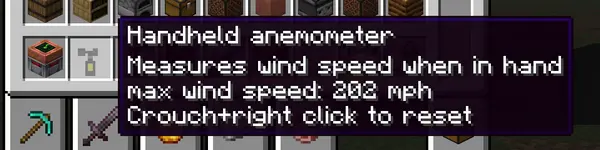
- A handheld anemometer

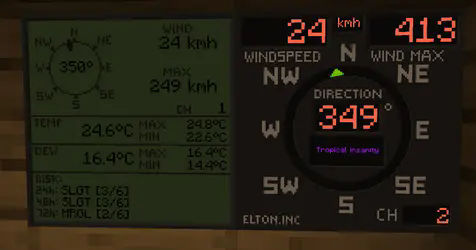
- Displays for reading wind values

The mod will not work without PM weather.
<iframe width="560" height="315" src="https://www.youtube-nocookie.com/embed/_g3nBkQApMY" title="YouTube video player" frameborder="0" allow="accelerometer; autoplay; clipboard-write; encrypted-media; gyroscope; picture-in-picture; web-share" allowfullscreen></iframe>
Setting up the channels
Pre 0.0.29 To setup a channel on anemometers, shift+right click the anemometer. No item should be held by either left or right hand at the time. That includes shields
0.0.29 and up To setup a channel on anemometers, press wind meter interaction key+right click the anemometer. Default interaction key is set so Shift, you can edit this key in the game's key binds. Setting up any other key than shift will allow you to enter anemometer channel setup even when holding items or shields in hand. 
IMPORTANT when you click confirm, it will say that the channel is occupied, this is because you just set the anemometer to that channel and it is now occupied by the anemometer you just set on it. If it says occupied before you even click confirm, that means an anemometer is already on the channel.
After 0.0.30 When you click confirm, it will say "request sent" if the confirm was successful.
To setup a channel on display, right click the display. Anemometer and display must have same channel to communicate. Channel 0 is non transmitting and is used for debugging. If anemometer channel could not be set, try setting it to 0 and then back to desired channel.
There are currently 100 available channels.
Right clicking anemometer will display it's channels that server and client see. This number must always be equal. The feature now remains in the mod for debugging.
Anemometer GUI will display "Channel could not be set because placement is invalid" This is the case:
- if anemometer is placed under a block,
- if anemometer is in any other dimension than overworld,
- for about 1 sec after it's being placed down, so immediately placing it and setting channel won't work, just wait a sec and then enter channel setup.
Redstone output
For setting up the redstone output, it is quite same as setting the channels. You put in the wind speed at which the display should output the redstone signal. It is not possible to set less that 4 mph due to histeresis (to prevent spam). Because the system is based on mph, other units might not be able to be set at increments of 1. This mostly applies to kmh. Redstone output is only on wind displays.
Useful commands
Use /windmeter commands to find out which channels are occupied, which are free or get anemometer location by channel number. Sometimes, the channels might bug out, use command clear channel [channel number] to clean up the broken channel. This will not remove the channel from anemometer itself. The anemometer locating and channel clearing command require operator permissions.
Resetting the wind max and temperature max on display
Pre 0.0.29 To reset max values on display, shift+right click the display when not holding any items.
0.0.29 and up To reset max values on display, wind meter interaction key+right click the display when not holding any items.
Highlights
From source dataGame versions
Supports 2 Minecraft versions, the newest being 1.21.1.
Loaders
Runs on Forge and NeoForge.
Footprint
Rated a light load on a server.
What kind of mod it is
From the catalogGameplay & overhauls
New mechanics, content and overhauls that change how the game plays.
Runs on your server
From source side supportModrinth lists Elton's Wind meter for PMWeather as required on the server. Check its Modrinth page to see whether players need it too.
Compatibility
- Game
- Minecraft
- Loaders
- ForgeNeoForge
- Runs on
- Serverrequired on the server
- Game versions
- 1.21.1 and 1 earlier
Verified at the source
- ✓ModrinthOfficial listing, checked 2026-10-03Open ↗
- ✓AuthorElton_inc., as published on Modrinth
- ✓LicenseLicenseRef-All-Rights-ReservedFree








