






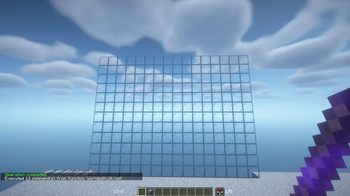

About World Editor
From ModrinthMake building easier with the World Editor datapack! Datapack has singleplayer and multiplayer support.

<img src="https://img.shields.io/modrinth/dt/uRd37jgq?color=6CFF7E&&label=Downloads&logo=modrinth" alt="Modrinth">
<img src="https://img.shields.io/modrinth/game-versions/uRd37jgq?label=Game%20versions&labelColor=235865F2&color=6CFF7E">
<img alt="Discord" src="https://img.shields.io/discord/878270685867311164?logo=discord&color=6CFF7E&cacheSeconds=3600&link=https%3A%2F%2Fdiscord.com%2Finvite%2FD75yRDfWKD"> <img alt="Website" src="https://img.shields.io/website?url=https%3A%2F%2Fexplorerseden.eu&color=6CFF7E&up_message=Click%20Me&down_message=We%27ll%20be%20right%20back!&label=Website&cacheSeconds=3600"> 
📖 Description
This datapack adds commands to make building way easier!
Explore the seamless functionality in both single-player and multiplayer modes.
Commands
Operator permission is required to use this datapack/mod.
V2.4.0+
/function we:tools/cut
/function we:tools/set {block:stone}
/function we:tools/outline {block:dirt}
/function we:tools/replace {old:dirt, new:stone}
/function we:tools/copy
/function we:tools/paste
/function we:tools/move
/function we:tools/rotate {degrees:90}
/function we:tools/undo
/function we:tools/redo

/function we:movement/up {amount:1}
/function we:movement/down {amount:1}

/function we:give/wand
/function we:give/brush

/function we:misc/outline
/function we:misc/deselect_area
/function we:misc/phasing
How to use:
Use ``/function we:give/wand`` to get the selector item.
When you have selected two positions named #1 and #2, you can start using the tools.
Use ``/function we:give/brush`` to get the brush item.
Instructions are on the item description.
Use ``/function we:misc/outline`` to enable/disable the outline particles that appear when you select two positions.
Use ``/function we:misc/phasing`` to enable/disable the player being able to phase through blocks when flying.
Copy-Paste info
You must have an area already copied to use the paste function.
Pasted areas will be pasted facing up and south-east. You can also use F3. Make sure that the X, Y, and Z axis lines are all facing away from you. The build is also facing that way.

Highlights
From source dataGame versions
Supports 18 Minecraft versions, the newest being 26.3.
Loaders
Runs on Data pack, Fabric, Forge, NeoForge and Quilt.
Footprint
Rated a light load on a server.
What kind of mod it is
From the catalogBuilding & decoration
Blocks, furniture, decorations and building tools.
Runs on your server
From source side supportModrinth lists World Editor as required on the server. Check its Modrinth page to see whether players need it too.
Compatibility
- Game
- Minecraft
- Loaders
- Data packFabricForgeNeoForgeQuilt
- Runs on
- Serverrequired on the server
- Game versions
- 26.3 and 17 earlier
Verified at the source
- ✓ModrinthOfficial listing, checked 2026-10-01Open ↗
- ✓AuthorVanderflys, as published on Modrinth
- ✓LicenseApache-2.0Free








