






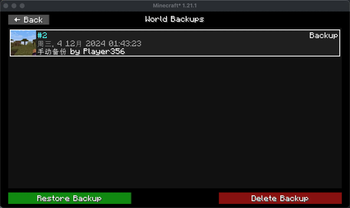
About X Backup
From ModrinthThe advanced backup mod for fabric
X Backup
简体中文 | English
The advanced backup mod for fabric.
Advantages
- ⚡️Lightning-Fast Speeds: Utilizes multithreading technology for rapid backup processes, completing tasks in a fraction of the time, speeding up to 50 times faster. [^1]
- 💾Space-Efficient: Implements incremental backups and automatically compresses large files, minimizing storage usage.
- 🔄Seamless Restoring: Automatically restarts the server after restoring, allowing for a seamless experience.
- ✨Regional Restoring: Restore only the chunks within a specified range, Players outside the range will not be affected.
- 🛡️Flexible Support: Designed to support both servers and clients, providing a versatile solution for all your backup needs.
- ☁️Automatic Cloud Backup: Effortlessly back up your data to the cloud, with support for Microsoft OneDrive, ensuring your information is safe and accessible from anywhere.
Usage
Creating a Backup
You can use the /xb create command to create a new backup. This command saves the current state of the game so you can restore it later. If you want to add a note to the backup, you can add it after the command, for example:
/xb create This is my first backupThis way, you create a backup with a note.
Viewing Created Backups
If you want to view the backups you have created, you can use the /xb list command. This command lists all the backups and displays the number, creation time, and note of each backup. For example:
/xb listThis command displays the last 6 backups. If you have many backups, you can click the gray font button to view more backups.
Restoring a Backup
If you want to restore to a specific backup, you can use the /xb restore <id> command, where <id> is the number of the backup. For example:
/xb restore 1This command restores the game to the state of backup number 1. If you want to restore a specific range, you can use the --chunk parameter to specify the coordinates from which to which, for example:
/xb restore 1 --chunk 0 0 10 10> [!TIP] > These are the x/z coordinates of the blocks, do not confuse them with chunk coordinates.
This will restore the game to backup 1, but only restore the area from block coordinates (0, 0) to (10, 10).
Scheduled Backup Configuration
You can set the automatic backup interval using the /xb backup-interval <seconds> command. For example, if you want to automatically back up every 3 hours, you can set it like this:
/xb backup-interval 10800This command sets the automatic backup interval to 10,800 seconds (i.e., 3 hours).
Mirror Server Configuration
If you are using a mirror server, you can use the /mirror command to synchronize the latest backup from the main server. For example:
First, you need to create a backup on the main server:
/xb createThen, in the mirror server configuration, set the main server's file path (the one containing server.properties) and blob_path, and enable mirror mode:
{
  "mirror_mode": true,
  "mirror_from": "C:\\MinecraftServer\\My-Server",
  "blob_path": "C:\\MinecraftServer\\My-Server\\blob"
}
After that, execute the /mirror command. This command will synchronize the latest backup state from the main server to the mirror server. You can also add the id parameter to specify the backup number to synchronize:
/mirror 1If you want to stop the server and restore the backup, you can use the --stop parameter:
/mirror --stopCleaning Up Unnecessary Backups
The mod also provides an automatic cleanup feature for old backups. You can set the keep_policy in the configuration file, for example:
{
  "prune": {
    "enabled": false,
    "keep_policy": {
      "1d": "30m",
      "1w": "6h",
      "1M": "1d",
      "1y": "1w",
      "2y": "1M"
    }
  }
}
This configuration means:
- Keep backups every 30 minutes for the last 1 day
- Keep backups every 6 hours for the last 1 week
- Keep daily backups for the last 1 month
- Keep weekly backups for the last 1 year
- Keep monthly backups for the last 2 years
You can adjust these settings according to your needs.
When enabled is true, the mod will automatically clean up backups that do not meet the retention policy. Alternatively, you can manually clean up unnecessary backups using the /xb prune command.
Viewing Backup Information
If you want to view detailed information about a specific backup, you can use the /xb info <id> command, for example:
/xb info 1This command will display detailed information about backup #1, including backup time, notes, size, etc.
Credits
Some part (GUI) of this mod is based on BackupManager by CreeperHost LTD.
Highlights
From source dataGame versions
Supports 21 Minecraft versions, the newest being 1.21.11.
Loaders
Runs on Fabric.
Footprint
Rated a light load on a server.
What kind of mod it is
From the catalogGameplay & overhauls
New mechanics, content and overhauls that change how the game plays.
Works on a server
From source side supportModrinth lists server-side support for X Backup as optional: it can run on a server, but isn’t required there.
Compatibility
- Game
- Minecraft
- Loaders
- Fabric
- Runs on
- Serveroptional on the server
- Game versions
- 1.21.11 and 20 earlier
Verified at the source
- ✓ModrinthOfficial listing, checked 2026-10-01Open ↗
- ✓Authorzly2006, as published on Modrinth
- ✓LicenseAGPL-3.0-onlyFree








