







About XP Storage
From ModrinthA mod that lets you store your experience in multiple ways!


NO PORT TO FORGE PLANNED! (but feel free to port it by yourself and link it)
The mod is fully configurable to enable only changes that you like
Description
In this mod, you can craft XP Books in order to store your experience and save it from a coming death. After storing it, you can retrieve your experience back in two different ways: same way that you stored it OR you can brew the experience of the XP Book with the brewing stand in order to create special Experience Bottles that can give you even more experience.
TO READ WHEN UPDATING TO V1.6
⚠️ v1.6 UPDATE: XP Book II and III were removed, and there were some changes with item data! You can update the mod in your world without losing anything, but be sure to put your books in a crafting table to update them. Old saves won't be supported forever, this warning will be update whenever a version without the transition support is uploaded.
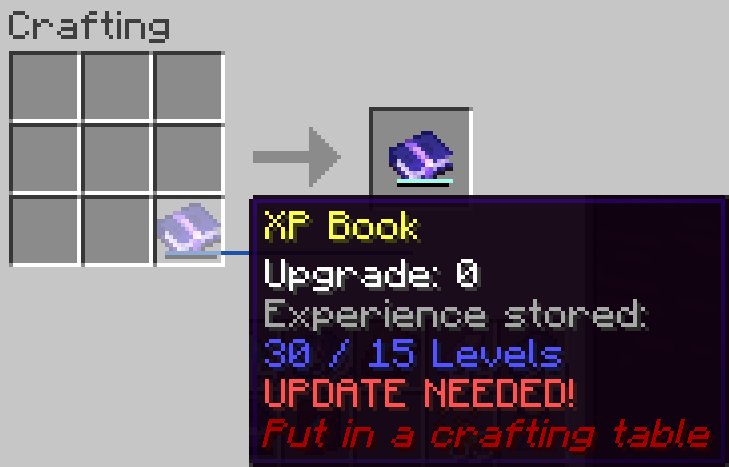
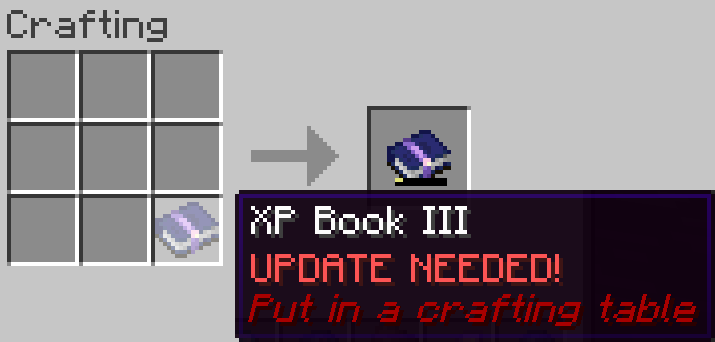
This is a short description, full description below.
FAQ
- Does it work on a server? Yes, it works on a server. File needed for both client and server
- Can I include it in my modpack? Yes, you are free to include this mod into your modpack
- For any other things: Feel free to share your experience, problems, enhancement ideas in the Discord server, or directly creating issues on the GitHub
Full description
Recipes
Crystallized Lapis
- 4 Lapis Lazuli (it stores experience so that makes senses)
- 1 Amethyst Shard (it's a precious gem)
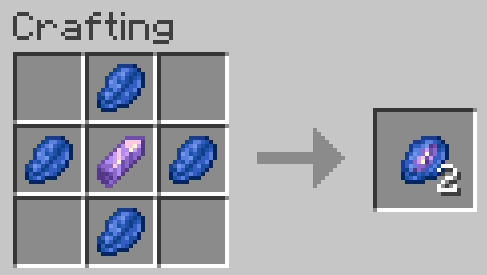
XP Book
- They can store up to 15 levels without upgrades (config).
This means experience to go from 0 level to X levels! Not the same amount than experience from Y to X+Y!
- 1 Book (of course, it's a book)
- 4 Crystallized Lapis
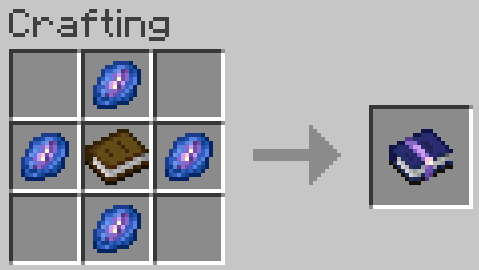
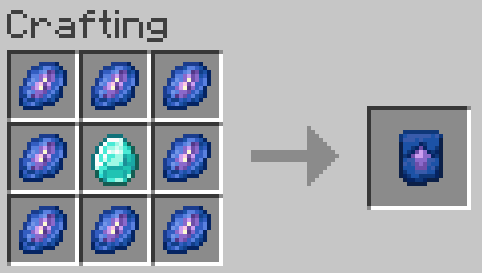
Smithing Template
- They can be used to upgrade XP Books of any level, only the ingredient with it changes
- 1 Diamond
- 8 Crystallized Lapis
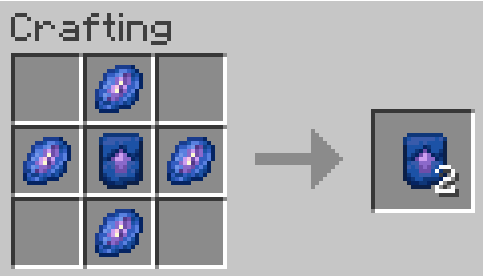
Smithing Template Duplication
- 1 Smithing Template
- 4 Crystallized Lapis
How to use?
XP Book
- Store experience: Store the maximum amount of your experience in the book by right clicking. If you have more experience than the maximum amount, you will keep the remaining experience
- Retrieve experience: Get 85, 90, 95 or 100% (depending on book's level) of the experience stored in the book by right clicking while sneaking
Brewing
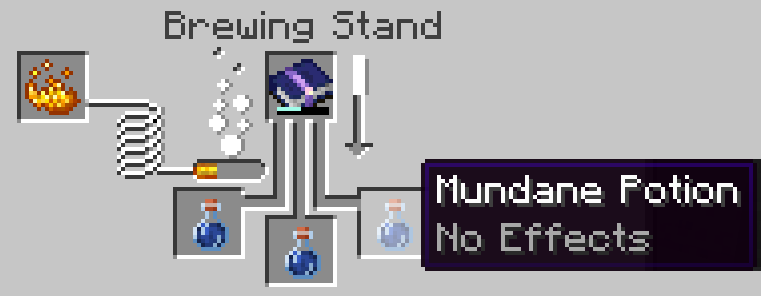
- Take 1, 3, 5 or 10 levels (depending on book's level) of the experience stored in the book for each mundane potions (or Experience Bottle) placed in the brewing stand and put it in the resulting Experience Bottle (or add it to the current ones)
- Each Experience Bottle can store a maximum of 30 levels (config)
XP Book Upgrades
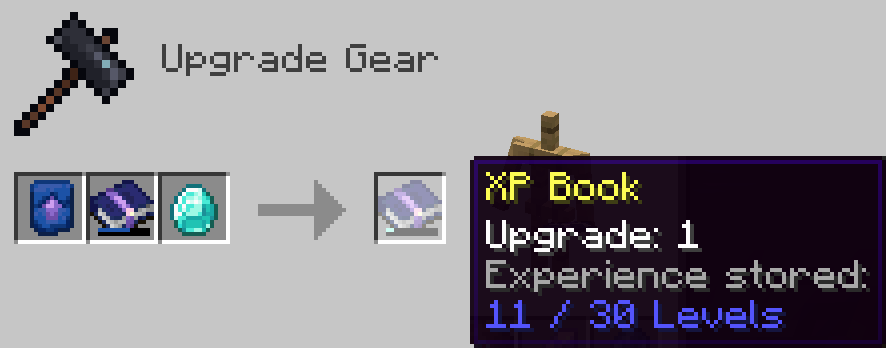
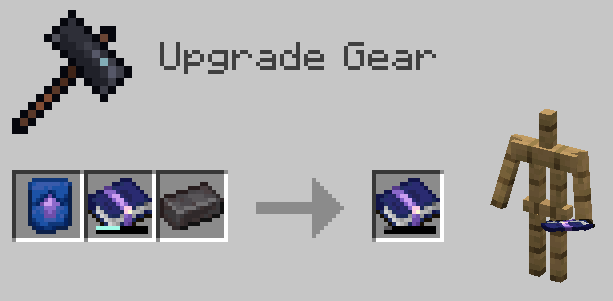
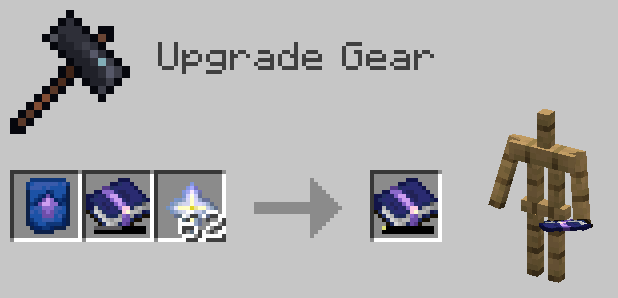
- You can upgrade the book, so that it can store more experience and retrieve it more efficiently
- You need to craft an XP Book Upgrade Smithing Template and use it with the right ingredient, depending on the XP Book level in input (Diamond, Netherite Ingot or Nether Star).
- You can update the new smithing recipes to customize the parameters of the XP Book in output, such as its new capacity or efficiency for example with your custom resource pack
- You can also add new smithing recipes in your custom resource pack to add more XP Book levels

Highlights
From source dataGame versions
Supports 9 Minecraft versions, the newest being 1.21.3.
Loaders
Runs on Fabric.
Footprint
Rated a light load on a server.
XP Storage on Nxeon
From our catalogue- One-click install
- Supported on Nxeon Minecraft servers. We download it from Modrinth, place it, and restart the server.
- Server side
- Required on the server
- Server type needed
- Fabric
- Server load
- light
- Smallest plan we suggest
- Minecraft — 1.5 GB (2 GB RAM). This follows our own load rating above, not a benchmark.
- Latest build
- 1.6+1.21.3, released 2024-12-09
Game versions by loader
| Loader | Game versions | Newest |
|---|---|---|
| Fabric | 1.21 to 1.21.3 (3 versions) | 1.21.3 |
From 5 recorded builds of XP Storage.
Recent builds
| Build | Released | Game versions | Loaders |
|---|---|---|---|
| 1.6+1.21.3 | 2024-12-09 | 1.21.3 | Fabric |
| 1.6+1.21 | 2024-10-22 | 1.21 to 1.21.1 (2 versions) | Fabric |
| 1.5.10+1.21 | 2024-08-06 | 1.21 to 1.21.1 (2 versions) | Fabric |
| 1.5.9+1.21 | 2024-07-23 | 1.21 | Fabric |
| 1.5.8+1.21 | 2024-07-20 | 1.21 | Fabric |
Run XP Storage on a Minecraft server
Pick a server or deploy a new one above; it is installed in one click.
What kind of mod it is
From the catalogGameplay & overhauls
New mechanics, content and overhauls that change how the game plays.
Runs on your server
From source side supportModrinth lists XP Storage as required on the server. Check its Modrinth page to see whether players need it too.
Compatibility
- Game
- Minecraft
- Loaders
- Fabric
- Runs on
- Serverrequired on the server
- Game versions
- 1.21.3 and 8 earlier
Verified at the source
- ✓ModrinthOfficial listing, checked 2026-10-08Open ↗
- ✓AuthorPardys, as published on Modrinth
- ✓LicenseMITFree









