







About TravelingHaldor
From ThunderstoreBring a dynamic and immersive customizable trading experience to Valheim with Traveling Haldor.
Traveling Haldor Mod
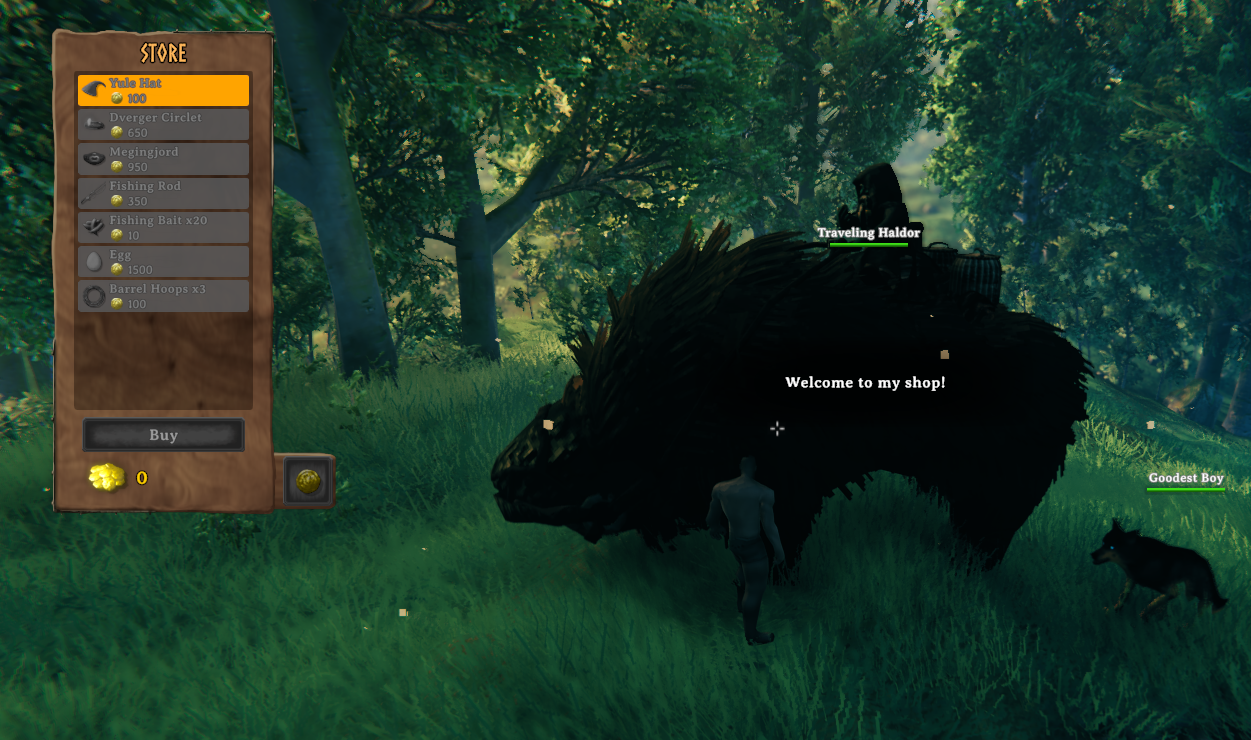
Welcome to the Traveling Haldor Mod! This mod brings a dynamic and immersive trading experience to your Valheim adventure by introducing a roaming trader, Haldor, who appears in different biomes and regions with customizable behavior and inventory.
Features
- Supports EpicLoot Bounties
- Pick up your EpicLoot Bounties from Traveling Haldor.
- Supports Trader Quest by Rusty
- Pick up your Trader Quest Bounties, Gamble, and more from Traveling Haldor.
- Traveling Haldor Token
- Traveling Trader Token that can be used to spawn Traveling Haldor. Coin is purchased from "Haldor" or "Traveling Haldor" after defeating Bonemass.
- Settings for Token within "Trader Items" and "Traveling Trader Token"
- Traveling Despawn Settings
- Traveling Haldor can be set not to despawn if trapped by player builds.
- Dynamic Trader Spawning
- Haldor spawns at random intervals and locations within specified biomes and regions.
- Customize the spawn distance from the player.
- Set the "Custom Map Pin" to
truefor a map pin to display when Traveling Haldor is spawned. This is set tofalseby default.
- Customizable Trader Behavior
- Set custom greetings, goodbyes, and trade dialogues to personalize Haldor's interactions.
- Configurable event interval, chance, and duration for Haldor's appearances.
- Biome and Region Specific Spawning
- Control where Haldor can spawn using combined biome and region settings.
- Default spawn regions: Meadows, BlackForest
- Possible additional locations: Swamp, Mountain, Plains, AshLands, DeepNorth, Ocean, Mistlands, All, None
- Global Key Requirement for Events
- Add a global key requirement to trigger the trader event, ensuring Haldor only appears after specific milestones are met.
- Default Value:
defeated_gdking - Acceptable Values:
- defeated_bonemass
- defeated_gdking
- defeated_goblinking
- defeated_dragon
- defeated_eikthyr
- defeated_queen
- defeated_fader
- defeated_serpent
- KilledTroll
- killed_surtling
- KilledBat
- Day/Night Specific Spawning
- Control when Haldor can spawn using day/night settings.
- Acceptable Values:
Always, Day, Night
- Trader Inventory Customization
- Define the items Haldor sells, including amount, cost, and required global keys.
- New Console Command: Clear All Haldors
- If multiple Haldors are in the world, you can remove them using the console command:
clear_traveling_haldors
- This will remove all active Traveling Haldors and display a confirmation message.
Configuration Options
Event Settings
Event Interval (Days): How often (in in-game days) Traveling Haldor appears.Event Chance: Chance (0-1) of the event occurring when the interval is reached.Event Duration (Seconds): How long Haldor stays in one place.Global Key Requirement: Global key required to trigger the event. Default value isdefeated_gdking. Acceptable values:defeated_bonemass,defeated_gdking,defeated_goblinking,defeated_dragon,defeated_eikthyr,defeated_queen,defeated_fader,defeated_serpent,KilledTroll,killed_surtling,KilledBat.Specific Spawn Time: Specify when Haldor can spawn. Acceptable values:Always, Day, Night.Spawn Distance (Meters): Distance from the player at which the trader spawns.Max Haldor Count: Sets the maximum number of Traveling Haldors that can exist at one time.Force Despawn: IftrueHaldor will despawn when trapped by player builds.Trader Icon: Iftruean icon will be displayed on the map.
Trader Settings
TradeItems: List of items Haldor sells. Format:PrefabName,Amount,Cost,RequiredGlobalKey.
Custom Dialogues
Greetings: Custom greetings for the trader. Separate multiple greetings with;.Goodbyes: Custom goodbyes for the trader. Separate multiple goodbyes with;.TradeDialogues: Custom trade dialogues for the trader. Separate multiple dialogues with;.
Location Settings
Enable Location Variability: Enable or disable trader location variability.Spawn Regions: Possible spawn regions for the trader. Separate multiple regions with;.
Installation
- Download the Traveling Haldor Mod from the provided link.
- Extract the contents to your Valheim
BepInEx\pluginsfolder. - Customize the configuration file located in
BepInEx\config\org.bepinex.plugins.travelinghaldor.cfgto suit your preferences. - Enjoy the dynamic and immersive trading experience with Traveling Haldor!
Use with Trader Quest by Rusty for gambling, bounties, and more!!
For Questions or Comments, find Gravebear in the Odin Plus Team on Discord:

Visit my BuyMeACoffee for a free Admin craft Shark Hat and Tuna Sword!

Special Thanks to Rusty and Blaxxun for all her help with code and managers
Highlights
From source dataLoaders
Runs on BepInEx.
Footprint
Rated a light load on a server.
Last update
Its author last shipped an update 59d ago.
TravelingHaldor on Nxeon
From our catalogue- One-click install
- Supported on Nxeon Valheim servers, for BepInEx servers. We download it from Thunderstore, place it, and restart the server.
- Server side
- Optional on the server
- Server type needed
- BepInEx
- Server load
- light
- Smallest plan we suggest
- Valheim — 2 GB (2 GB RAM). This follows our own load rating above, not a benchmark.
- Latest build
- 1.2.0, released 2026-09-23
Game versions by loader
| Loader | Game versions | Newest |
|---|---|---|
| BepInEx |
From 17 recorded builds of TravelingHaldor.
Recent builds
| Build | Released | Game versions | Loaders |
|---|---|---|---|
| 1.2.0 | 2026-09-23 | n/a | BepInEx |
| 1.1.7 | 2026-06-18 | n/a | BepInEx |
| 1.1.6 | 2026-02-10 | n/a | BepInEx |
| 1.1.4 | 2026-02-05 | n/a | BepInEx |
| 1.1.3 | 2026-02-05 | n/a | BepInEx |
| 1.1.1 | 2025-09-29 | n/a | BepInEx |
Dependencies
- Required: BepInExPack Valheim
Declared by the newest build that lists any. Required ones are installed with it on one-click installs.
Run TravelingHaldor on a Valheim server
Pick a server or deploy a new one above; it is installed in one click.
What kind of mod it is
From the catalogEconomy & shops
Currencies, shops, trading and rewards.
Works on a server
From source side supportThunderstore lists server-side support for TravelingHaldor as optional: it can run on a server, but isn’t required there.
Compatibility
- Game
- Valheim
- Loaders
- BepInEx
- Runs on
- Serveroptional on the server
- Requires
- One-click install needs a BepInEx server.
Verified at the source
- ✓ThunderstoreOfficial listing, checked 2026-10-16Open ↗
- ✓AuthorOdinPlus, as published on Thunderstore
- ✓LicenseNot published by the sourceFree















