
configkit
In-game settings for your mods, without ImGui (alternative to configlib).
Description
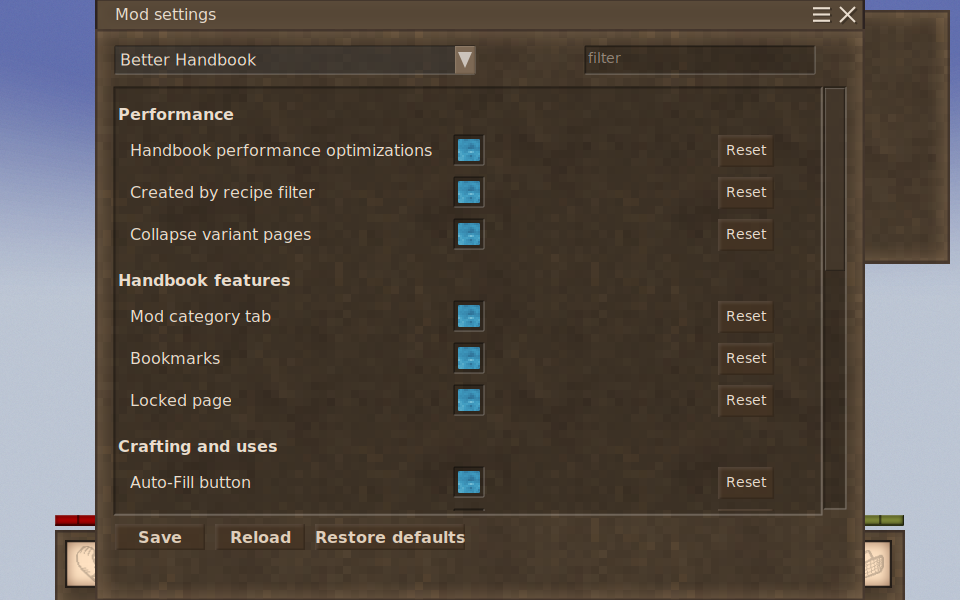
<p><strong>ConfigKit</strong> gives Vintage Story mods an in-game settings screen, drawn with the game's own interface. No Dear ImGui, and nothing extra to install alongside it.</p> <p>It reads the same <code>configlib-patches.json</code> files mods already ship and writes a plain <code>ModConfig/<mod>.yaml</code> you can edit by hand, so <strong>a content mod needs no changes at all</strong>, and no dependency on this library either. If ConfigKit isn't installed, a mod simply falls back to the default values in its own assets.</p> <p><em>Tested in-game across singleplayer, real two-process multiplayer, and a run alongside another config mod. Verified against a 95-mod pack: every asset it patches resolves identically to configlib's output.</em></p> <h3>For players</h3> <ul> <li>Press <strong>P</strong>, or use the <strong>Mod settings</strong> button in the pause menu.</li> <li>Settings the server controls are shown read-only unless you have <code>controlserver</code>.</li> <li>Edit a file in <code>ModConfig/</code> while the game is running and it reloads on the spot.</li> <li>Type in the filter box beside the mod dropdown to find a setting by name, wherever it lives.</li> <li><strong>Don't install ConfigKit and configlib together.</strong> If ConfigKit sees configlib or autoconfiglib it stands down and says so in the log, so nothing breaks, but only one of them can manage your configs. Config managers that only handle <em>some</em> mods are a different matter: name a mod under <code>UnmanagedDomains</code> in <code>ModConfig/configkit.json</code> and ConfigKit leaves that one alone without switching itself off.</li> <li>You can join a server that doesn't have it, and you keep your own settings screen for client-side mods.</li> <li>A server running it needs its players to have it too. Anyone without it is turned away on the connect screen and offered the download, the same as any other server-side mod.</li> </ul> <h3>For server admins</h3> <p>Settings can rewrite values inside other mods' JSON assets (block behaviour, recipes, item stats) from one config file, without repacking anything. That is often the quickest way to retune a pack for a server, and the server's values are synced to every client on join.</p> <h3>For mod authors</h3> <p>Most mods need <strong>no changes</strong>. The migration guide covers four cases:</p> <ul> <li>Ships a <code>configlib-patches.json</code> and no C#? <strong>Nothing to do.</strong></li> <li>Checks whether a config mod is installed? <strong>One line.</strong></li> <li>Calls into the library? <strong>Swap a reference and rebuild.</strong></li> <li>Draws its own ImGui settings screen? <strong>Describe the settings instead</strong>, usually less code than you had.</li> </ul> <p>A settings class needs only stock .NET attributes (<code>[Description]</code>, <code>[Range]</code>, <code>[Category]</code>), so it keeps no reference to ConfigKit and still compiles and runs without it. Nested classes, dictionaries and lists render themselves — a sub-object becomes a foldable section, a dictionary opens a screen of its own with a filter and an Add button, and neither needs a line of UI code.</p> <p>It also reads what your class already carries: your <code>///</code> doc comments become the tooltips, <code>[DisplayFormat]</code> decides how a number reads, validation attributes are enforced with the messages you wrote — including your own <code>ValidationAttribute</code> — and a nullable value type keeps its null instead of showing it as zero.</p> <p>Full guides are linked under <strong>Documentation</strong>, just below.</p> <h3>Documentation</h3> <p>All of it lives in the repository, so it stays with the code it describes:</p> <ul> <li><a href="https://github.com/dizzyd/configkit/blob/main/docs/STRUCTURED-CONFIG.md">Structured config</a> — what each shape becomes on screen: nested classes, dictionaries, lists, and every attribute that steers them. With screenshots.</li> <li><a href="https://github.com/dizzyd/configkit/blob/main/docs/INTEGRATING.md">Integrating</a> — the API, when your values are actually there, client and server, and what to look at when a setting does not appear.</li> <li><a href="https://github.com/dizzyd/configkit/blob/main/docs/CONFIG-FORMAT.md">The config file format</a> — settings, patches, JSON paths and expressions, for a mod with no C# at all.</li> <li><a href="https://github.com/dizzyd/configkit/blob/main/docs/MIGRATING.md">Migrating from configlib</a> — four cases, and most mods fall into the one that needs no work.</li> <li><a href="https://github.com/dizzyd/configkit/blob/main/docs/COMPATIBILITY.md">Compatibility</a> — a survey of the 2,000 most-downloaded 1.22 mods, sorted by what each would have to change.</li> <li><a href="https://github.com/dizzyd/configkit/blob/main/docs/CHANGES-FROM-CONFIGLIB.md">What changed from configlib</a> — the deliberate differences, what was added, and the bugs fixed on the way.</li> </ul> <h3>Verifying what you downloaded</h3> <p>Every release is built by GitHub Actions and carries Sigstore-signed provenance tying the zip to the commit that produced it:</p> <pre>gh attestation verify configkit_<version>.zip --repo dizzyd/configkit</pre> <p>The build also refuses to package anything questionable: it asserts that <code>ConfigKit.dll</code> declares only its own types (dependencies ship as separate files and are never merged in), that every third-party dll matches its publisher's SHA-256, and that each one ships with its licence. What that proves is <em>provenance</em>: the binary contains what the source says, not that the behaviour is correct. The source is short; read it.</p> <h3>Origin, and credit</h3> <p>ConfigKit is derived from <strong>configlib</strong> by <strong>Maltiez</strong>, released under CC0. The config model, the patch format, the expression syntax and the server-sync design are his work, and they are good work. configli
Ratings & reviews
Sign in to leave a rating or comment.