
Description
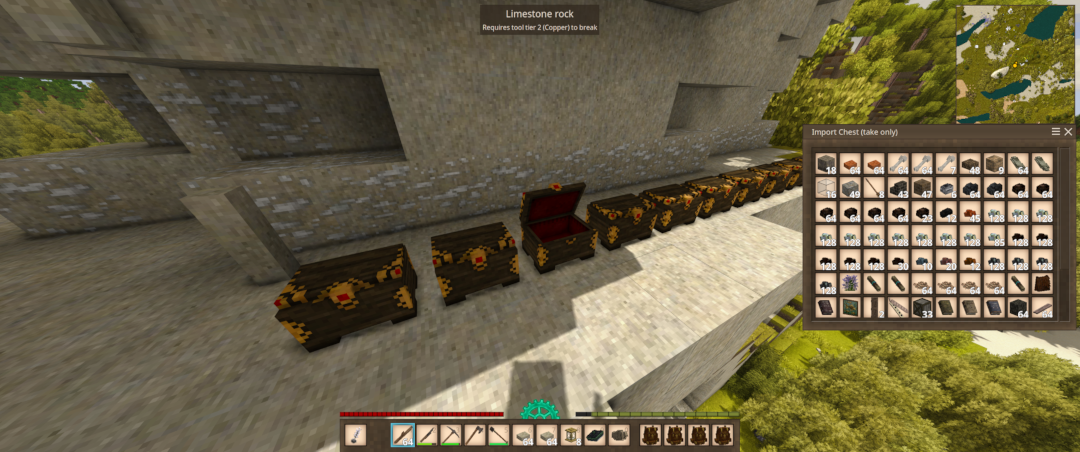
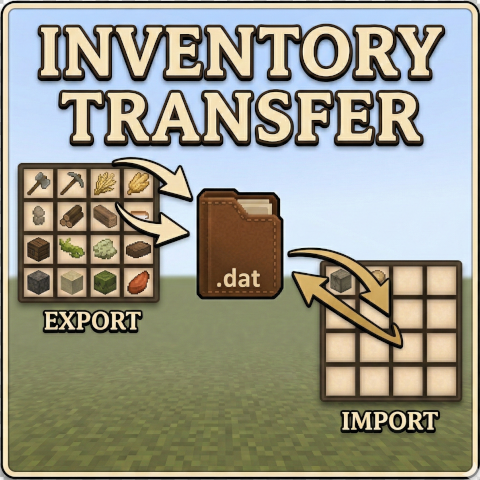
<h3><strong>Inventory Transfer</strong></h3> <p>Take your loot to a new world.</p> <p>Inventory Transfer lets you export items from one Vintage Story world and import them into another. Whether you're migrating to a fresh seed, moving to a friend's server, or just want to carry<br />your hard-earned gear forward — this mod handles it.</p> <p> </p> <p><strong>How It Works</strong></p> <p>Exporting (/exportinv): Collects items from your player inventory (hotbar, character slots, bags and their contents) and from every storage block within a 30-block radius — chests, crates,<br />trunks, barrels, baskets, vessels, planters, tool racks, ground storage piles, shelves, bookshelves, display cases, mold racks, scroll racks, armor stands, and anything else that exposes an<br />inventory. Storage blocks now travel even when empty, so your new base arrives already stocked with containers to fill. Decor blocks (banners, tapestries, rugs, carpets, paintings, lanterns,<br />and glass) are lifted as their item form so painted/dyed/type attributes survive the trip. Mechanical blocks (windmill rotors, axles, angled gears, large gears, transmissions, clutches, brakes,<br />and toggles) are picked up as well. The manifest is saved to a config file that persists outside the world save.</p> <p>Importing (/importinv): Reads the exported data and places items into your inventory. If your inventory fills up, the mod spawns overflow chests at your feet and walks east, filling each one<br />in turn. The manifest is sorted before placement so same-type stacks land in contiguous chests (and merge into full stacks), with decor parked in its own section at the end of the chest row.<br />After import, you get a per-source audit report so you can verify every category transferred cleanly.</p> <p>Decor and mechanical blocks won't auto-place themselves in the new world — they arrive as items in your import chest and you re-place them where you like.</p> <p> </p> <p><strong>What Gets Exported</strong></p> <p>Most items and blocks are exported, including tools, weapons, armor, food, ingots, ores, gems, animal parts, dyes, clothing, bags (and their contents), chests and other containers (empty or<br />full), torches, molds, decor blocks, mechanical parts, and any other items or blocks not on the filter list below.</p> <p>Item attributes are preserved — tool durability, food freshness, custom names, dyed/painted decor patterns, and other metadata all carry over.</p> <p>Bags: A bag's contents are pulled out and transferred as their own line items, and the bag itself arrives as a fresh, empty container. Worn bags, bags sitting in chests, and nested bags are<br />all handled — no duplication, no loss, even for bulk contents.</p> <p> </p> <p><strong>What Gets Filtered Out</strong></p> <p>To keep exports clean and focused on valuables, the following common bulk blocks are automatically skipped:</p> <p> - Stone (all stone-material blocks)<br /> - Soil/Dirt (all soil-material blocks)<br /> - Gravel (all gravel-material blocks)<br /> - Sand (all sand-material blocks)<br /> - Cobblestone<br /> - Plaster<br /> - Planks<br /> - Logs</p> <p>Exceptions: Anything explicitly collected by a dedicated pass is exported even if it would otherwise match a filtered material — containers, torches, molds, decor, bags, mechanical parts, and<br />(when you use --all) crafted build blocks.</p> <p> </p> <p><strong>Liquids</strong></p> <p>Liquids don't travel — only the vessels do.</p> <p> - On export, any liquid-portion stacks (the way barrels store liquid in a slot) are dropped.<br /> - On import, liquid contents are stripped from buckets, jugs, barrels, and watering cans (where liquid is stored as item attributes). The vessel comes through clean and ready to use; the<br />liquid is gone.<br />- The audit report notes this as "Liquid vessels emptied: N".</p> <p> </p> <p><strong>Cooked Food Limitation</strong></p> <p>When VS cooks food and stores it in a crockpot or bowl, it saves the ingredient stacks with numeric item IDs that are assigned per-world. Those numbers are essentially the item's index in that<br />world's registry — and they don't match in a different world. When transferred, those IDs resolve to completely wrong items.</p> <p>What does transfer:<br /> - The crockpot itself (arrives empty, ready to cook in)<br /> - The bowl itself (arrives empty)<br /> - All raw ingredients, tools, ore, gear, etc. — anything that doesn't embed nested item stacks</p> <p>What can't transfer:<br /> - The cooked meal inside — it's a blended result with embedded ingredient references that are world-specific</p> <p> </p> <p><strong>Creative Mode</strong></p> <p>Both commands refuse to run while you're in Creative mode and print a clear error explaining why. In Creative, your inventory has effectively infinite capacity, so the overflow chests would<br />never spawn and items would vanish silently into the creative inventory. Switch to Survival, run the command, switch back if you want.</p> <p> </p> <p><span style="background-color: #f1c40f;"><strong>Export Everything (--all)</strong></span></p> <p>By default the export focuses on loot, containers, decor, and mechanical parts. Add the --all switch to /exportinv and the mod will additionally scan every placed crafted build block in range —<br />walls, floors, doors, stairs, fences, slabs, glass, metal, brick, and so on — picked by a material-based rule. Natural terrain (rock, ore, soil, sand, gravel, logs, trees, water/ice) is skipped.<br />These land as a separate block source, grouped by type. The scan is non-destructive — it reads the wor
Download
No download link is available for this entry right now.
Ratings & reviews
Sign in to leave a rating or comment.



