
ModUpdateChecker
Server-side mod that checks the Vintage Story Mod Database for updates to tracked mods and notifies
Description
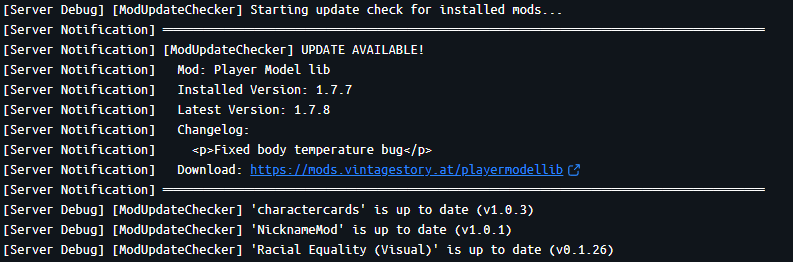
<div> <h2>Mod Update Checker</h2> <br /> <div>A server-side Vintage Story mod that automatically detects installed mods, compares their versions with the official Mod Database, and notifies admins when updates are available via logs and in-game chat.</div> <h3>Features</h3> <br /> <div>- Automatic Installed Mod Detection: Scans all installed mods on your server</div> <div>- Smart Version Comparison: Compares installed versions with the latest versions from VS Mod DB API</div> <div>- Flexible Tracking: Check all installed mods or only specific ones</div> <div>- Changelog Display: Shows what changed in the new version</div> <div>- In-Game Notifications: Alerts admins with controlserver privilege when updates are found</div> <div>- Server Log Output: Detailed update information in server logs</div> <div>- Persistent State: Remembers last checked versions across server restarts</div> <div>- In-Game Commands: Add/remove mods and force checks without editing config files</div> </div> <p> </p> <div> <h3>Configuration</h3> <br /> <div>The config file is created at ModConfig/modupdatechecker.json:</div> <div> </div> <div><code>{</code></div> <div><code> "TrackedMods": [</code></div> <div><code> "charactercards",</code></div> <div><code> "NicknameMod"</code></div> <div><code> ],</code></div> <div><code> "CheckIntervalMinutes": 60,</code></div> <div><code> "CheckOnStartup": true,</code></div> <div><code> "AnnounceInChat": true,</code></div> <div><code> "CheckAllInstalledMods": true,</code></div> <div><code> "ComparisonMethod":"version"</code></div> <div><code>}</code></div> <h4>Config Options</h4> <table style="border-collapse: collapse; width: 87.1471%;" border="1"> <tbody> <tr> <td style="width: 10.6777%; text-align: center;"><strong>Option </strong></td> <td style="width: 20.1543%; text-align: center;"><strong>Default </strong></td> <td style="width: 31.315%; text-align: center;"><strong>Description </strong></td> </tr> <tr> <td style="width: 10.6777%;">TrackedMods</td> <td style="width: 20.1543%;">[]</td> <td style="width: 31.315%;">List of mod IDs to track (only used when CheckAllInstalledMods is false)</td> </tr> <tr> <td style="width: 10.6777%;">CheckIntervalMinutes</td> <td style="width: 20.1543%;">60</td> <td style="width: 31.315%;">How often to check for updates (in minutes)</td> </tr> <tr> <td style="width: 10.6777%;">CheckOnStartup</td> <td style="width: 20.1543%;">true</td> <td style="width: 31.315%;">Check for updates when server starts</td> </tr> <tr> <td style="width: 10.6777%;">AnnounceInChat</td> <td style="width: 20.1543%;">true</td> <td style="width: 31.315%;">Send in-game chat messages to admins</td> </tr> <tr> <td style="width: 10.6777%;">CheckAllInstalledMods</td> <td style="width: 20.1543%;">true</td> <td style="width: 31.315%;">If true, checks all installed mods. If false, only checks mods in TrackedMods list</td> </tr> <tr> <td>ComparisonMethod</td> <td>date</td> <td> <ul> <li>"date" - Compares release dates/IDs to detect updates (more reliable)</li> <li>"version" - Compares version strings with installed version</li> </ul> </td> </tr> </tbody> </table> <p> </p> <h3>Finding Mod IDs</h3> <br /> <div>Mod IDs can be found:</div> <div>1. In the mod's URL on mods.vintagestory.at (e.g., mods.vintagestory.at/charactercards → charactercards)</div> <div>2. In the mod's modinfo.json file</div> <div>3. Using the numeric asset ID from the API</div> <br /> <h2>Commands</h2> <p> </p> <table style="border-collapse: collapse; width: 79.049%; height: 120px;" border="1"> <tbody> <tr style="height: 20px;"> <td style="width: 33.3333%; height: 20px; text-align: left;"><strong>Command </strong></td> <td style="width: 33.3333%; height: 20px; text-align: left;"><strong>Permission</strong></td> <td style="width: 33.3333%; height: 20px; text-align: left;"><strong>Description </strong></td> </tr> <tr style="height: 20px;"> <td style="width: 33.3333%; height: 20px;">/modupdates</td> <td style="width: 33.3333%; height: 20px;">controlserver</td> <td style="width: 33.3333%; height: 20px;">Show status and help</td> </tr> <tr style="height: 20px;"> <td style="width: 33.3333%; height: 20px;">/modupdates check</td> <td style="width: 33.3333%; height: 20px;">controlserver</td> <td style="width: 33.3333%; height: 20px;">Force an immediate update chec</td> </tr> <tr style="height: 20px;"> <td style="width: 33.3333%; height: 20px;">/modupdates list</td> <td style="width: 33.3333%; height: 20px;">controlserver</td> <td style="width: 33.3333%; height: 20px;">List all tracked mods and their versions</td> </tr> <tr style="height: 20px;"> <td style="width: 33.3333%; height: 20px;">/modupdates add <modid></td> <td style="width: 33.3333%; height: 20px;">controlserver</td> <td style="width: 33.3333%; height: 20px;">Add a mod to tracking</td> </tr> <tr style="height: 20px;"> <td style="width: 33.3333%; height: 20px;">/modupdates remove <modid></td> <td style="width: 33.3333%; height: 20px;">controlserver</td> <td style="width: 33.3333%; height: 20px;">Remove a mod from tracking</td> </tr> </tbody> </table> <div> </div> <h3>How It Works</h3> <br /> <div>1. On startup and at regular intervals, the mod scans your server for installed mods</div> <div>2. For each mod (all mods or just tracked ones, depending on config):</div> <div> - Queries the VS Mod DB API for the latest version</div> <div> - Compares the installed version with the API version</div> <div> - Notifies admins if an update is available</div> <div>3. Notifications are sent via server logs and in-game chat to admins</div> <h4> </h4> <h4>Example Log Output</h4> <br /> <div>When an update is found:</div> <div> </div> <div><code>═══════════════════════════════════════════════════════════</code></div> <div><code>[M
Download
No download link is available for this entry right now.
Ratings & reviews
Sign in to leave a rating or comment.



