
Rustique: Vintage Story Mod Manager - Linux
A fast AF mod manager & updater that handles dependencies and has modpack support!
Description
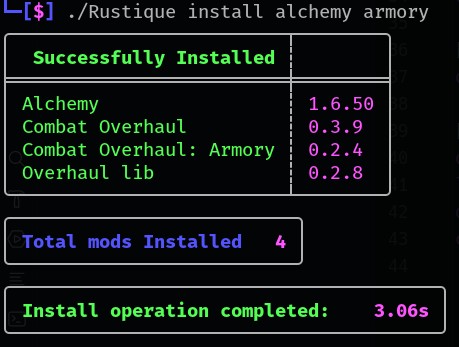
<h1 style="text-align: center;"><span style="color: #2880b9;" data-darkreader-inline-color=""><strong>Rustique</strong> </span></h1> <h4 style="text-align: center;"><span style="color: #2b3e50;" data-darkreader-inline-color="">The complete Mod Manager for Vintage Story!</span></h4> <h4 style="text-align: center;"><span style="color: #9b59b6; --darkreader-inline-color: var(--darkreader-text-9b59b6, #a467bc);" data-darkreader-inline-color="">For <span style="color: #2fcc71; --darkreader-inline-color: var(--darkreader-text-2fcc71, #47d582);" data-darkreader-inline-color="">Linux</span>, <a style="color: #9b59b6;" href="https://mods.vintagestory.at/rustiquewindows" data-darkreader-inline-color="">Windows</a> & <a href="https://github.com/Tekunogosu/Rustique/releases">Mac</a> <span style="color: #95a5a6; --darkreader-inline-color: var(--darkreader-text-95a5a6, #aaa398);" data-darkreader-inline-color="">(On Github!)</span></span></h4> <h6 style="text-align: center;"><em><span style="color: #27ae60; --darkreader-inline-color: var(--darkreader-text-27ae60, #5cda91);" data-darkreader-inline-color="">Written in Rust; fitting, right?</span></em></h6> <p> </p> <p><a title="Ko-fi" href="https://ko-fi.com/terratera"><img style="display: block; margin-left: auto; margin-right: auto;" src="https://storage.ko-fi.com/cdn/brandasset/v2/support_me_on_kofi_badge_blue.png" alt="Support me with Ko-fi" width="115" height="60"></a></p> <p>Hiya! </p> <p> </p> <p>I've created a new mod manager for Vintage Story as I felt there was a need for a fast AF solution that handles dependencies.</p> <p> </p> <h1>Platforms:</h1> <p> </p> <p><span style="color: #2fcc71;" data-darkreader-inline-color=""><em><strong> THIS VERSION IS FOR <span style="color: #9b59b6;" data-darkreader-inline-color="">LINUX</span></strong> <br></em></span></p> <p> </p> <p><strong>Windows Version: <a title="Rustique: Windows" href="https://mods.vintagestory.at/rustiquewindows"><span style="color: #2fcc71; --darkreader-inline-color: var(--darkreader-text-9b59b6, #a467bc);" data-darkreader-inline-color="">Windows</span></a></strong></p> <p> </p> <h3> </h3> <h2><span style="color: #2fcc71;" data-darkreader-inline-color=""><strong>MAC builds on GITHUB!</strong></span></h2> <p>I'm prob not going to make a new mod page for the mac builds, but they will always be updated at the same time as the linux build.</p> <p><a href="https://github.com/Tekunogosu/Rustique/releases">https://github.com/Tekunogosu/Rustique/releases</a></p> <p> </p> <h3>Mac Installations (Thank you EKDE for the instructions)</h3> <p> </p> <ol> <li>To compile Rustique on the Mac, install <a href="https://www.rust-lang.org/tools/install" target="_blank" rel="noopener">Rust</a> and <a href="https://git-scm.com/downloads/mac" target="_blank" rel="noopener">Git</a>.</li> <li>Clone the repo: git clone <a href="https://github.com/Tekunogosu/Rustique.git" target="_blank" rel="external nofollow noopener">https://github.com/Tekunogosu/Rustique.git</a>.</li> <li>cd into its folder then do cargo build --release.</li> <li>The executable will be placed in a subfolder and ready to use. Works great on my Mini M1 as of 0.3.0.</li> </ol> <p><br><br></p> <p><span style="color: #e74c3c;" data-darkreader-inline-color=""><strong>!!Caution!!: <span style="color: #e67e23;" data-darkreader-inline-color="">This is Alpha software. Back up your mods just in case and expect things to blow up on occasion. Expect extra verbosity and annoying messages. :3</span></strong> </span></p> <p> </p> <p><span style="--darkreader-inline-color: var(--darkreader-text-e74c3c, #e95849);"><strong><span style="color: #18bc9b; --darkreader-inline-color: var(--darkreader-text-18bc9b, #4ee8c9);" data-darkreader-inline-color="">~D</span><span style="color: #2fcc71; --darkreader-inline-color: var(--darkreader-text-2fcc71, #47d582);" data-darkreader-inline-color="">I</span><span style="color: #3598db; --darkreader-inline-color: var(--darkreader-text-3598db, #46a1de);" data-darkreader-inline-color="">S</span><span style="color: #2880b9; --darkreader-inline-color: var(--darkreader-text-2880b9, #54a5da);" data-darkreader-inline-color="">C</span><span style="color: #9b59b6; --darkreader-inline-color: var(--darkreader-text-9b59b6, #a467bc);" data-darkreader-inline-color="">O</span><span style="color: #8e44ad; --darkreader-inline-color: var(--darkreader-text-e74c3c, #e95849);" data-darkreader-inline-color="">R</span><span style="color: #e74c3c;" data-darkreader-inline-color="">D~</span></strong></span></p> <p><span style="--darkreader-inline-color: var(--darkreader-text-e74c3c, #e95849);"><span style="--darkreader-inline-color: var(--darkreader-text-e67e23, #e88a37);">I created a discord to make it easier to get in touch with me about bugs or suggestions you might have. This will also be the best place to get dev builds if you want to do some testing. These builds will be the ones between the versions released here on the mod site. <br></span></span></p> <p> </p> <p><a title="Rustique Discord" href="https://discord.gg/mXXVTgQgzs"><strong><span style="color: #9b59b6; --darkreader-inline-color: var(--darkreader-text-9b59b6, #a467bc);" data-darkreader-inline-color="">https://discord.gg/mXXVTgQgzs</span></strong></a><span style="color: #e74c3c; --darkreader-inline-color: var(--darkreader-text-e74c3c, #e95849);" data-darkreader-inline-color=""><strong><span style="color: #e67e23; --darkreader-inline-color: var(--darkreader-text-e67e23, #e88a37);" data-darkreader-inline-color=""><br></span></strong></span></p> <h3>How to use? (Linux + Mac)</h3> <p> </p> <ol> <li>Download the executable and place it wherever you want. This is a binary, <strong>NOT</strong> a mod. It will work regardless of where it's located. Feel free to rename it too so its easier to type if you want.</li> <li> Ensure it's executable <ul> <li><strong><span style="color: #e74c3c; --darkreader-inline-color: v
Ratings & reviews
Sign in to leave a rating or comment.



