
Temperature monitor
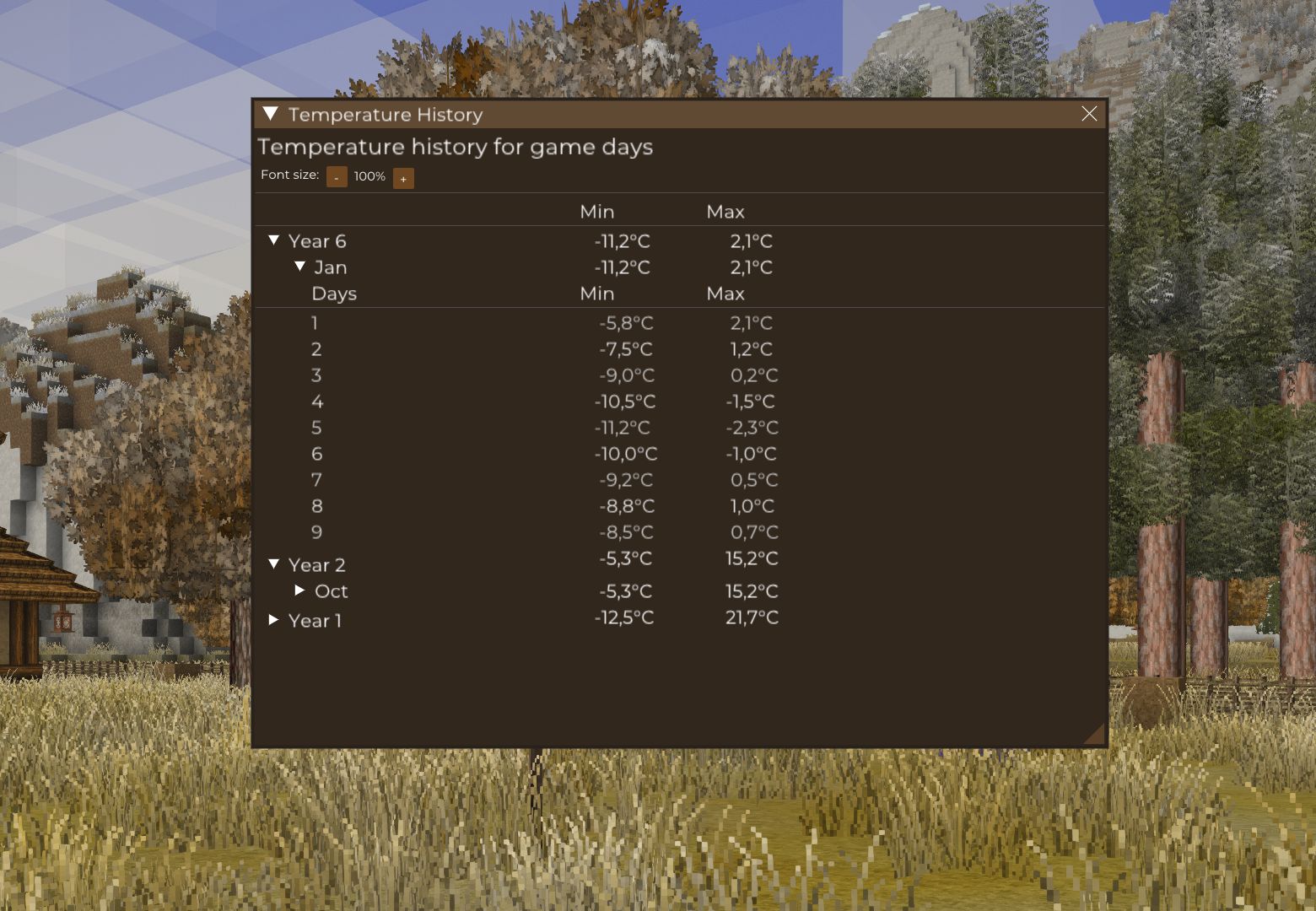
Automatically monitors and records minimum and maximum temperatures in the game world.
Description
<div> <h1 class="text-2xl font-bold mt-1 text-text-200">Temperature Monitor</h1> <h2 class="text-xl font-bold text-text-200 mt-1 -mb-0.5">Description</h2> <p class="whitespace-pre-wrap break-words">Temperature Monitor is a mod that automatically tracks minimum and maximum temperatures in the game world. Weather data is recorded for each game day and can be easily viewed using hotkeys.</p> <h2 class="text-xl font-bold text-text-200 mt-1 -mb-0.5">Features</h2> <ul class="[&:not(:last-child)_ul]:pb-1 [&:not(:last-child)_ol]:pb-1 list-disc space-y-1.5 pl-7"> <li class="whitespace-normal break-words"><strong>Automatic temperature monitoring</strong> - the mod records minimum and maximum temperatures for each game day</li> <li class="whitespace-normal break-words"><strong>Easy data access</strong> - view temperature history by pressing Alt+T</li> <li class="whitespace-normal break-words"><strong>Hierarchical interface</strong> - clear organization of data by years, months, and days</li> <li class="whitespace-normal break-words"><strong>Configurable measurement location</strong> - choose spawn point or custom coordinates</li> <li class="whitespace-normal break-words"><strong>Multi-language support</strong> - interface available in English and Polish</li> <li class="whitespace-normal break-words"><strong>Full multiplayer support</strong> - temperature data is synchronized between server and clients</li> </ul> <h2 class="text-xl font-bold text-text-200 mt-1 -mb-0.5">Requirements</h2> <ul class="[&:not(:last-child)_ul]:pb-1 [&:not(:last-child)_ol]:pb-1 list-disc space-y-1.5 pl-7"> <li class="whitespace-normal break-words"><a class="underline" href="https://mods.vintagestory.at/imgui">VSImGui</a> - required for the temperature history interface</li> </ul> <h2 class="text-xl font-bold text-text-200 mt-1 -mb-0.5">How to Use</h2> <h3 class="text-lg font-bold text-text-200 mt-1 -mb-1.5">Viewing Temperature Data</h3> <p class="whitespace-pre-wrap break-words">Press <strong>Alt+T</strong> to display temperature history. You'll see a list of all recorded days with their minimum and maximum temperatures.</p> <h3 class="text-lg font-bold text-text-200 mt-1 -mb-1.5">Changing Measurement Location</h3> <p class="whitespace-pre-wrap break-words">By default, the mod measures temperature at the world's spawn point. You can change this with chat commands:</p> <ul class="[&:not(:last-child)_ul]:pb-1 [&:not(:last-child)_ol]:pb-1 list-disc space-y-1.5 pl-7"> <li class="whitespace-normal break-words"><code class="bg-text-200/5 border border-0.5 border-border-300 text-danger-000 whitespace-pre-wrap rounded-[0.3rem] px-1 py-px text-[0.9rem]">/tempsensor</code> - shows the current sensor location</li> <li class="whitespace-normal break-words"><code class="bg-text-200/5 border border-0.5 border-border-300 text-danger-000 whitespace-pre-wrap rounded-[0.3rem] px-1 py-px text-[0.9rem]">/tempsensor setspawn</code> - sets the sensor to measure at the world spawn point</li> <li class="whitespace-normal break-words"><code class="bg-text-200/5 border border-0.5 border-border-300 text-danger-000 whitespace-pre-wrap rounded-[0.3rem] px-1 py-px text-[0.9rem]">/tempsensor setcurrlocation</code> - sets the sensor to measure at your current location</li> </ul> <h2 class="text-xl font-bold text-text-200 mt-1 -mb-0.5">Why Use This Mod?</h2> <ul class="[&:not(:last-child)_ul]:pb-1 [&:not(:last-child)_ol]:pb-1 list-disc space-y-1.5 pl-7"> <li class="whitespace-normal break-words"><strong>Long-term Climate Analysis</strong> - track temperature patterns to understand your game world's climate</li> <li class="whitespace-normal break-words"><strong>Farming Planning</strong> - identify the best locations and seasons for specific crops</li> <li class="whitespace-normal break-words"><strong>Building Decisions</strong> - choose the right materials and designs based on local climate conditions</li> <li class="whitespace-normal break-words"><strong>Weather Monitoring</strong> - keep track of extreme temperature events</li> </ul> </div>
Download
No download link is available for this entry right now.
Ratings & reviews
Sign in to leave a rating or comment.



