
Wayfinder
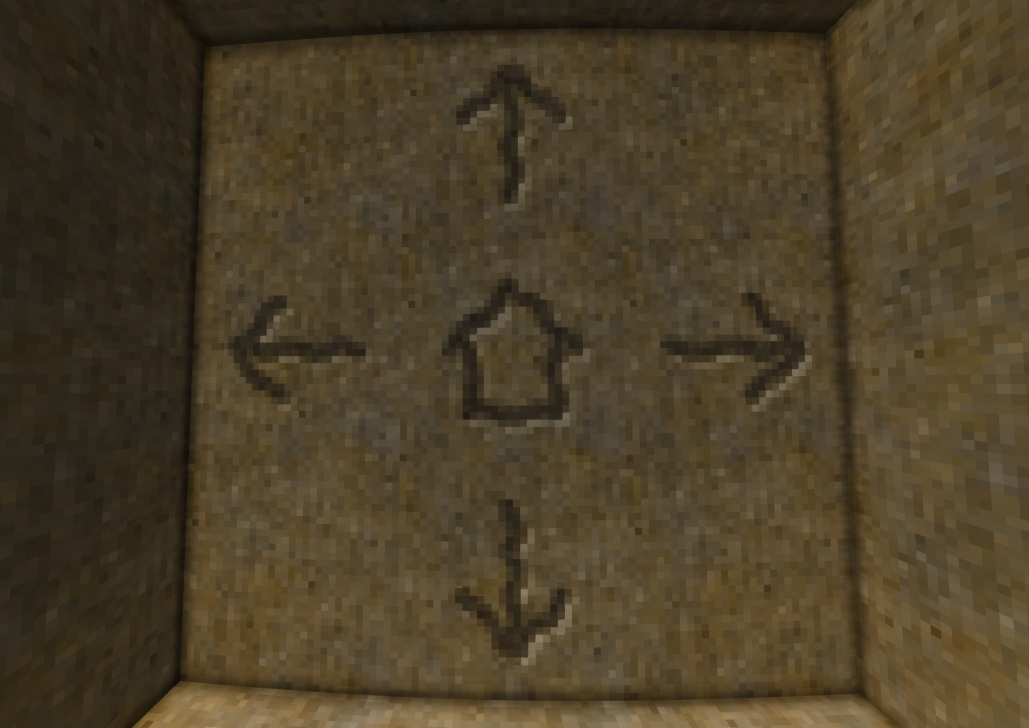
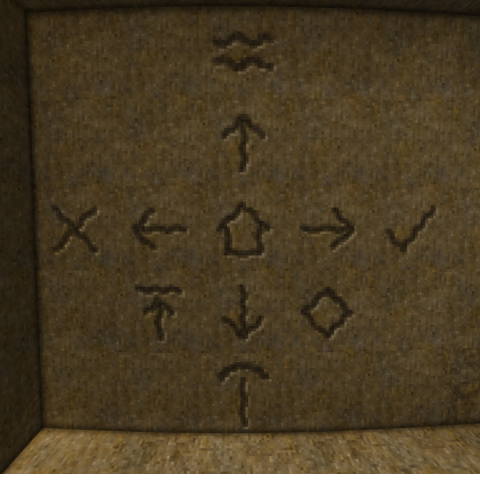
Make cave wall markings to help you navigate the caverns below. Visible icon of selected symbol.
Description
<table style="width: 624px; border-spacing: 0px;" cellpadding="5"><tbody><tr valign="top"><td style="background-color: #2b5f2b; width: 149px;"><p><span style="color: #ffffff;"><span style="font-family: Arial, serif;"><span style="font-size: small;"><strong>Mod ID</strong></span></span></span></p> </td> <td style="width: 453px;"> <p><span style="font-family: Arial, serif;"><span style="font-size: small;">wayfinder</span></span></p> </td> </tr> <tr valign="top"> <td style="background-color: #2b5f2b; width: 149px;"> <p><span style="color: #ffffff;"><span style="font-family: Arial, serif;"><span style="font-size: small;"><strong>Version</strong></span></span></span></p> </td> <td style="width: 453px;"> <p><span style="font-family: Arial, serif;"><span style="font-size: small;">1.0.0</span></span></p> </td> </tr> <tr valign="top"> <td style="background-color: #2b5f2b; width: 149px;"> <p><span style="color: #ffffff;"><span style="font-family: Arial, serif;"><span style="font-size: small;"><strong>Side</strong></span></span></span></p> </td> <td style="width: 453px;"> <p><span style="font-family: Arial, serif;"><span style="font-size: small;">Client + Server (required on both)</span></span></p> </td> </tr> <tr valign="top"> <td style="background-color: #2b5f2b; width: 149px;"> <p><span style="color: #ffffff;"><span style="font-family: Arial, serif;"><span style="font-size: small;"><strong>Hotkeys</strong></span></span></span></p> </td> <td style="width: 453px;"> <p><span style="font-family: Arial, serif;"><span style="font-size: small;">Ctrl+U — Cycle mark type | Sneak+Right-Click — Place mark.</span></span></p> </td> </tr> </tbody> </table> <p><span style="color: #2b5f2b;"><span style="font-family: Arial, serif;"><span style="font-size: medium;"><strong>Description</strong></span></span></span></p> <p><span style="font-family: Arial, serif;"><span style="font-size: small;">Wayfinder lets you 'carve' navigation marks directly into rock surfaces using a chisel. There are seven mark types: four directional arrows (up, down, left, right), an explored marker, a danger warning, and a resource indicator. These flat marks attach to vertical wall faces and help you navigate complex cave systems without getting lost. </span></span></p> <p> </p> <p><strong><span style="font-family: arial, helvetica, sans-serif;">Wayfinder 1.5.0</span></strong></p> <ul> <li><strong><span style="font-family: arial, helvetica, sans-serif;">New: carve marks without a chisel. Sneak+Right-Click rock with flint, chert, obsidian or any antler to carve the selected mark, so you can leave marks before the copper age. Ctrl+U cycling and the selected-mark icon work with these too.</span></strong><br><strong><span style="font-family: arial, helvetica, sans-serif;">- Flint, chert and obsidian mark walls and ceilings only, so knapping and placing loose stones on the ground still work as before.</span></strong><br><strong><span style="font-family: arial, helvetica, sans-serif;">- Antlers and horns can mark floors as well, just like chisels.</span></strong></li> </ul> <p> </p> <p><span style="color: #2b5f2b;"><span style="font-family: Arial, serif;"><span style="font-size: medium;"><strong>Crafting</strong></span></span></span></p> <p><span style="font-family: Arial, serif;"><span style="font-size: small;">No crafting required. You only need a chisel (no hammer needed — in fact, having a hammer in your off-hand will use normal chiseling instead).</span></span></p> <p><span style="color: #2b5f2b;"><span style="font-family: Arial, serif;"><span style="font-size: medium;"><strong>How to Use</strong></span></span></span></p> <p><span style="font-family: Arial, serif;"><span style="font-size: small;"><strong>1. </strong></span></span><span style="font-family: Arial, serif;"><span style="font-size: small;">Equip a chisel in your main hand. Do NOT put a hammer in your off-hand.</span></span></p> <p><span style="font-family: Arial, serif;"><span style="font-size: small;"><strong>2. </strong></span></span><span style="font-family: Arial, serif;"><span style="font-size: small;">Look at any rock, stone, or ore wall surface.</span></span></p> <p><span style="font-family: Arial, serif;"><span style="font-size: small;"><strong>3. </strong></span></span><span style="font-family: Arial, serif;"><span style="font-size: small;">Sneak + Right-Click to place a mark on the surface.</span></span></p> <p><span style="font-family: Arial, serif;"><span style="font-size: small;"><strong>4. </strong></span></span><span style="font-family: Arial, serif;"><span style="font-size: small;">Press Ctrl+U to cycle through mark types: Arrow Up, Arrow Down, Arrow Left, Arrow Right, Explored, Danger, Resources, Translocator.</span></span></p> <p><span style="font-family: Arial, serif;"><span style="font-size: small;"><strong>5. </strong></span></span><span style="font-family: Arial, serif;"><span style="font-size: small;">The current mark type is shown in chat when you cycle.</span></span></p> <p><span style="font-family: Arial, serif;"><span style="font-size: small;"><strong>6. </strong></span></span><span style="font-family: Arial, serif;"><span style="font-size: small;">Marks can be broken by punching them.</span></span></p> <p><span style="color: #2b5f2b;"><span style="font-family: Arial, serif;"><span style="font-size: medium;"><strong>Notes</strong></span></span></span></p> <p><span style="font-family: Arial, serif;"><span style="font-size: small;">If you have a hammer in your off-hand, the chisel will behave normally (for block chiseling) instead of placing marks. This is intentional so the two systems don’t conflict.</span></span></p>
Download
No download link is available for this entry right now.
Ratings & reviews
Sign in to leave a rating or comment.



