
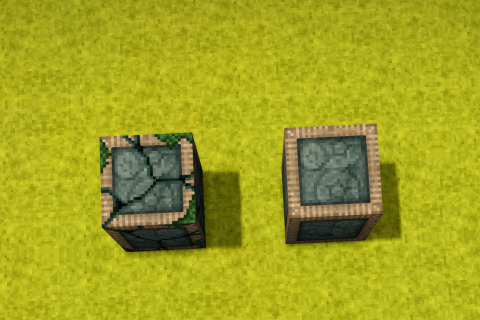
Weak Teleporter
Add the weak teleporter that only teleports players and disallows certain items in inventory.
Description
<p>This is a mod I made for a server. It's useful for multiplayer (or a map scenario/dungeon run, perhaps) where there are many towns so far apart that players can teleport to a certain town without making the other means of transportation (e.g., by boats, elk, or foot) obsolete.</p> <ul> <li>The weak teleporter will only allow players to be teleported (unlike the vanilla teleporter, which allows all entities). Like the vanilla teleporter, you can select the destination in creative mode + right-click the block. So, 1-way or 2-way teleporting is highly configurable.</li> <li>It also checks the player's inventory for banned items similar to the portal in the game Valheim (configurable in AppData\Roaming\VintagestoryData\ModConfig). So players still have to rely on long-distance travel options such as boats, elks to open trade routes between distant towns.</li> <li>By default, the "weak teleporter" and the "tuning fork" are not craftable. However, you can change "isCraftable" to true in the ModConfig to enable crafting them.</li> <li>The "Tuning Fork" is an item that can be used in Survival Mode to configure the "Weak Teleporter" and SHIFT + RIGHTCLICK any placed "Weak Teleporter" to drop it as an item on the ground.</li> <li>To protect your "Weak Teleporter" in multiplayer from being reconfigured, make sure that you claim the area!!!</li> </ul> <pre> </pre> <p><strong><span style="text-decoration: underline;">Other Mods Compatibility:</span></strong><br />* Carry On Mod: Players that have a carried-on block (chest, reed chest, .etc) with them will not be able to be teleported with the Weak Teleporter </p> <p> </p> <p>This mod features an extensive way to ban items in the ModConfig. Check the guide below.</p> <details style="border: 1px solid #ddd; border-radius: 8px; margin: 10px 0; overflow: hidden; box-shadow: 0 2px 8px rgba(0,0,0,0.1);"> <summary style="background-color: white; color: #2c3e50; padding: 12px 16px; font-weight: bold; font-size: 1.1em; cursor: pointer; outline: none; border-bottom: 1px solid #eee;">Guide On Configuration</summary> <div style="padding: 16px; background-color: white; border-top: 1px solid #eee;"> <h3 style="color: #2d3748; margin-top: 16px;">There are 3 main ways you can ban an item</h3> <h4 style="color: #2d3748; margin-top: 16px;">1. Ban a specific item</h4> <p style="color: #4a5568; line-height: 1.6;">You can write an item code in string format, such as "flaxtwine" like this:</p> <pre style="background-color: #1a365d; color: #e2e8f0; padding: 12px; border-radius: 4px; overflow-x: auto; margin: 8px 0; border-left: 4px solid #4299e1;"><code><span style="color: #e2e8f0;"> "BannedItemCodes": [ "flaxtwine" ],</span></code></pre> <p style="color: #4a5568; line-height: 1.6;">You can search for item codes in this wiki: <a href="https://wiki.vintagestory.at/Special:MyLanguage/Item_codes">https://wiki.vintagestory.at/Special:MyLanguage/Item_codes</a><br />Or you can turn on Developer Mode and see the item codes in-game: Settings -> Interfaces -> Developer Mode</p> <h4 style="color: #2d3748; margin-top: 16px;">2. Ban a group of items using wildcard</h4> <p style="color: #4a5568; line-height: 1.6;">Notice that in the vanilla version, item codes (like above) are written with an organized prefix (or suffix). For example :</p> <ul style="color: #4a5568; line-height: 1.6;"> <li>fish-raw</li> <li>fish-cooked</li> <li>fish-cured</li> </ul> <p style="color: #4a5568; line-height: 1.6;">Therefore, you can use wildcards to ban anything starting with fish:</p> <pre style="background-color: #1a365d; color: #e2e8f0; padding: 12px; border-radius: 4px; overflow-x: auto; margin: 8px 0; border-left: 4px solid #4299e1;"><code><span style="color: #e2e8f0;"> "BannedItemWildcards": [ "fish-*", ],</span></code></pre> <p style="color: #4a5568; line-height: 1.6;">ending with fish:</p> <pre style="background-color: #1a365d; color: #e2e8f0; padding: 12px; border-radius: 4px; overflow-x: auto; margin: 8px 0; border-left: 4px solid #4299e1;"><code><span style="color: #e2e8f0;"> "BannedItemWildcards": [ "*fish", ],</span></code></pre> <p style="color: #4a5568; line-height: 1.6;">or has a "fish" string somewhere in the middle of the item codes:</p> <pre style="background-color: #1a365d; color: #e2e8f0; padding: 12px; border-radius: 4px; overflow-x: auto; margin: 8px 0; border-left: 4px solid #4299e1;"><code><span style="color: #e2e8f0;"> "BannedItemWildcards": [ "*fish*", ],</span></code></pre> <p style="color: #4a5568; line-height: 1.6;">The last example above, "*fish*", should normally be avoided, because you are banning everything that has the word "fish" but might not be related, e.g., "fish-trap", "clothing-fisherman", "fishscale".</p> <h4 style="color: #2d3748; margin-top: 16px;">3. Lastly, you can ban a certain class of the items</h4> <p style="color: #4a5568; line-height: 1.6;">I imagine that not ALL modders follow the convention of item code naming as in vanilla, so if you have a bunch of mods installed and are not sure about the item codes of those installed mods, you have a last powerful option, which is banning the class of items. All items in Vintage Story are inherited from a certain class of code. For example, a poultice has its code written like this:</p> <pre style="background-color: #1a365d; color: #e2e8f0; padding: 12px; border-radius: 4px; overflow-x: auto; margin: 8px 0; border-left: 4px solid #4299e1;"><code><span style="color: #e2e8f0;"> public class ItemPoultice : Item, ICanHealCreature </span></code></pre> <p style="color: #4a5568; line-height: 1.6;">Let's say a modder makes a mod that increases the healing effect of poultice or adds many other different types of poultice, chances are they will use "ItemPoultice" class or "ICanHealCreature" class. Therefore, you can ban all poultices using:</p> <pre style="background-color: #1a365d; color: #e2e8f0; padding: 12px; border-radius: 4px; overflow-x: auto; margi
Ratings & reviews
Sign in to leave a rating or comment.



