

Set CUSTOM Stack Size, Slots, Weight and much more
 By Gabriel89GR
Set stack size to ANY VALUE (blocks, food, seeds, items), set ANY number of slots, and much more! Compitable with ANY VERSION!
Description
NOTE: IF YOU CHANGE THE SLOTS, THEN YOU NEED TO PICK UP AND PLACE AGAIN EVERY ITEM WHICH HAS SLOTS, IN ORDER TO SEE THE NEW SLOTS IN YOUR GAME. IF YOU GET AN ERROR FROM YOUR SERVER AFTER YOU APPLY SETTINGS, BEFORE TRYING TO APPLY SETTINGS AGAIN, VERIFY YOUR FILES WITH STEAM FIRST.
COMPITABLE WITH ANY VERSION!
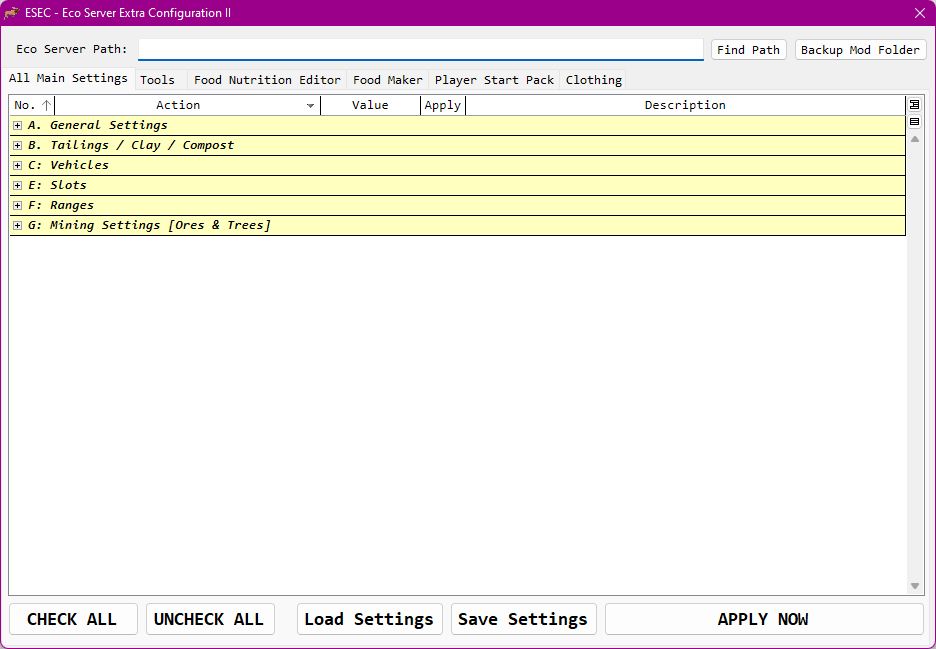
This is an excecutable file you can use to auto set the followings:
- The Stack Size for Blocks - YOU CAN SET STACK SIZE TO 5000 OR 500000, OR EVEN MORE
- The Stack Size for Food and Items - YOU CAN SET STACK SIZE TO 5000 OR 500000, OR EVEN MORE
- The Maximum Weight for Backpacks - WHAT ABOUT 800.000KG FOR A BACKPACK? YOU CAN DO IT!
- The Maximum Weight for Carts and Trucks - WHAT ABOUT 900.000KG FOR VECHICLES?
- The Storage Range of every Vehicle - SICK OF HAVING NO ACCESS TO A STORAGES BECAUSE THEY ARE WAY TOO FAR? LET'S JUST FIX THAT!
- The ability to change the DURABILITY OF ALL TOOLS! Increase/Decrease the durability as you want and find the perfect balance for you.
- The number of slots (Small Wood Cart, Wood Cart, Powered Cart, Steam Truck, Truck and Storage Boxes) - DO YOU WANT 100 SLOTS FOR A SMALL WOOD CART? 1000 SLOTS? WHY NOT?!
- Disable/Enable the restriction to store Blocks (Dirt, Roads, Ores, etc) into Storage Boxes. - HAVE YOU EVER THINK HOW NICE WOULD BE IF YOU COULD STORE YOUR IRON IN JUST A STORAGE BOX? YES, NOW YOU CAN DO THIS!
- Set Grow Rate - PLAY GOD AND MAKE YOUR PLANTS GROW IN 0,3 HOURS OR EVEN LESS!
- Disable/Enable the Height Limit of stockpiles and trucks.
- Disable/Enable Tailing Production from Crafting Stations
- Set Air Pollution rate produced from Vechicles and Crafting Stations
- The Maximum Weight and slots for Skid Steer - WHAT ABOUT 900.000KG FOR A SKID STEER?
- The Maximum Weight and slots Excavator - WHAT ABOUT 900.000KG FOR AN EXCAVATOR?
- Set the Default Stockpile Slots
- Set Slots for any type of Stockpile independently - DO YOU WANT 100 SLOTS FOR A TINY STOCKPILE OR 1000 SLOTS FOR A LARGE LUMBER STOCKPILE? EVERYTHING'S UP TO YOU!
- Set Slots for any type of SILO independently - DO YOU WANT 100 SLOTS FOR A STORAGE SILO OR 1000 SLOTS FOR POWERED STORAGE SILO? EVERYTHING'S UP TO YOU!
- Set the range of Stockpiles and Storage Boxes - SICK OF HAVING NO ACCESS TO A STORAGE BOX BECAUSE IS WAY TOO FAR? LET'S JUST FIX THAT!
- The Range of Crafting Stations - SICK OF HAVING NO ACCESS TO A STORAGES BECAUSE THEY ARE WAY TOO FAR? LET'S JUST FIX THAT!
- Edit the Nutrition of EVERY Food - WHAT ABOUT AN EXTENDED VITAMIN SALAD?
- Create your own Food - WHAT ABOUT AN IRON PIE OR A CHARRED AXE OR EVEN AN GAS ENERY DRINK? ENYTHING YOU CAN THINK, YOU CAN MAKE IT!
- Disable/Enable BREAKING ROCKS WITH ONE CLICK.
- Disable/Enable ALWAYS BREAKING ROCKS INTO FOUR (4) CHUNKS.
- Disable/Enable the BIG SHOVEL. By this, you will be able to interact with dirt/sand using interaction button (usually E), while you're holding a shovel. This way, you can get as much dirt/sand as your stack size is. TIP: HOLDING THE INTERACTION BUTTON (USUALLY E), YOU CAN DIG CONTINUOUSLY.
Disclaimer: The Big Shovel ability of this app has nothing to do with the Mod "Big Shovel", and in cannot replace it in any case.
- The Player Start Pack. - MORE CLAIM PAPERS FOR NEW PLAYERS? SOME BLOCKS TO START BUILDING? A CART MAYBE? SOME SKILL SCROLLS? YOU CAN DO ANYTHING!
- Auto DESTROY TREE STUMPS.
- Auto DESTROY DEBRIS.
- PICKUP ENTIRE TREE without slice it in smaller pieces.
- Customize CLOTHES SKILLS.
- Make the MILK RECIPE CRAFTABLE.
- Five new block recipies to make (DRY TAILINGS, DRY TAILINGS NEUTRALIZER, WET TAILINGS, WET TAILINGS NEUTRALIZER, COMPOST)
- Ability to change PLANTS DEATH RATE and PLANTS SPREAD RATE
I developed this tool, in order to change the settings of my own private ECO Server. It worked so good for me, so I decided to share it with you. I hope you like it. If you have any ideas or you want to add more options, please let me know.
This tool is totally free. If you want to support my work, click the button below
[Paypal Donation]
HOW TO USE THE APP
STEP 1: BACKUP THE ENTIRE "MOD" FOLDER from "Steam\steamapps\common\Eco Server", just in case you want to restore the default values.
STEP 2: Type or copy-paste the path of Eco Server (example: C:\Program Files\Steam\steamapps\common\Eco Server\Mods). For local games, use the path [...]/steam/steamapps/common/Eco/Eco_Data/Server/Mods.
STEP 3: Fill the fields with the values you want to set. The the default values you'll see are those I set for my private server. YOU CAN SET STACK SIZE TO 5000 OR 500000, OR EVEN MORE! Everything's up to you! ;)
STEP 4: Check which settings will be changed.
STEP 5: Press the "Apply Now" Button
STEP 6: Wait for the "All Done" message.
STEP 7: Restart your Server and enjoy! :)
NOTE: AFTER ANY ECO UPDATE, IT'S GOOD TO RE-RUN THE APP JUST IN CASE
FOR RENTED SERVERS
- Install Eco Server on your local PC through Steam Tools.
- Run the "Eco Server.exe" and wait for the very first initialization.
- Close the "Eco Server.exe"
- Run the "Eco Server Extra Configuration.exe" and make the changes you want, following the steps 1-6 of the above "How to Use".
- BACKUP THE ENTIRE "MOD" FOLDER of the Rented Server.
- Navigate to Eco Server Path of your local PC (example: C:\Program Files\Steam\steamapps\common\Eco Server\Mods).
- Copy-Paste the entire "User Code" Folder to your rented server.
- Do not forget to enjoy! :)
NOTE: IF YOU CHANGE THE SLOTS, THEN YOU NEED TO BE PICKED UP AND PLACE AGAIN EVERY ITEM WHICH HAS SLOTS, IN ORDER TO SEE THE NEW SLOTS IN YOUR GAME.
HOW TO USE FOOD NUTRITION EDITOR
- Press the button "Load Food Nutrition"
- Change that Carbs, Fat, Protein, Vitamins and Calories to your needs.
- Press "Save Food Nutrition"
- Restart your Server/Game.
Never forget to backup your Mod Folder in case you want to restore the default values.
Ratings & reviews
Sign in to leave a rating or comment.


