
Description
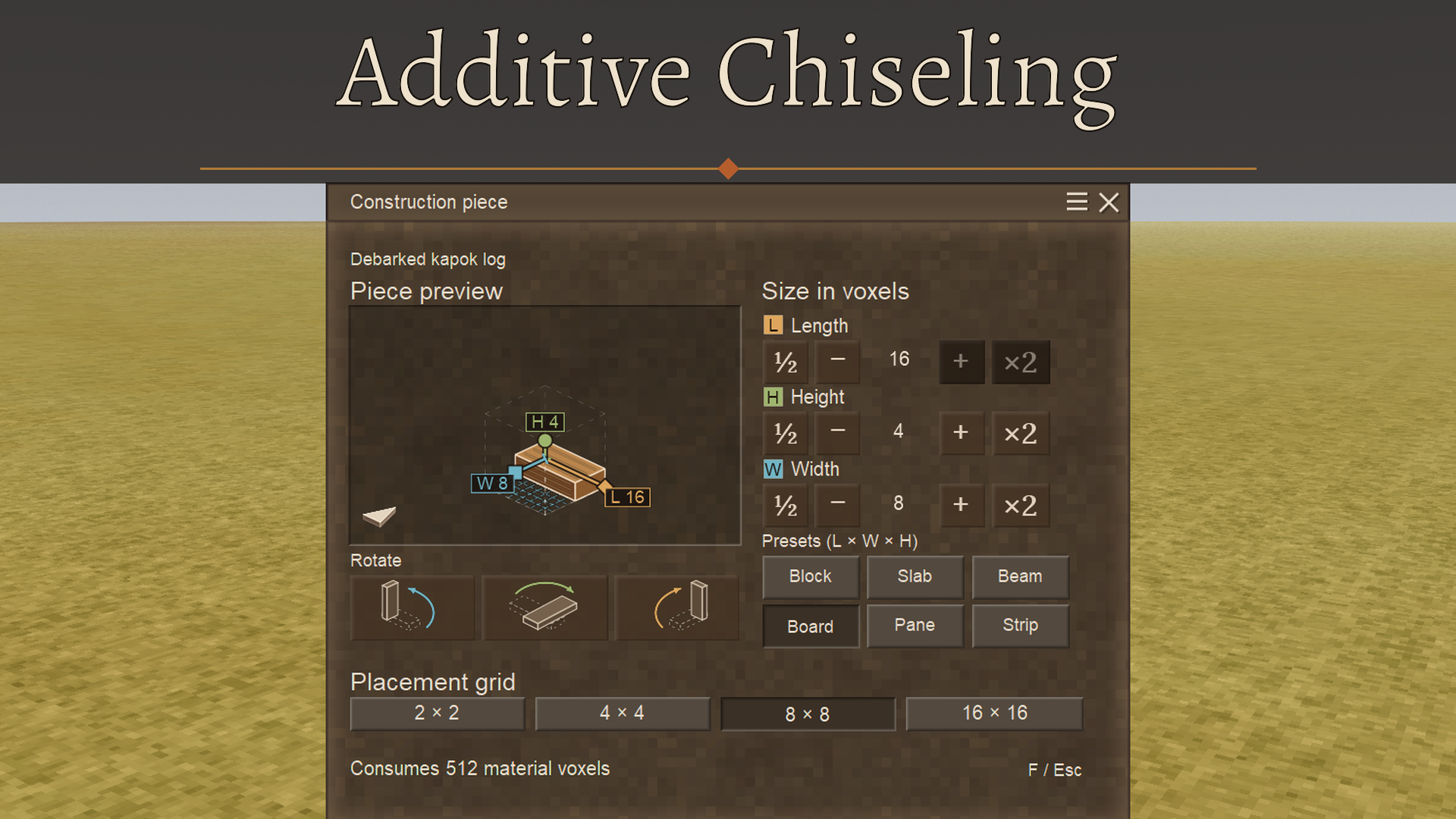
<h2>Description</h2> <p>The chisel mechanic is powerful, but in my opinion, it doesn't live up to its full potential. I believe that's because chiseling is kinda inconvenient, and that's what this mod tackles: it adds a whole new way of building with chiseled blocks: building with pieces. It's additive instead of subtractive. With any hammer in the offhand and a voxel in the main hand, you select a shape via a fully custom tool menu, and then place it with right-click. You can remove the whole piece with left-click. Just like placing and removing blocks, but for custom-shaped pieces. The cool part: the placement doesn't need to respect block boundaries. They are merely a suggestion. Any block the piece falls on is automatically transformed into a chiseled block, you can just focus on building. Of course, a chiseled block cannot exist in the same space as a regular block, so that's one limitation.</p> <h2><img src="https://i.imgur.com/erIPVgj.gif" alt="" width="480" height="272"></h2> <p><img src="https://i.imgur.com/4xUs5EF.gif" alt="" width="480" height="272"></p> <h2>The voxel economy</h2> <p>This mod fundamentally changes chiseling, even the vanilla kind. In vanilla, if a chiseled block uses a material, no matter how much or how little, it always consumes a whole block of that material. In this mod I add voxel items, each one representing one voxel in a block. 1 block = 4096 voxels. To make voxels it's simple: any hammer+block on the crafting grid makes voxels of that material, and you can transform these voxels back into blocks free of charge(if there's enough voxels of course). There's no loss, by design. The hammer doesn't even consume durability. Then when placing pieces, you'll use exactly the amount of voxels that piece needs. <br>This is implemented for vanilla chiseling too: taking out voxels will refund voxels, placing them will use voxels. There are some non-block items that can be transformed into voxels, like ingots and linen. <br>There's also a new bag, the voxel bag, built from a sack + any voxel. It's used to, you guessed it, store voxels. Has 12 spaces.<br>The QP chisel mod is supported! All the custom tools from that mod will use voxels with this mod installed.</p> <h2>The piece menu</h2> <p>With an offhand hammer and any voxel in the main hand, pressing F will bring up the piece menu. In it you can set the size of the piece you want to place, either manually or via handy gizmos, and also rotate the piece. The arrow on the bottom left represents your POV, so you know how to rotate the piece. The grid size will set the granularity of placement, similar to the vanilla chisel size modes. There are also a couple of shortcuts for common shapes. I have a feature in development to copy and place custom shapes, complete with a piece library and sharing, so stay tuned!</p> <p><img src="https://i.imgur.com/IjDgqYC.png" alt="" width="640" height="490"></p> <h2>The wooden mallet</h2> <p>I've added a new type of hammer, it server two purposes:<br>- Allows voxel construction before the copper age<br>- Takes out the early-game "I can't break my hammer" anxiety from building<br>Of course, you wont be able to use it to forge. It's wood. Craft it with a stick+log.</p> <h2>The preview outline</h2> <p>The placement outline colors can tell you things:<br>- green: can place<br>- yellow: could place, but intersects something, can override<br>- red: can't place<br>- red, dotted: Not enough voxels<br>- blue: nudge mode</p> <p>When the outline is yellow, you can hold Ctrl to override the intersection and place anyway. This will place a custom piece that perfectly fills the empty space. This is super handy because it means you don't always need to go change the shape size when you need to fill an odd-shaped space.</p> <h2>The nudge mode</h2> <p>Sometimes it is just impossible to get the piece outline exactly where you want to place it. Inspired by Satisfactory, I added a nudge mode, Ctrl+E by default(rebindable). <br>When activated, the outline will freeze in place and you can move it using arrow keys(forward/backward, left/right) and pgUp/pgDown(up/down). Holding shift will switch it to rotation mode, where the same keys will rotate it in place instead(tip: shift+those keys will also rotate outside nudge mode). When you're happy, pressing Enter will place the piece. PS: the movement increments depend on the selected grid size.</p> <p> </p> <div class="tab-container"> <div class="tab-content description"> <h3>Safe to add/remove to ongoing saves?</h3> <p>Yes!</p> <p> </p> <h3>Mod compatibility</h3> <p>The big one, QP chisel tools, is patched already. Other chiseling mods will need patching too so they use the new voxel system. I'll add those on-demand</p> <h3>You may also like my other chiseling mods!</h3> <p>All my other mods were made while this one was in development, meaning they all were made to improve the experience with this mod. I highly encourage using them!</p> <p> </p> <p><a href="https://mods.vintagestory.at/densegroundstorage"><strong>Dense ground storage</strong></a>: Allows placement of small things, like pots and bowls, inside chiseled blocks.</p> <p><a href="https://mods.vintagestory.at/chiseledgroundplacement"><strong>Chiseled Ground Placement</strong></a>: Allows placement of big items that take an entire block on chiseled blocks, like firepits, chests, beds, etc<br><a href="https://mods.vintagestory.at/chiseledwallmounting"><strong>Chiseled Wall Mounting</strong></a>: Allows placing wall-mounted things on chiseled blocks<br><a href="https://mods.vintagestory.at/betterinsulation"><strong>Better insulation</strong></a>: Improves the logic for determining if a chiseled block is insulating, so chiseled windows become possible</p></div></div>
Ratings & reviews
Sign in to leave a rating or comment.



