
Feral Kinship: Companions
Gives tamed animals personalities, backpacks, duties, talents, breeding, and expeditions.
Description
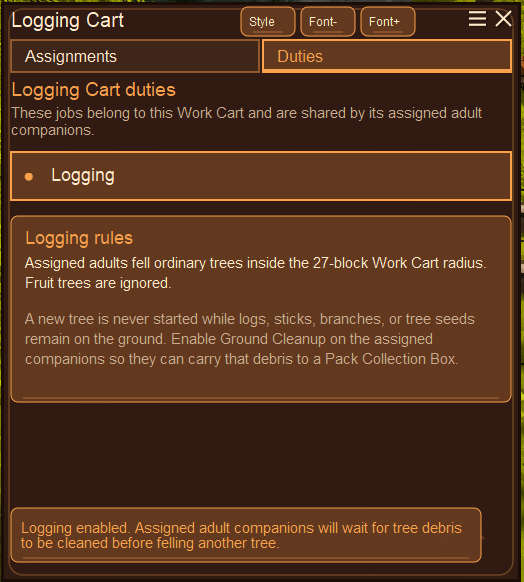
<h1>Feral Kinship: Companions</h1> <p>Gives your tamed animals personalities, conversations, jobs, talents, and expeditions. They can help around camp, travel with you, and occasionally stand nearby judging your decisions.</p> <h2>Living with a pack</h2> <p>Companions have 16 personalities, changing moods, relationships, and over 8,000 authored dialogue lines. Empty-hand right-click an owned companion to open its journal; use the whistle for nearby pack commands.</p> <p>While following a stationary player, they can wander a little, look around, walk over and sit watching you, or get close and lie down for a while. Occasionally they pace between two points. Moving on or giving them something more important to do interrupts the idle behavior.</p> <h2>Requests, levels, and talents</h2> <p>Check in for requests based on the animal and its surroundings. Completed requests give Companion Points and shared Pack Points. Duties, expeditions, growing up, and helping defeat hostiles also earn experience. Individual talents cover combat, survival and mobility, and social and economy; the pack board supplies shared upgrades.</p> <h2>Food, work, and storage</h2> <p>Companions eat suitable food from Dining Boards or by hand. Hunger is non-lethal, but an empty food meter stops ordinary activities until they have eaten or recovered. Dining Board consumption pauses while the owner is offline. The food system can be disabled.</p> <p>Adults assigned duties work while At Ease. They can gather dropped items, rocks, plants, ripe crops, berries, fruit, mushrooms, and other enabled resources. Logging Carts coordinate tree cutting. Commands, danger, injuries, rest, and expeditions take priority.</p> <p>Use the Pack Ledger to assign storage categories, or Advanced Mode for exact-item rules. Companions deliver to compatible containers and can sort misplaced cargo. Adult companions visibly carry duty cargo in their mouths.</p> <p>Companions do not automatically pick up animal corpses, including through the Pack Cart’s take-with-companions control. Butcherable bodies and storage rules were not a useful combination.</p> <h2>Backpacks and deliveries</h2> <p>Adult companions can equip one vanilla or compatible modded bag. Crouch-right-click the companion to open its backpack: the bag slot and its contents are shown together. Capacity and item restrictions come from the bag you equip.</p> <p>You manage the backpack contents yourself. Use <strong>Go home and unload</strong> to send the companion back to unload, or <strong>Go home, unload and come back</strong> to have it come back afterwards. Deliveries go to General storage at the Pack Cart. Anything that does not fit stays in the bag. Homeward Bound reduces return time by 15% per rank, up to three ranks.</p> <p>The pack roster shows the equipped bag, used slots, and delivery status, so you can keep track of companions sent home with supplies.</p> <h2>Commands, combat, and rescue</h2> <p>Choose activity, follow distance, rest, home behavior, risk tolerance, and Passive, Defensive, Protective, Assist, Aggressive, or Flee combat styles. Companions do not attack players or other owned companions.</p> <p>A lethal hit normally leaves a companion mortally wounded. Hold Ctrl and use a compatible healing item during the rescue window. Talents can improve recovery and survival.</p> <h2>Expeditions</h2> <p>The Pack Cart manages expedition parties, routes, preparations, reports, cargo, and missing companions. Routes include foraging, hunting, scavenging, patrols, recruitment, and more dangerous trips. Parties can return with supplies, injuries, recruits, or missing members. Search expeditions can look for those left behind. Two parties can operate at once by default; Many Trails adds more slots.</p> <h2>Breeding and young companions</h2> <p>Breeding is opt-in for supported foxes, hares, hyenas, wolves, goats, pigs, sheep, and compatible dogs, cats, and Fox Taming foxes. Adults need breeding enabled, At Ease, and beds in a suitable shared room. Pregnancy attempts require the owner online; a due birth waits for the owner to return.</p> <p>Young animals retain their source appearance and juvenile behavior, with safe requests, basic commands, and persistent identities. Talent progress is banked until adulthood.</p> <h2>Bramble and in-game help</h2> <p>Bramble is an optional animal guide who helps with taming and looking after the pack. Choose a supported animal form and set hints to Quiet, Occasional, or Frequent. The question-mark buttons and Handbook also explain the companion screens.</p> <h2>Interface and recovery</h2> <p>Journals cover the pack, duties, storage, backpacks, talents, breeding, expeditions, and help. Four themes and adjustable text settings are saved per player.</p> <p>For a missing animal still in the Pack Ledger, use the creative/admin Companion Recovery Ledger first. It can restore a companion from its saved record. The confirmed NUCLEAR option replaces the stored world entity and drops carried cargo; it is a fallback, not the normal recovery button.</p> <h2>Settings</h2> <p>In <code>ModConfig/FeralKinshipCompanions.json</code>:</p> <ul> <li><code>EnableCompanionFoodSystem = true</code>: enables companion hunger.</li> <li><code>AllowCompanionDoorUse = false</code>: enable to let companions open permitted doors and close them after passing.</li> <li><code>EnableBramble = true</code>: enables the guide.</li> <li><code>StfuMode = false</code>: enable to turn off companion dialogue.</li> </ul> <p>Custom name pools are in <code>ModConfig/FeralKinshipCompanionNames.cfg</code>. Per-player themes and text settings are saved in <code>ModConfig/feralkinshipcompanions-ui.json</code>.</p> <h2>Requirements and compatibility</h2> <p>Requires <a href="https://mods.vintagestory.at/animalkinship">Feral Kinship</a> 0.4.3 or later and <a href="https://mods.vintagestory.at/petai">PetAI</a> through Feral Kinship.</p> <p>Supports the base Feral Kinship animals, with optional supp
Ratings & reviews
Sign in to leave a rating or comment.



