







About Auto Map Markers
From Vintage Story ModDBAutomatically adds map markers to your map when you interact with certain objects.
Overview
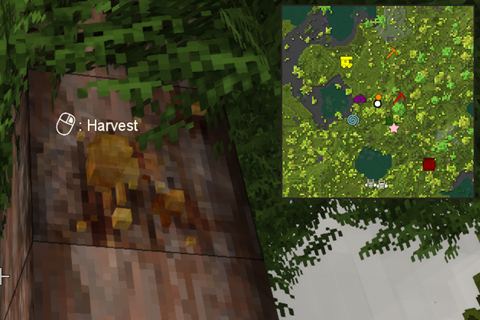
Automatically adds map markers to your map when you interact with certain objects. Works both in singleplayer mode and on multiplayer servers. The mod includes three modes for marking objects - you can use one mode (or multiple): either mark the map when you interact with the object (begin to harvest or break it), mark the map by sneaking while looking at the object, or mark the map when you press a customizable hotkey.
Fully configurable to add only the map markers you are interested in. Current options include:
- Flora: resin, berries, mushrooms, flowers, fruit trees, wild crops, reeds
- Surface ore: 14 varieties of surface ore bits, including copper, gold, silver, and others
- Deep ore: 19 varieties including iron, bismuth, tin, zinc, and others
- Misc: boats, beehives, translocators, red clay, blue clay, fire clay, peat, high fertility soil, meteoric iron, saltpeter
- Traders: all 9 varieties of trader
Makes it easier to remember locations and return to those locations later, and eliminates the tedium of manually opening the map and creating map markers. Can also help to ensure you don't miss out on gold or silver surface ore, which are sometimes difficult to spot!
The mod also supports additional hotkeys:
- Up to 3 custom, configurable map markers linked to hotkeys.
- A hotkey to delete the nearest map marker.
The mod is disabled by default when first installed. To enable the mod, open the configuration menu (Ctrl+Shift+M by default, adjustable keybind), and click the Enable button. You can also configure all of your preferences from this menu, including the icons, colors, and names that should be used for each type of automatically created map marker.
Translations
The mod currently includes localizations for Belarusian, Brazilian Portuguese, Chinese, Czech, Dutch, English, French, German, Italian, Japanese, Korean, Polish, Russian, Spanish, Turkish, and Ukranian. Thanks to those who have helped to provide these translations!
Interested in adding or improving a translation for the mod? Check out the mod's crowdin or GitHub page, and thank you!
FAQ
- Auto Map Markers works automatically with custom map icons and colors added by other mods.
- Auto Map Markers supports patch files to make it compatible with other mods. Instructions are on the mod wiki.
- For multiplayer, must be installed both on the client side and the server side to work.
- If you press the hotkey (Ctrl+Shift+M by default) and it just opens the in-game map instead of the mod menu, it means that the mod has failed to load. Check your logs to understand why, and share your log errors if you would like assistance. Some common reasons include:
- Using the wrong version of the mod for your version of Vintage Story
- Using the mod on a server where the mod is not installed server-side
Highlights
From source dataGame versions
Built for Vintage Story 1.14.10.
Footprint
Rated a light load on a server.
Auto Map Markers on Nxeon
From our catalogue- One-click install
- Supported on Nxeon Vintage Story servers. We download it from Vintage Story ModDB, place it, and restart the server.
- Server side
- Required on the server
- Server load
- light
- Smallest plan we suggest
- Vintage Story — 1 GB (1 GB RAM). This follows our own load rating above, not a benchmark.
Run Auto Map Markers on a Vintage Story server
Pick a server or deploy a new one above; it is installed in one click.
What kind of mod it is
From the catalogQuality of life & UI
Small conveniences, tweaks and interface improvements players notice straight away.
Runs on your server
From source side supportVintage Story ModDB lists Auto Map Markers as required on the server. Check its Vintage Story ModDB page to see whether players need it too.
Compatibility
- Game
- Vintage Story
- Runs on
- Serverrequired on the server
- Game versions
- 1.14.10
Verified at the source
- ✓Vintage Story ModDBOfficial listing, checked 2026-09-24Open ↗
- ✓Authoregocarib, as published on Vintage Story ModDB
- ✓LicenseNot published by the sourceFree















