







About Better Hoe
From Vintage Story ModDBAdds function to create paths with the hoe.
- If you use this with Primitive Survival https://mods.vintagestory.at/primitivesurvival you have to ajust config file !
In Primitive Survival's modconfig file set FurrowedLandEnabled to false. The two hoe behaviours conflict so you need to choose one. - This mod is not compatible with Xskills Hoe https://mods.vintagestory.at/show/mod/44074.
The 2x2 and 3x3 ploughing modes are not supported.
All other XSkills features should work correctly. If you encounter any issues, please let me know.
About the mod :
- Add a function to create paths with the hoe
- Dirt Path have walkspeedmultiplier: 1.2
- Stair dirt path have walkspeedmultiplier: 1.1
- Stone path have walkspeedmultiplier: 1.3 same as vanilla
- Stone path stairs have walkspeedmultiplier: 1.2 same as vanilla
- You can adjust settings in the config file : %appdata%\VintagestoryData\ModConfig -> EDIT "BetterHoeConfig.json"
- The config file is generated after you'r first launch. You have to restart the server or you'r game to apply new change.
ℹ️ How to use it
- Hold Left Click to use the hoe like in vanilla.
- Press F (or your custom Select Tool / Clayforming Mode key in Settings → Controls) to switch between BetterHoe modes.
- Hold Right Click on a dirt block to use the selected mode.
- Stone Path mode requires stones in your inventory and can also be used on sand and gravel blocks.

Feel free to send me translation and if you can make better svg icon i will upload it !
You can use Crowding to add translation : https://crowdin.com/translate/vintage-story-mods/21048
Mabe Crowding are not updated idk why... You can send me translated files here or into Discord.
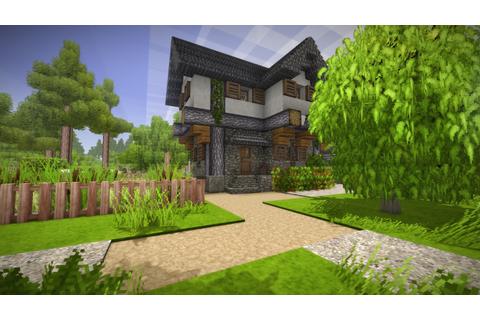
Or give me your beautifful path screenshot :) The first screenshot is from Bigmaison67 Huge tanks
Happy Vintage day !
BetterHoeConfig.json
⚠️ Do not copy the bold lines starting with // into your configuration file. They are comments for documentation purposes only. Including them will make the configuration file invalid and the mod will fail to load.
en.json,
Highlights
From source dataGame versions
Built for Vintage Story 1.18.14.
Footprint
Rated a light load on a server.
Better Hoe on Nxeon
From our catalogue- One-click install
- Supported on Nxeon Vintage Story servers. We download it from Vintage Story ModDB, place it, and restart the server.
- Server side
- Required on the server
- Server load
- light
- Smallest plan we suggest
- Vintage Story — 1 GB (1 GB RAM). This follows our own load rating above, not a benchmark.
Run Better Hoe on a Vintage Story server
Pick a server or deploy a new one above; it is installed in one click.
What kind of mod it is
From the catalogCosmetics, visuals & audio
Skins, textures, shaders, models and sound — how the game looks and sounds.
Runs on your server
From source side supportVintage Story ModDB lists Better Hoe as required on the server. Check its Vintage Story ModDB page to see whether players need it too.
Compatibility
- Game
- Vintage Story
- Runs on
- Serverrequired on the server
- Game versions
- 1.18.14
Verified at the source
- ✓Vintage Story ModDBOfficial listing, checked 2026-09-24Open ↗
- ✓AuthorTeknik, as published on Vintage Story ModDB
- ✓LicenseNot published by the sourceFree
More like Better Hoe
Other Vintage Story mods, same category first, ranked by real downloads.


Primitive Survival
Cosmetics, visuals & audio · Vintage Story ModDB
Fishing, trapping, irrigation, smoker, nightcrawlers, snakes, and much more!


BetterRuins
World generation · Vintage Story ModDB
Adds many new ruins over and underground to your survival game world.


Carry On
Building & decoration · Vintage Story ModDB
Adds the capability to carry various things. Replaces CarryCapacity.


Overhaul lib
Libraries & compatibility · Vintage Story ModDB
Library for Combat Overhaul, Firearms and other mods


QP's Chisel Tools
Quality of life & UI · Vintage Story ModDB
Unleash your creativity while chiseling! Invaluable, survival friendly tool set for chiselers!


A Culinary Artillery 2.0.0-dev.24
Technology & automation · Vintage Story ModDB
Adds an arsenal of tools to enhance the culinary experience.


Expanded Foods: Core 2.0.0-dev.14
Quality of life & UI · Vintage Story ModDB
Adds a variety of new uses for existing foods.


ImGui
Libraries & compatibility · Vintage Story ModDB
Wrapper for GUI library
Better Hoe, answered
Generated from the mod’s own source data.
Do my players need to install Better Hoe?
Vintage Story ModDB lists Better Hoe as required on the server. Check its Vintage Story ModDB page to see whether players need it too.
Is it free?
Yes. Better Hoe is free to download from Vintage Story ModDB.
How do I add it to my Nxeon server?
Use “Add to a server” on this page, or open NxLabs from your dashboard. We install it, restart your server and switch it on.

Run Better Hoe on a Vintage Story server.
Deploy in about a minute from $4.00 a month, then add Better Hoe in one click.