
ChatUI
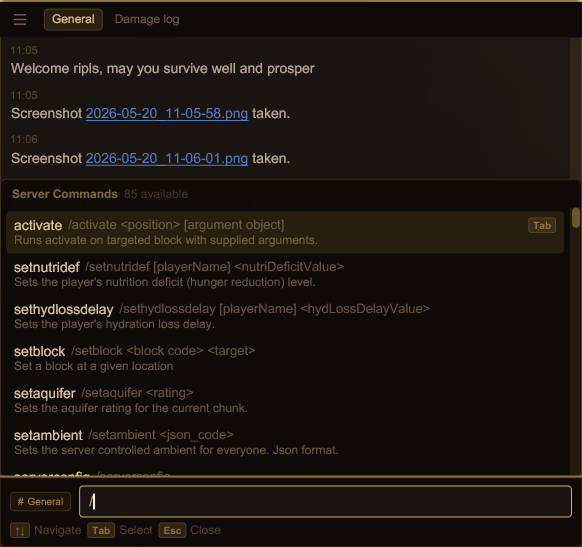
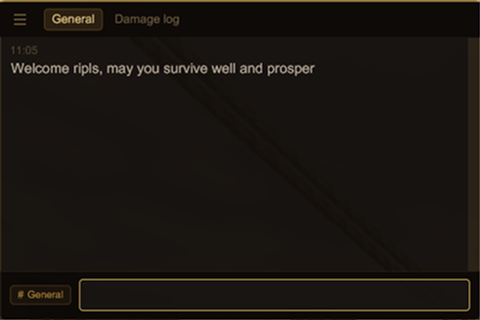
Custom chat dialog with channel tabs, command autocomplete, and player mentions.
Description
<div style="font-family: 'JetBrains Mono', monospace; background: #f0e4db; border-left: 4px solid #aa998f; padding: 16px 20px; border-radius: 0 8px 8px 0; margin-bottom: 16px;"><p style="font-size: 0.8em; text-transform: uppercase; letter-spacing: 2px; color: #aa998f; margin-bottom: 8px;">Overview</p> <p>ChatUI replaces the vanilla chat dialog with a custom UI built on <a href="https://mods.vintagestory.at/libgui">libGUI</a>.</p> <p>A HUD overlay shows recent messages while you play. The full dialog adds channel tabs, command autocomplete, and <code>@mention</code> suggestions.</p> </div> <details style="font-family: 'JetBrains Mono', monospace; background: #f0e4db; border-left: 4px solid #8b9e7d; border-radius: 0 8px 8px 0; margin-bottom: 16px; overflow: hidden;"> <summary style="padding: 16px 20px; cursor: pointer; font-size: 0.8em; text-transform: uppercase; letter-spacing: 2px; color: #8b9e7d; user-select: none;">Theming</summary> <div style="padding: 0 20px 16px 20px;"> <p>To switch themes, set <code>"theme"</code> in <code>ModConfig/libgui.json</code>. The UI redraws the moment you save the file — no game restart, no reload command.</p> <p>Looking for more looks? Check <a style="color: #7d4f50;" href="https://discord.com/channels/302152934249070593/1506510064616341514">here</a>.</p> </div> </details><details style="font-family: 'JetBrains Mono', monospace; background: #f0e4db; border-left: 4px solid #7d4f50; border-radius: 0 8px 8px 0; margin-bottom: 16px; overflow: hidden;" open="open"> <summary style="padding: 16px 20px; cursor: pointer; font-size: 0.8em; text-transform: uppercase; letter-spacing: 2px; color: #7d4f50; user-select: none;">Features</summary> <div style="padding: 0 20px 16px 20px;"> <p style="font-size: 0.8em; text-transform: uppercase; letter-spacing: 2px; color: #aa998f; margin: 16px 0 6px 0;">Channels & tabs</p> <p>Pin any channel to the tab bar — General, Damage Log, Info Log, Server Info, or player groups. The browse button lists every channel the server has assigned you.</p> <p style="font-size: 0.8em; text-transform: uppercase; letter-spacing: 2px; color: #aa998f; margin: 20px 0 6px 0;">Command autocomplete</p> <p>Type <code>/</code> to browse server commands, <code>.</code> for client commands. Each row shows the command name, full call syntax, and description. Navigate with <kbd>↑ ↓</kbd>, confirm with <kbd>Tab</kbd>.</p> <p style="font-size: 0.8em; text-transform: uppercase; letter-spacing: 2px; color: #aa998f; margin: 20px 0 6px 0;">@mention autocomplete</p> <p>Type <code>@</code> followed by any characters to filter online players by name. The matching part highlights as you type. Confirm with <kbd>Tab</kbd> or click.</p> <p style="font-size: 0.8em; text-transform: uppercase; letter-spacing: 2px; color: #aa998f; margin: 20px 0 6px 0;">Resizable window</p> <p>Drag to reposition, resize to taste. Position and size are saved to <code>chatui.json</code> and restored on next login.</p> </div> </details><details style="font-family: 'JetBrains Mono', monospace; background: #f0e4db; border-left: 4px solid #aa998f; border-radius: 0 8px 8px 0; margin-bottom: 16px; overflow: hidden;"> <summary style="padding: 16px 20px; cursor: pointer; font-size: 0.8em; text-transform: uppercase; letter-spacing: 2px; color: #aa998f; user-select: none;">Hotkeys</summary> <div style="padding: 0 20px 16px 20px;"> <p>ChatUI hooks into the vanilla hotkeys, so nothing needs rebinding.</p> <table style="border-collapse: collapse; font-size: 0.85em; margin-top: 8px;"> <tbody> <tr> <td style="padding: 4px 16px 4px 0; color: #7d4f50;"><code>T</code> / Tab</td> <td style="color: #5a4a3a;">Open chat</td> </tr> <tr> <td style="padding: 4px 16px 4px 0; color: #7d4f50;"><code>/</code></td> <td style="color: #5a4a3a;">Open chat prefilled with <code>/</code> — server command mode</td> </tr> <tr> <td style="padding: 4px 16px 4px 0; color: #7d4f50;"><code>.</code></td> <td style="color: #5a4a3a;">Open chat prefilled with <code>.</code> — client command mode</td> </tr> <tr> <td style="padding: 4px 16px 4px 0; color: #7d4f50;"><code>Alt+up/down</code></td> <td style="color: #5a4a3a;">Prev/Next command in msg history</td></tr></tbody></table></div></details>
Ratings & reviews
Sign in to leave a rating or comment.



