







About Dead
From Vintage Story ModDBLeaves a lootable corpse of the player (with their exact skin and worn gear) at the death spot
Dead
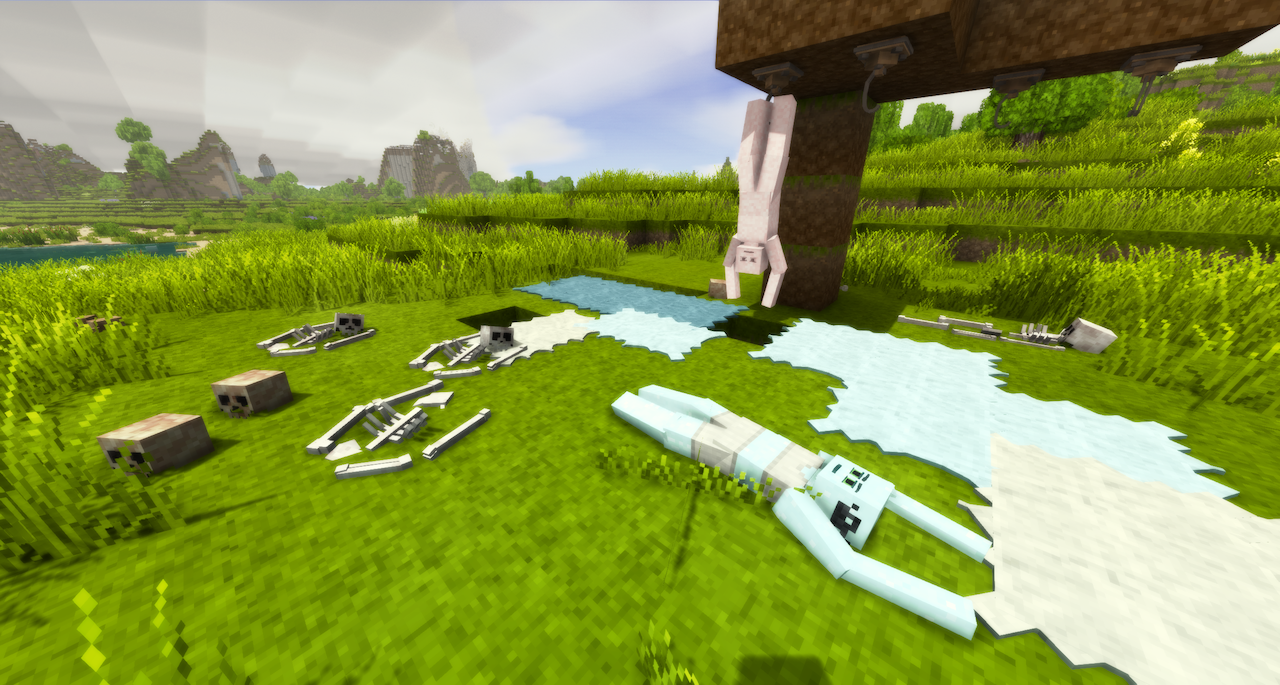
When you die, a corpse with your skin, features, clothes and armor spawns at the death spot, holding everything you were carrying. For those familiar with the PlayerCorpse mod, this mod is similar.
In this mod I have made a conscious decision to not allow the corpses to stay around forever like other corpse entity mods do.
Features
The corpse
- Spawns at your death spot on respawn, in a random death pose
- Has your exact skin, features and character model, with all your clothing and armor visible on the body
- Holds your full inventory: hotbar, offhand, bags with their contents, armor, clothing
- Cannot be destroyed by damage, only butchering or time will get rid of it
- Shows the race in the description
- Shows how long until it perishes


Looting
- Hold Sprint + RMB (3 seconds, configurable) to kneel down and open the corpse's inventory in a loot GUI, with bags, bag contents, armor and character gear laid out in tabs
- Hold Sneak + RMB (6 seconds, configurable) to loot everything at once
- Any player can loot any corpse (optionally it can be locked for a while for the player whose corpse it is)
- You can redress corpses too

Dragging
- With empty hands, hold RMB on a body to grab it and drag it behind you
- Useful for moving remains somewhere hidden, or for a proper burial
- Dragging slows you down (configurable)

Stowing
- Drag a body to your elk and look at the back slot while still holding RMB to stow it on the elk
- Shift + RMB to unstow it
- You can also interact with the body (take items from the inventory) while it is stowed. Be warned that the hitbox to target it might be a bit janky.
- Requires that the back slot is empty of any attachments or bodies.

Injuries
- Last 5 injuries are logged down, including damage type, damage, and weapon used
- If Combat Overhaul is installed, the body part will be shown as well
- You can toggle this in the configuration via CorpseWoundLogEnabled and CorpseWoundCount
- Useful for medical roleplay and murder investigations

Decay
- Corpses rot away after a configurable number of in-game days (default 40)
- When a corpse perishes, its remaining contents drop to the ground and skeletal remains are left behind
- Perish time is affected by the conditions it is in: cellars and cold environments will lengthen the time, hot weather will lower the time

Butchering integration
- Use a rope on the body to attach it to a butchering hook
- You can skin the bodies on hooks to receive scraped hides named after the race. These hides will have the correct skin color.
- The corpses will drip blood
- The corpses can be butchered later, giving drops like Prime Meat, Bloody offals, Sinew, Bones, and Fat
- You can drag the corpse on top of a butchering table to get more butchering drops
- Butchering the corpse drops a skull that is named after the race (example: Skull (Seraph))


Persistence
- Corpses are stored in their own database on the server, which means in case the mod fails to load and the corpse entities are deleted in-game, they will be restored the next time the mod loads.
- The .db file can be found at
ModData\YourSaveGameIdentifier\dead\corpses.db - Expired corpses are cleaned up on a timer without loading any chunks, and deleted from chunks next time they are loaded.
- The contents of the corpses are still kept around in the database in case an admin wants to return lost items via /dead return (they will be marked as (expired) in the /dead list)
Configuration
The config can be adjusted in dead.json or in-game via ConfigLib.
Highlights
From source dataGame versions
Supports 20 Vintage Story versions, the newest being 1.22.4.
Footprint
Rated a light load on a server.
Dead on Nxeon
From our catalogue- One-click install
- Supported on Nxeon Vintage Story servers. We download it from Vintage Story ModDB, place it, and restart the server.
- Server side
- Required on the server
- Server load
- light
- Smallest plan we suggest
- Vintage Story — 1 GB (1 GB RAM). This follows our own load rating above, not a benchmark.
Run Dead on a Vintage Story server
Pick a server or deploy a new one above; it is installed in one click.
What kind of mod it is
From the catalogQuality of life & UI
Small conveniences, tweaks and interface improvements players notice straight away.
Runs on your server
From source side supportVintage Story ModDB lists Dead as required on the server. Check its Vintage Story ModDB page to see whether players need it too.
Compatibility
- Game
- Vintage Story
- Runs on
- Serverrequired on the server
- Game versions
- 1.22.4 and 19 earlier
Verified at the source
- ✓Vintage Story ModDBOfficial listing, checked 2026-09-24Open ↗
- ✓AuthorSiiMeR, as published on Vintage Story ModDB
- ✓LicenseNot published by the sourceFree















