
Discord Pigeon To Ingame
Deliver Discord messages as signed parchments to players' inventories
Description
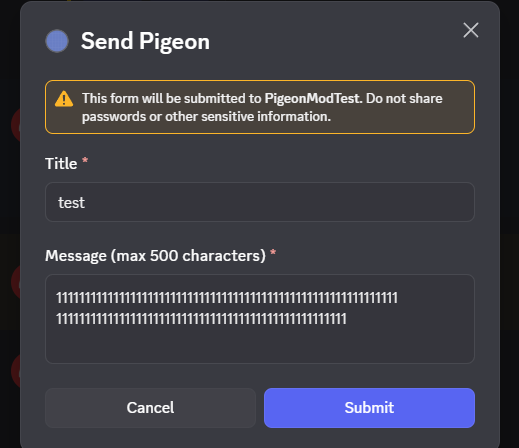
<p>Allows players to send in-game messages to each other directly from Discord. Messages are composed through a Discord slash command and delivered as signed parchments, carried by pigeon, so the recipient must be standing somewhere with a clear view of the sky.</p> <p>This mod is intended for roleplay and community servers that want to reduce metagaming and powergaming on Discord by giving players a proper in-game alternative. It increases the amount of information that lives within the world itself rather than outside it.</p> <h2>Features</h2> <ul> <li>Send a pigeon from Discord to any linked player on the server. Pigeons are delivered as signed parchments after a configurable delay (<code>DeliveryDelayMinutes</code>, default 5 minutes)</li> <li>Pigeons are delivered directly into your inventory. If you have no room, a chat notification will let you know. Step outside and run <code>/discordpigeon receive</code> once you've cleared some space</li> <li>You can only send a pigeon once every <code>PigeonCooldownMinutes</code> (default 30 minutes). Server admins can grant shorter cooldowns to specific Discord roles via <code>PigeonCooldownMinutesPerRoleOverride</code></li> <li>Pigeons can only be delivered if the recipient has a clear view of the sky. If they are indoors or underground they will see: <em>"You feel like a pigeon is trying to find you but cannot see you from the sky."</em> Once outside, the pigeon can be claimed with <code>/discordpigeon receive</code><code></code></li> </ul> <ul> <li>When a pigeon arrives, a sound plays for the recipient and nearby players</li> <li>All sent pigeons are recorded in the server logs. Optionally they can also be forwarded to a Discord channel for staff oversight (<code>AuditChannelId</code>)</li> <li>Players link their Discord account to their in-game name once using <code>/pigeon link</code>, optionally restricted to a specific Discord role (<code>LinkRoleId</code>). From then on, they can send and receive pigeons.</li> <li>After linking, players can also view their sent pigeon history with <code>/pigeon list</code> . Staff (users who have the <code>ModerationRoleId</code>) can also view the history of other players (both sent and received pigeons in this case) using <code>/pigeon list <Discord User> </code></li> <li>Staff can also link other players through the<code> /pigeon link username:<VS Username> user:<Discord User></code> command</li> </ul> <h2>Commands</h2> <p>All commands are Discord slash commands.</p> <ul> <li><code>/pigeon link <username></code> - link your Discord account to your Vintage Story player name</li> <li><code>/pigeon send</code> - send a pigeon to a player, either by Discord mention or by Vintage Story username</li> <li><code>/pigeon list (page)</code> - view your sent and received pigeon history. 10 entries per page are shown to not run into rate limiting issues.</li> <li><code>/pigeon list [user] (page)</code> - (moderation role only) view another player's pigeon history</li> </ul> <h2>Setup</h2> <p>This mod requires you to create and host your own Discord bot. It cannot work without one.</p> <ol> <li>Go to the <a href="https://discord.com/developers/applications">Discord Developer Portal</a> and create a new application</li> <li>Under <strong>Bot</strong>, create a bot and copy the token</li> <li>Under <strong>OAuth2</strong>, generate an invite URL with the <code>bot</code> and <code>applications.commands</code> scopes and the <code>Send Messages</code> and <code>Use Slash Commands</code> permissions, then invite it to your server</li> <li>Install the mod on your server and start it once to generate the config file</li> <li>Fill in the config file (see below) and restart<code></code></li> </ol> <p> </p> <p>To copy Discord IDs, enable Developer Mode in Discord under <strong>Settings → Advanced → Developer Mode</strong>. You can then right-click any server, channel, role, or user and select <strong>Copy ID</strong>.</p> <ul> <li><strong>Guild ID</strong> - right-click your server name and select Copy Server ID</li> <li><strong>Channel ID</strong> - right-click any text channel and select Copy Channel ID</li> <li><strong>Role ID</strong> - go to <strong>Server Settings → Roles</strong>, right-click the role and select Copy Role ID</li> </ul> <h2>Configuration</h2> <p>The config file is located at <code>VintagestoryData/ModConfig/discordpigeontoingame.json</code>.</p> <div> <div><code>{</code></div> <div><code> "BotToken": "YOUR_TOKEN", // The token from Setup step 2.</code></div> <div><code> "GuildId": 719244890449510462, // Your Discord server ID (a.k.a Guild ID).</code></div> <div><code> "AuditChannelId": 719244890449510465, // The channel ID where the audit log is posted every time a pigeon is sent.</code></div> <div><code> "LinkRoleId": 1233511716722315358, // The role ID required to use the /pigeons link command. If you want members to be able to self-onboard, set this to something everyone has, like a Member role.</code></div> <div><code> "ModerationRoleId": 1233511716722315358, // The role ID required to use the /pigeons list <username> command. </code></div> <div><code> "DeliveryDelayMinutes": 5, // The amount of IRL minutes it takes for the pigeon to reach the recipient.</code></div> <div><code> "PigeonCooldownMinutes": 30, // The amount of IRL minutes it takes for a new pigeon to be able to be sent (per-person). This is shown in Discord as well.</code></div> <div> <div> <div><code> "DmFallbackEnabled": false, // If late delivery of pigeon message contents in DMs is enabled (useful in cases players can't log on for extended periods of time)</code></div> <div><code> "DmFallbackDelayMinutes": 240, // How many minutes after sending will the late delivery take place</code></div> </div> </div> <div><code> "PigeonMessageCharacterLimit": 500, // Allows you to make messages limited in length.</code></div> <div><cod
Download
No download link is available for this entry right now.
Ratings & reviews
Sign in to leave a rating or comment.



