About Emotes
From Vintage Story ModDBAdds more custom emotes to the game.
EMOTES
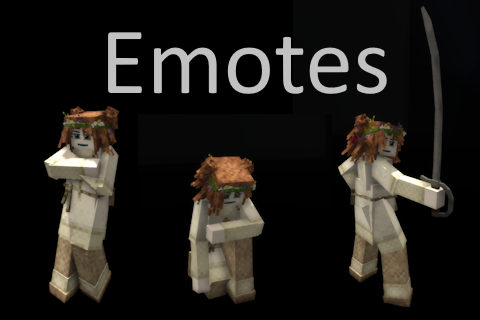
A simple emotes system to make your character feel more alive.
This mod adds a bunch of expressive animations you can access through a menu (Shift+J) or through the command /emotes.
Vanilla emotes are also included in this menu, in a separate vanilla category.
Whether you’re greeting someone, deep in roleplay, or just messing around, it gives you more ways to show personality in-game.
You’ll find a mix of social, combat, and idle emotes like bows, salutes, handshakes, idle poses, sitting poses, and more.
This mod was designed with roleplay servers in mind, hoping to deepen the immersion in characters' interactions.
The mod will forcibly disable Combat Overhaul animations while the emote is playing.
Most emotes will not end unless you move, sprint, crouch, mount something, sit, right or left click.
Compatible with PlayerModelLib
Showcase of emotes in v1:
<iframe src="//www.youtube-nocookie.com/embed/IgD-HVf05v4" width="720" height="404" allowfullscreen="allowfullscreen" allow="encrypted-media; picture-in-picture; web-share; clipboard-write"></iframe>
2-Player Emotes
Paired emotes can be started by looking at another player and selecting an emote from the Paired tab. The targeted player will receive a chat prompt allowing them to accept or refuse the interaction. Paired emotes can only be accepted within a short range.
DISCLAIMER: SIZE DIFFERENCES WILL MESS UP THE ALIGNMENT OF THE 2-PLAYER EMOTES
Paired
- Hug (Friendly)
- Hug (Intimate)
- Kiss (Intimate)
- Smooch
- Handshake
- Handshake (Double)
- Hold Hands
- Hold Hands (Intimate)
- Dap Up
Solo Emotes
Sitting (Ground)
- Sit (Seiza)
- Sit (Cool)
- Sit (Chill)
- Sit (Relaxed)
- Sit (Refined)
- Sit (Calm)
- Sit (Innocent)
- Sit (Rested) (meant to be used inside water, has a half block height in mind)
- Sit (Introvert)
- Prayer
- Squat
- Kneel
Sitting (Elevated)
- Sit (Calm)
- Sit (Chill)
- Sit (Cool)
- Sit (Innocent)
- Sit (Introvert)
- Sit (Refined)
- Sit (Relaxed)
- Sit (Rested)
Laying
- Lay Down
- Lay Back
- Lay Down (Sensual)
- Prone
- Play Dead
Friendly
- Blow Kiss
- Clap
- Kiss Hand
- Polite Bow
- Victory
Idle
- At Ease
- Cross Arms
- Hands on Hips
- Lean (Arms Crossed) (snaps to the nearest wall at least 2 blocks tall within a 2 block radius)
- Lean (Hands on Head) (snaps to the nearest wall at least 2 blocks tall wi
- Lean (Hips) (snaps to the nearest wall at least 2 blocks tall within a 2 block radius)
- Lean (Simple) (snaps to the nearest wall at least 2 blocks tall within a 2 block radius)
- Lean Over (Simple)
- Lean Over (Confident)
Neutral
- Think
- Think Hard
- Rub Hands
- Hand Up
- Knock
- Martial Arts
- Point
- Prayer (Standing)
- Salute
- Salute (Noble)
- Salute (Refined)
- Scan
- Surrender
- Crack Knuckles
Aggressive
- Bring It On
- Chest Thump
- En Garde
- Flip Off
- Slit Throat
Commands
/emotes play <name> - play the named emote/emotes list - list all available emotes/emotes stop - stop your current emote/emotes showcase - play through emotes as a showcase/emotes consent <true|false> - set auto-accept for paired emote requests/emotes accept - accept a pending paired emote request/emotes refuse - refuse a pending paired emote request
Configuration:
emotes.json
{ "PairedEmotesRequireConsent": true, // set to false to disable the 2-player emote confirmation message "DisabledEmotes": [] // Disabled emote codes in an array}
Adding Custom Emotes
You can create your own content mod to add new emotes and have them be picked up by the Emotes mod (and visible in the emote list). On startup, you get a summary line: how many emotes loaded, from how many files, and how many were skipped.
Animations can be authored either in VSMC or BlockBench. Base game player animations can be found in assets\game\shapes\entity\humanoid (if you need inspiration you can look at them or animations from this mod)
One thing to watch out for: because of bugs in the game's animator, the last keyframe has to list every element the animation touches, even the ones that do not change in that frame. Elements left out of the last keyframe end
up misbehaving and weirdly interpolating. Earlier keyframes only need the elements that actually change.
Where the files go
<pre>YourMod/ modinfo.json assets/ yourdomain/ config/ emotes/ wave.json lang/ en.json</pre>Highlights
From source dataGame versions
Supports 24 Vintage Story versions, the newest being 1.21.7.
Footprint
Rated a light load on a server.
Emotes on Nxeon
From our catalogue- One-click install
- Supported on Nxeon Vintage Story servers. We download it from Vintage Story ModDB, place it, and restart the server.
- Server side
- Required on the server
- Server load
- light
- Smallest plan we suggest
- Vintage Story — 1 GB (1 GB RAM). This follows our own load rating above, not a benchmark.
Run Emotes on a Vintage Story server
Pick a server or deploy a new one above; it is installed in one click.
What kind of mod it is
From the catalogQuality of life & UI
Small conveniences, tweaks and interface improvements players notice straight away.
Runs on your server
From source side supportVintage Story ModDB lists Emotes as required on the server. Check its Vintage Story ModDB page to see whether players need it too.
Compatibility
- Game
- Vintage Story
- Runs on
- Serverrequired on the server
- Game versions
- 1.21.7 and 23 earlier
Verified at the source
- ✓Vintage Story ModDBOfficial listing, checked 2026-09-24Open ↗
- ✓AuthorSiiMeR, as published on Vintage Story ModDB
- ✓LicenseNot published by the sourceFree