
Pattern Mining
Mine in 5 distinct patterns using your pickaxe. Now includes shovels!!
Description
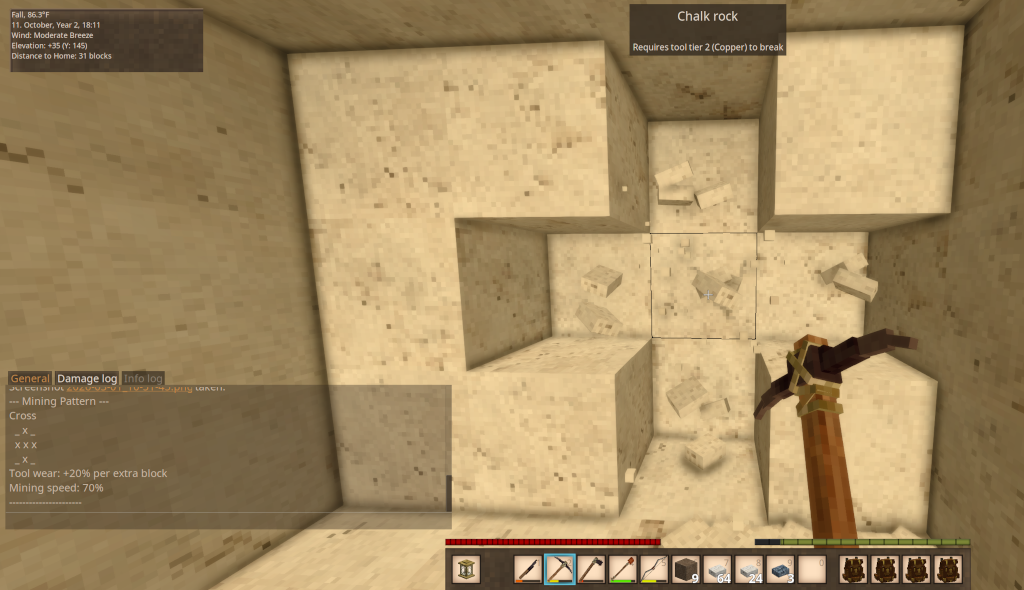
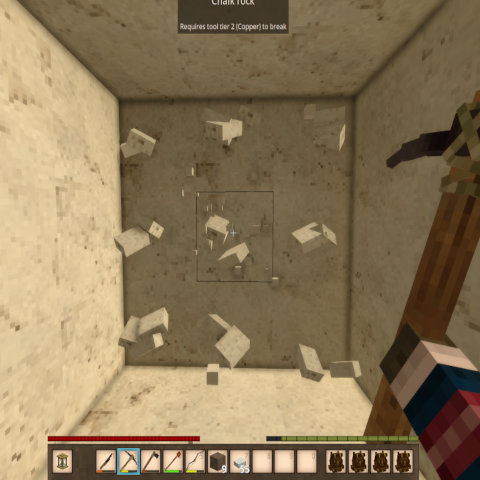
<h2><strong>Pattern Mining</strong> (formerly Vertical Mining)</h2> <h3><strong>...:::What's New:::...</strong></h3> <p> </p> <p><strong>Shovels now work with Pattern Mining!</strong></p> <ul> <li>Hold a shovel (or a pickaxe, as before) and press Ctrl+P to cycle patterns.<br />- Shovels dig soil, gravel, sand and snow. Stone, ore and wood in your pattern<br /> are left standing — switch to a pickaxe for those.<br />- Bug fix: a full pattern could destroy a nearly-spent tool despite the<br /> "tools won't break from pattern mining" rule. Fixed.</li> <li> <p>Adds a <strong>Single 1x1 pattern </strong>that breaks only the block you hit — no extra tool<br />wear, no mining speed penalty. It's now the pattern you start on, so you can<br />leave Pattern Mining enabled all the time and it won't change how you mine<br />until you cycle to something bigger.</p> <p>Single 1x1 is first in the cycle. Your existing pattern carries across on your<br />next login — if you were mining with Cross, you'll still be on Cross.</p> <p>The on-screen dot grid is now larger and tighter, so the active pattern reads<br />as one shape at a glance. Both are adjustable in patternmining.json:<br />HudScale for dot size (default 1.6) and HudDotSpacing for the gap between<br />them (default 0.72, lower is tighter).</p> </li> </ul> <p> </p> <p>The pattern-cycle key is rebindable — change it in Settings > Controls or in<br />patternmining.json.</p> <p>Side: Client and Server<br />Hotkeys: Ctrl+P (cycle patterns) Commands: /pm (toggle on/off)</p> <p>New: on-screen pattern indicator. A small 3×3 dot grid shows the shape of your active mining pattern while Pattern Mining is enabled, tucked just left of the off-hand slot. It hides when you<br />toggle off with /pm, and follows pattern cycling live. Turn it off with "ShowHud": false in patternmining.json.</p> <p> </p> <p><strong>Description</strong></p> <p>Pattern Mining expands on the original Vertical Mining concept by giving you five<br />distinct mining patterns to choose from, all accessible through a simple hotkey.<br />Whether you're shaft mining, clearing tunnels, or carving out rooms, there's a<br />pattern to match your task. Larger patterns come with trade-offs — increased tool<br />wear and slower mining speed — keeping things balanced and grounded in realistic<br />gameplay. As of 3.0.0, those trade-offs are fully configurable.</p> <h3>Mining Patterns</h3> <p> </p> <table style="width: 764px;"> <thead> <tr> <th style="width: 133.433px;">Pattern</th> <th style="width: 280.2px;">Shape</th> <th style="width: 86.3333px;">Extra Blocks</th> <th style="width: 107.417px;">Tool Wear</th> <th style="width: 155.617px;">Mining Speed</th> </tr> </thead> <tbody> <tr> <td style="width: 133.433px;">Center 1x1</td> <td style="width: 280.2px;">Center</td> <td style="width: 86.3333px;">1</td> <td style="width: 107.417px;">Normal</td> <td style="width: 155.617px;">100%</td> </tr> <tr> <td style="width: 133.433px;">Vertical 1x2</td> <td style="width: 280.2px;">Center + below</td> <td style="width: 86.3333px;">1</td> <td style="width: 107.417px;">Normal</td> <td style="width: 155.617px;">100%</td> </tr> <tr> <td style="width: 133.433px;">Column 1x3</td> <td style="width: 280.2px;">Center + above + below</td> <td style="width: 86.3333px;">2</td> <td style="width: 107.417px;">+10%</td> <td style="width: 155.617px;">85%</td> </tr> <tr> <td style="width: 133.433px;">Horizontal 3x1</td> <td style="width: 280.2px;">Center + left + right</td> <td style="width: 86.3333px;">2</td> <td style="width: 107.417px;">+15%</td> <td style="width: 155.617px;">85%</td> </tr> <tr> <td style="width: 133.433px;">Cross</td> <td style="width: 280.2px;">Center + above + below + left + right</td> <td style="width: 86.3333px;">4</td> <td style="width: 107.417px;">+20%</td> <td style="width: 155.617px;">70%</td> </tr> <tr> <td style="width: 133.433px;">Tunnel 3x3</td> <td style="width: 280.2px;">Full 3x3 face</td> <td style="width: 86.3333px;">8</td> <td style="width: 107.417px;">+25%</td> <td style="width: 155.617px;">50%</td> </tr> </tbody> </table> <h3>Pattern Diagrams</h3> <p> </p> <pre><code>Center 1x1 Vertical 1x2 Column 1x3 Horizontal 3x1 Cross Tunnel 3x3 _ _ _ _ _ _ _ x _ _ _ _ _ x _ x x x _ x _ _ x _ _ x _ x x x x x x x x x _ _ _ _ x _ _ x _ _ _ _ _ x _ x x x</code></pre> <p> </p> <p><strong>How to Use</strong></p> <p>1. Type /pm in chat to toggle Pattern Mining on.<br />2. Hold a pickaxe or shovel and press Ctrl+P to cycle through the five mining patterns.<br /> The selected pattern and its stats are displayed in the chat window.<br />3. Mine any block — the extra blocks in your selected pattern will break automatically, based on which face of the block you hit.<br />4. Hold Sneak while mining to temporarily override the pattern and mine only a single block.<br />5. Type /pm again to toggle Pattern Mining off. Mining speed returns to normal.</p> <p> </p> <p><strong>Changing the "Cycle Mining Pattern" key</strong></p> <p>The default is Ctrl+P. To change it, pick whichever is easier:</p> <p>In-game (easiest): Settings → Controls → search "Cycle Mining Pattern" → click it and press your new key. This overrides the config file.</p> <p>Config file: edit patternmining.json in your Vintage Story ModConfig folder, then restart the game:<br />- Windows: %APPDATA%\VintagestoryData\ModConfig\patternmining.json<br />- Linux: ~/.config/VintagestoryData/ModConfig/patternmining.json<br />- macOS: ~/Library/Application Support/VintagestoryData/ModConfig/patternmining.json</p> <p>"CycleHotkey": "P",<br />"CycleHotkeyCtrl": true,<br />"CycleHotkeyShift": false,<br />"CycleHotkeyAlt": false</p> <p>CycleHotkey takes a
Download
No download link is available for this entry right now.
Ratings & reviews
Sign in to leave a rating or comment.



