About Piles!
From Vintage Story ModDBA modding library for adding coal-style piles simply and easily
This a modding library/tool for adding custom piles in the style of coal and charcoal from Vanilla entirely through external content mods.
By default piles for Rot, Salt, and All types of vanilla Grain and included.
These piles have now been extracted out to their own mod.
Check out: Granary
This library adds the following relevant classes: BlockPile, BlockEntityPile, & BehaviorPileItem
To add your own pile with this mod installed it is as follows:
- Create a new content mod with a blocktype file for each of the piles you wish to create (if they are variant piles such as grain, you only need 1 with variant groups)
- Each of these blocktypes assign them the class BlockPile and entityclass BlockEntityPile
- (Optional) add an attributes section to the block type to specify parameters of that pile. Any not-specified attribute will be given a default value. If the attributes array is not presnt at all, all values will be default.
The attributes are as follows:"attributes":
{
"addItemLabel" : "String" or "LangKey",
"removeItemLabel": "String" or "LangKey",
"defaultAddQuantity": Integer (default: 2),
"defaultTakeQuantity": Integer (default: 2),
"bulkTakeQuantity": Integer (default: 4),
"maxStackSize": Integer (default: 16),
"interactSoundPath" : "domain:pathToSound",
"allowUnstablePlacement": true/false (default: false)
} - Assign a texture to the blockPile you created just as you would a vanilla block.
- The piles support assignment by face if desired (such as defining a different texture for "up"/the top face and a seperate texture for the sides. If wanting the same texture for all sides use the vanilla "all" key for the textures field
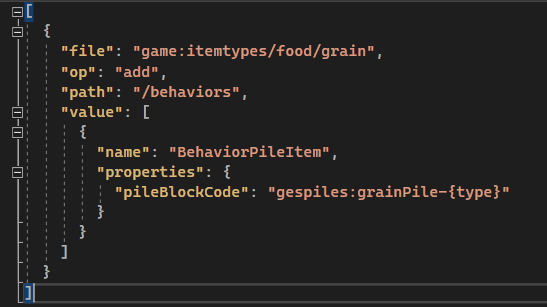
- Create a patch adding/appending BehaviorPileItem to the item you wish to pileable, with a properties array pointing to the corresponding code of the newly created blocktype.
- If using variants such as for example "grain" they may be defined as "grain-flax" or generically "grain-{type}", in which case you can specify the code of the pile blocktype created as "grainPile-{type}" and make sure that the blocktype for "grainPile" as the corresponding variantgroups array to have different piles per type of grain with only one blocktype file.
- For specifying those variant textures simply point the texture-path to the location and use the variant group {type} as you would with normal variant texturing
The source code and example implementation from the default piles can be found at: https://github.com/Pursec/PilesPilesPiles
Example of a patch file for grain supporting variantgroups:
[
{
"file": "game:itemtypes/food/grain",
"op": "add",
"path": "/behaviors",
"value": [
{
"name": "BehaviorPileItem",
"properties": { "pileBlockCode": "gespiles:grainPile-{type}"}
}
]
}
]
<pre class="language-csharp">Example of grainPile.json
{
"code": "grainPile",
"class": "BlockPile",
"entityClass": "BlockEntityPile",
"variantgroups": [
{
"code": "type",
"states": [ "spelt", "rice", "flax", "rye", "amaranth", "sunflower" ]
}
],
"creativeinventory": {
"general": [ "" ],
"decorative": [ "" ]
},
"behaviors": [
{ "name": "UnstableFalling" }
],
"attributes": {
"addItemLabel": "Add Grain",
"removeItemLabel": "Remove Grain",
"allowUnstablePlacement": true
},
"blockmaterial": "Soil",
"lightAbsorption": 0,
"sidesolid": { "all": false },
"sideopaque": { "all": false },
"textures": {
"all": { "base": "game:block/food/grain/{type}" }
},
"replaceable": 100,
"resistance": 2,
"collisionbox": {
"x1": 0,
"y1": 0,
"x2": 1,
"y2": 0,
"z2": 1
},
"selectionbox": {
"x1": 0,
"y1": 0,
"x2": 1,
"y2": 0,
"z2": 1
},
"drops": [],
"materialDensity": 600
}
If you wish to support me do so at:
Ko-fi
<a title="Patreon" href="https://patreon.com/user?u=54887552&utm_medium=clipboard_copy&utm_source=copyLink&utm_campaign=creatorshare_creator&utm_content=join_link" target="_blank" rel="noopener">Patreon
Highlights
From source dataGame versions
Supports 2 Vintage Story versions, the newest being 1.19.1.
Footprint
Rated a light load on a server.
Piles! on Nxeon
From our catalogue- One-click install
- Supported on Nxeon Vintage Story servers. We download it from Vintage Story ModDB, place it, and restart the server.
- Server side
- Required on the server
- Server load
- light
- Smallest plan we suggest
- Vintage Story — 1 GB (1 GB RAM). This follows our own load rating above, not a benchmark.
Run Piles! on a Vintage Story server
Pick a server or deploy a new one above; it is installed in one click.
What kind of mod it is
From the catalogListed on Vintage Story ModDB as “QoL”
Quality of life & UI
Small conveniences, tweaks and interface improvements players notice straight away.
Runs on your server
From source side supportVintage Story ModDB lists Piles! as required on the server. Check its Vintage Story ModDB page to see whether players need it too.
Compatibility
- Game
- Vintage Story
- Runs on
- Serverrequired on the server
- Game versions
- 1.19.1 and 1 earlier
Verified at the source
- ✓Vintage Story ModDBOfficial listing, checked 2026-09-24Open ↗
- ✓AuthorPursec, as published on Vintage Story ModDB
- ✓LicenseNot published by the sourceFree