
Reachable Creative Tabs
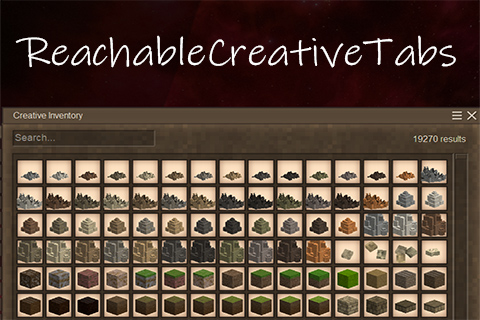
Makes overflowing creative inventory tabs reachable in heavily modded games by paging the right-side
Description
<div class="vs-mod-container" style="max-width: 1200px; width: 100%; margin: 0 auto; font-family: 'Outfit', 'Segoe UI', -apple-system, BlinkMacSystemFont, Roboto, sans-serif; background-color: #0b0908; color: #f5efe0; padding: 30px; border: 4px double #5c4e43; border-radius: 4px; box-shadow: 0 8px 30px rgba(0,0,0,0.7); box-sizing: border-box; line-height: 1.6;"><div style="background-color: #120e0b; border: 1px solid #4a3e33; border-left: 6px solid #d4af37; border-radius: 4px; padding: 30px; margin-bottom: 30px; position: relative;"><h1 style="font-family: 'Cinzel', 'Georgia', serif; font-size: 46.5px; color: #ffcc00; margin: 0 0 8px 0; font-weight: 800; letter-spacing: 1.5px; text-shadow: 0 2px 4px rgba(0,0,0,0.5);">REACHABLE CREATIVE TABS</h1> <p style="font-size: 20px; color: #c4b9a8; margin: 0 0 20px 0; font-weight: 600; line-height: 1.5;">Makes overflowing creative inventory tabs reachable in heavily modded games by paging the right-side tab column.</p> </div> <div style="margin-bottom: 35px;"> <h2 style="font-family: 'Cinzel', 'Georgia', serif; font-size: 25.5px; color: #d4af37; border-bottom: 2px solid #4a3e33; padding-bottom: 10px; margin-top: 0; margin-bottom: 18px; letter-spacing: 0.5px;">About the Mod</h2> <p style="font-size: 18.5px; color: #d5cbb7; margin: 0 0 15px 0; text-align: justify; line-height: 1.7;">The <strong>Reachable Creative Tabs</strong> mod is an essential quality-of-life tool for heavily modded games. When you have too many mods installed, the creative inventory tabs on the right side overflow and become inaccessible. This mod solves that problem by introducing a simple paging system, allowing you to easily navigate through all available creative tabs.<br><strong style="color: #ff8b8b;">Work as a client mod, so no matter you are in single or multiplayer, it will works!</strong></p> <div style="background-color: #1a150e; border-left: 4px solid #ffcc00; padding: 15px; margin: 25px 0; font-size: 18.5px; color: #f5efe0; border-radius: 3px; box-shadow: inset 0 0 10px rgba(0,0,0,0.3);"><strong style="color: #ffcc00; display: flex; align-items: center; margin-bottom: 6px; font-size: 20px;"> <span style="margin-right: 8px; font-size: 23px;">⭐</span> Important </strong> <span style="opacity: 0.95; line-height: 1.5; display: block;"> <strong>To get to creative run command /gm 2. Open the Creative Menu (default "H")</strong> in-game and use the new paging arrows to access all your modded tabs! </span></div> <div style="margin-bottom: 35px;"> <h2 style="font-family: 'Cinzel', 'Georgia', serif; font-size: 25.5px; color: #d4af37; border-bottom: 2px solid #4a3e33; padding-bottom: 10px; margin-top: 0; margin-bottom: 18px; letter-spacing: 0.5px;">Screenshots</h2> <div style="display: flex; flex-wrap: wrap; gap: 50px; justify-content: center;"> <div class="vs-class-card" style="flex: 1 1 45%; max-width: 500px; background-color: #1f1814; border: 1px solid #4a3e33; border-radius: 4px; overflow: hidden; display: flex; flex-direction: column; transition: all 0.2s ease-in-out; box-shadow: 0 4px 10px rgba(0,0,0,0.4);"> <div style="display: flex; flex-direction: column; border-bottom: 2px solid #4a3e33;"><a style="display: block; cursor: zoom-in; text-decoration: none; background-color: #111;" href="https://modb.vintagestory.cz/ReachableCreativeTabs/img/TAB1.png" target="_blank" rel="noopener"> <img style="width: 100%; height: auto; display: block;" src="https://modb.vintagestory.cz/ReachableCreativeTabs/img/TAB1.png" alt="First Page of Tabs"> </a></div> <div style="padding: 15px; flex-grow: 1; display: flex; flex-direction: column;"> <h3 style="margin: 0 0 4px 0; font-family: 'Cinzel', serif; font-size: 22px; color: #ffcc00;">Page 1</h3> <p style="margin: 0 0 12px 0; font-size: 15.5px; color: #a89f92;">Shows the initial set of creative tabs with a neat arrow to access the overflowing ones.</p> </div> </div> <div class="vs-class-card" style="flex: 1 1 45%; max-width: 500px; background-color: #1f1814; border: 1px solid #4a3e33; border-radius: 4px; overflow: hidden; display: flex; flex-direction: column; transition: all 0.2s ease-in-out; box-shadow: 0 4px 10px rgba(0,0,0,0.4);"> <div style="display: flex; flex-direction: column; border-bottom: 2px solid #4a3e33;"><a style="display: block; cursor: zoom-in; text-decoration: none; background-color: #111;" href="https://modb.vintagestory.cz/ReachableCreativeTabs/img/TAB2.png" target="_blank" rel="noopener"> <img style="width: 100%; height: auto; display: block;" src="https://modb.vintagestory.cz/ReachableCreativeTabs/img/TAB2.png" alt="Second Page of Tabs"> </a></div> <div style="padding: 15px; flex-grow: 1; display: flex; flex-direction: column;"> <h3 style="margin: 0 0 4px 0; font-family: 'Cinzel', serif; font-size: 22px; color: #ffcc00;">Page 2</h3> <p style="margin: 0 0 12px 0; font-size: 15.5px; color: #a89f92;">Provides access to the previously unreachable tabs that would normally be hidden off-screen.</p> </div> </div> </div> </div> <div style="margin-bottom: 35px;"> <h2 style="font-family: 'Cinzel', 'Georgia', serif; font-size: 25.5px; color: #d4af37; border-bottom: 2px solid #4a3e33; padding-bottom: 10px; margin-top: 0; margin-bottom: 18px; letter-spacing: 0.5px;">Check out my other mods:</h2> <div style="display: flex; flex-wrap: wrap; gap: 15px; justify-content: center;"><a class="vs-class-card" style="flex: 1 1 200px; max-width: 250px; background-color: #1f1814; border: 1px solid #4a3e33; border-radius: 4px; padding: 10px 15px; text-decoration: none; transition: all 0.2s ease-in-out; box-shadow: 0 4px 10px rgba(0,0,0,0.4); display: flex; align-items: center; gap: 12px; min-height: 60px;" href="https://mods.vintagestory.at/coffeeandtea" target="_blank" rel="noopener"> <img style="width: 42px; height: 42px; object-fit: contain; border-radius: 4px;" src="https://modb.vintagestory.cz/CoffeeAndTea/pic/modicon.png" alt="Coffee & Tea"> <span style="color: #d4af37; font-family: 'Cinzel', serif; font-size: 16px; font-weight: 600; li
Ratings & reviews
Sign in to leave a rating or comment.



