
Resonance Tracker - Global Player Map Markers
Locate your friends in real-time on the Vintage Story map with no distance limits!
Description
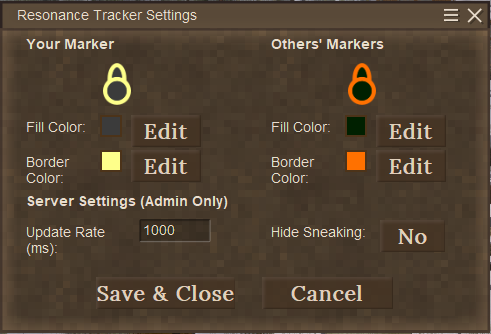
<div style="font-family: 'Inter', system-ui, -apple-system, sans-serif; color: #ece5db; background-color: #15110e; padding: 24px; border-radius: 8px; max-width: 800px; margin: 0 auto; border: 1px solid #2e241c;"><div style="background: linear-gradient(135deg, #32251a, #18110b); border: 2px solid #b08d57; border-radius: 8px; padding: 32px 24px; margin-bottom: 32px; text-align: center; box-shadow: 0 8px 24px rgba(0,0,0,0.5);"><h1 style="color: #e0a96d; margin: 0 0 8px 0; font-size: 32px; font-weight: bold; letter-spacing: 1.5px; text-shadow: 0 2px 4px rgba(0,0,0,0.8); font-family: 'Outfit', 'Inter', sans-serif;">RESONANCE TRACKER</h1> <div style="color: #b08d57; font-size: 13px; font-weight: bold; text-transform: uppercase; letter-spacing: 3px; margin-bottom: 16px;">Global Player Map Markers</div> <div style="width: 60px; height: 2px; background-color: #b08d57; margin: 0 auto 16px auto;"> </div> <p style="color: #cec4b7; margin: 0; font-size: 15px; line-height: 1.7; max-width: 620px; margin-left: auto; margin-right: auto; font-style: italic;">Locate other players in real-time on the Vintage Story map at any distance. Fully customizable with an interactive color picker and built with server performance in mind.</p> </div> <h2 style="color: #e0a96d; border-bottom: 2px solid #4e3f35; padding-bottom: 8px; font-size: 22px; margin-top: 32px; margin-bottom: 20px; text-transform: uppercase; letter-spacing: 1.5px; font-family: 'Outfit', 'Inter', sans-serif;">Core Features</h2> <div style="display: flex; flex-direction: column; gap: 14px;"> <div style="background-color: #1d1713; border-left: 4px solid #e0a96d; border-radius: 4px; padding: 16px; border-top: 1px solid #2e241c; border-right: 1px solid #2e241c; border-bottom: 1px solid #2e241c;"><strong style="color: #e0a96d; font-size: 16px; display: block; margin-bottom: 4px;">Unlimited Map Tracking Range</strong> <span style="color: #cec4b7; font-size: 14px; line-height: 1.5;">See player markers on the world map even if they are thousands of blocks away, bypassing the default server-side entity render limits.</span></div> <div style="background-color: #1d1713; border-left: 4px solid #b08d57; border-radius: 4px; padding: 16px; border-top: 1px solid #2e241c; border-right: 1px solid #2e241c; border-bottom: 1px solid #2e241c;"><strong style="color: #e0a96d; font-size: 16px; display: block; margin-bottom: 4px;">In-Game Color Customization</strong> <span style="color: #cec4b7; font-size: 14px; line-height: 1.5;">Customize both <strong>Fill</strong> and <strong>Border</strong> colors of your own marker and other players' markers through a bespoke HSV color picker.</span></div> <div style="background-color: #1d1713; border-left: 4px solid #a89470; border-radius: 4px; padding: 16px; border-top: 1px solid #2e241c; border-right: 1px solid #2e241c; border-bottom: 1px solid #2e241c;"><strong style="color: #e0a96d; font-size: 16px; display: block; margin-bottom: 4px;">Admin Configuration Controls</strong> <span style="color: #cec4b7; font-size: 14px; line-height: 1.5;">Allows server administrators to tweak the update transmission rate and toggle crouching stealth mechanics dynamically from within the game client.</span></div> <div style="background-color: #1d1713; border-left: 4px solid #4e3f35; border-radius: 4px; padding: 16px; border-top: 1px solid #2e241c; border-right: 1px solid #2e241c; border-bottom: 1px solid #2e241c;"><strong style="color: #e0a96d; font-size: 16px; display: block; margin-bottom: 4px;">Zero Conflict Map Components</strong> <span style="color: #cec4b7; font-size: 14px; line-height: 1.5;">Engineered using direct map components rather than hooking EntityMapComponent.Render, avoiding conflicts and NullReferenceExceptions with other map mods like AltMapIconRenderer.</span></div> </div> <h2 style="color: #e0a96d; border-bottom: 2px solid #4e3f35; padding-bottom: 8px; font-size: 22px; margin-top: 40px; margin-bottom: 20px; text-transform: uppercase; letter-spacing: 1.5px; font-family: 'Outfit', 'Inter', sans-serif;">Why is it lightweight?</h2> <p style="color: #cec4b7; font-size: 14px; line-height: 1.6; margin-bottom: 24px;">In vanilla Vintage Story, players are only displayed on the map if their entities are within the server's tracking range. Increasing this range (<code>DefaultEntityTrackingRange</code>) forces the server to process physics, AI, inventory sync, and state ticks for all far-away entities, which causes severe server lag.</p> <div style="background-color: #1d1713; border: 1px solid #2e241c; border-radius: 6px; padding: 20px; margin-bottom: 24px;"> <h3 style="color: #e0a96d; margin: 0 0 12px 0; font-size: 16px; text-transform: uppercase; letter-spacing: 1.1px; font-family: 'Outfit', 'Inter', sans-serif;">Entity Tracking Bypass</h3> <ul style="color: #cec4b7; font-size: 14px; line-height: 1.7; margin: 0; padding-left: 20px;"> <li style="margin-bottom: 8px;"><strong>Minimal Data Footprint:</strong> Instead of syncing the entire entity structure, the server gathers only three coordinates (X, Y, Z) and a rotation angle (Yaw) of active players.</li> <li style="margin-bottom: 8px;"><strong>Broadcasting Tick Rate:</strong> Runs a dedicated server tick listener. Admins can adjust this interval (e.g., set to 1000ms or 2000ms) to scale networking to their hardware capacity.</li> <li style="margin-bottom: 8px;"><strong>Cairo Surface Rendering:</strong> The client mod renders the player markers into custom textures using Cairo on a separate map layer. This avoids heavy constant translation tasks on the main rendering pipeline.</li> </ul> </div> <h2 style="color: #e0a96d; border-bottom: 2px solid #4e3f35; padding-bottom: 8px; font-size: 22px; margin-top: 40px; margin-bottom: 20px; text-transform: uppercase; letter-spacing: 1.5px; font-family: 'Outfit', 'Inter', sans-serif;">Configuration Guide</h2> <div style="background-color: #1d1713; border: 1px solid #2e241c; border-radius: 6px; padding: 20px; margin-bottom: 20px;"> <h3 style="color: #
Ratings & reviews
Sign in to leave a rating or comment.



