







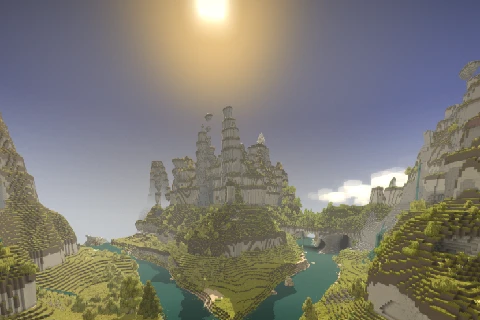
About Rivers
From Vintage Story ModDBAdds large scale moving rivers.
Adds rivers, which are flowing bodies of water, and lakes at the ends of them.
Rivergen uses 1-100 for config values and this one uses 0-1, if you have lakes everywhere reset your config.
Required Worldgen Settings
Oceans are required to generate rivers. 300-500% landcover scale and 50% landcover works good.
Where Does The River Go?
The river may come from in-land and flow out to an ocean.
Why are there lakes everywhere?
At some point this config setting was changed from an integer to a 0-1 percentage. Delete your config or fix it.
API
Once the first part of a chunk is generated (NewGenTerra) some data will be stored inside chunks IF a river is within range of them.
float[] flowVectors:
Stored inside the chunk at y0, or the bottom chunk of the column. Retrieved with GetModdata("flowVectors"), or ModDataCache.Get() which will not de-serialize it every time it's fetched.
Index is retrieved by localZ 32 + localX coordinates for the X vector, multiply the index by 2 for the Z vector.
Available on both the client and the server, used for rendering flowing water and physics.
ushort[] riverDistance:
Stored inside the column map chunk. Retrieved with GetModdata("riverDistance").
Index is retrieved by localZ 32 + localX.
Available on the server, has the distance in blocks from the edge of a river, or 0 if it's inside the river bank.
There is no caching for this, do not GetModdata in hot paths or cache it yourself.
Config, explanation of settings: https://github.com/glutzer/Rivers-Mod/blob/master/Rivers/src/RiverConfig.cs
Does not work with terra prety unless you also use watersheds which implements this in it's own way and is compatible.
Highlights
From source dataGame versions
Built for Vintage Story 1.19.0-pre.0.
Footprint
Rated a light load on a server.
Rivers on Nxeon
From our catalogue- One-click install
- Supported on Nxeon Vintage Story servers. We download it from Vintage Story ModDB, place it, and restart the server.
- Server side
- Required on the server
- Server load
- light
- Smallest plan we suggest
- Vintage Story — 1 GB (1 GB RAM). This follows our own load rating above, not a benchmark.
Run Rivers on a Vintage Story server
Pick a server or deploy a new one above; it is installed in one click.
What kind of mod it is
From the catalogWorld generation
Changes or adds to how new terrain, biomes and structures are created.
Runs on your server
From source side supportVintage Story ModDB lists Rivers as required on the server. Check its Vintage Story ModDB page to see whether players need it too.
Compatibility
- Game
- Vintage Story
- Runs on
- Serverrequired on the server
- Game versions
- 1.19.0-pre.0
Verified at the source
- ✓Vintage Story ModDBOfficial listing, checked 2026-09-24Open ↗
- ✓Authorsneezerstein, as published on Vintage Story ModDB
- ✓LicenseNot published by the sourceFree















