
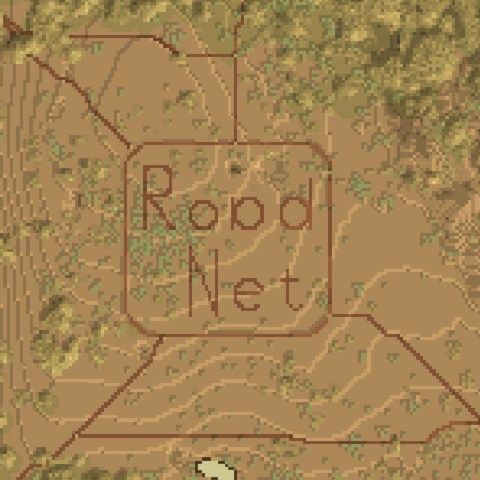
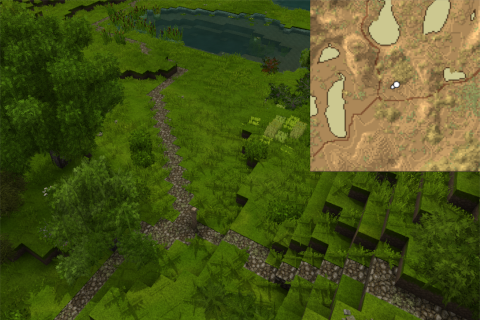
Road network - connected curved roads and bridges
Road Network allows you to spawn roads automatically, which snuggle to the terrain.
Description
<p>In my last playthrough, I always wanted to create a road network between our village and my mine, but never came around to become a road builder. So I created this mod for easy road creation (no cost in creative mod).</p> <p> </p> <p>First, create a "Base of Builder Team" (check manual for recipe) and place stone path blocks inside. (Pole needs to be right clicked after server start again). (Can be skipped in creative mod.)</p> <p>Afterwards, place two <a href="https://wiki.vintagestory.at/index.php/Signpost" target="_blank" rel="noopener">road signs</a> and right click one selecting "Create Road" to confirm you want to create this road. This automatically generates a road curving through the landscape from point A to point B.</p> <p>Alernatively you can select "Toggle Preview" to see a preview.</p> <div class="uploadprogress" style="display: none;">100%</div> <div class="uploadprogress" style="display: none;">100%</div> <p> </p> <p>Existing roads will be followed with priority and larger water surfaces will get a small bridge if there is no faster way around. The cost of traversing water ways ("WaterTranstionConst") can be changed in the config file "%appdata/VintageStoryData/ModConfig/roadnetwork_PathSearchParameter.json" (after starting a game with the mod once) and the config can be reloaded with /roadnetwork reload-config.</p> <p> </p> <p>In case something weired happens you can use the commands (<strong>.roadnetwork <subcommand></strong>) to toggle:</p> <ul> <li>a simple plane of the search area (<strong>toggle-planar</strong>)</li> <li>display the found surface area (<strong>toggle-surface</strong>) one above the actual found surface for better visiblity. My guess is this is the most helpfull to find blocks, which are falsely detected as ground blocks).</li> <li>the road preview (<strong>toggle-road</strong>) again one block above the actual road for better visibility</li> </ul> <p>All three options disable direct road placement on sneak right clicking sign. Only one visualization can be active at a time.</p> <p> </p> <div class="spoiler"> <div class="spoiler-toggle"><span style="font-size: 10pt;">Commands - mainly for visually debugging</span></div> <div class="spoiler-text"> <table style="border-collapse: collapse; width: 95.8204%; height: 375.334px;" border="1"> <tbody> <tr style="height: 23.8167px;"> <td style="width: 43.9559%; height: 23.8167px; text-align: center;"><span style="font-size: 14pt;"><strong>Command</strong></span></td> <td style="width: 55.9973%; height: 23.8167px; text-align: center;"><span style="font-size: 14pt;"><strong>Description</strong></span></td> </tr> <tr style="height: 23.8167px;"> <td style="width: 43.9559%; height: 23.8167px; text-align: center;"><span style="font-size: 14pt;">.help roadnetwork</span></td> <td style="width: 55.9973%; height: 23.8167px; text-align: left; padding-left: 40px;"><span style="font-size: 14pt;">get help/description in game</span></td> </tr> <tr style="height: 46.2px;"> <td style="width: 43.9559%; height: 46.2px; text-align: center;"><span style="font-size: 14pt;">.roadnetwork toggle-planar</span></td> <td style="width: 55.9973%; height: 46.2px; text-align: left; padding-left: 40px;"><span style="font-size: 14pt;">toggle plane in xz to get an overview about the space being searched</span></td> </tr> <tr style="height: 46.2px;"> <td style="width: 43.9559%; height: 46.2px; text-align: center;"><span style="font-size: 14pt;">.roadnetwork toggle-surface</span></td> <td style="width: 55.9973%; height: 46.2px; text-align: left; padding-left: 40px;"><span style="font-size: 14pt;">toggle detected surface (one above detected blocks for better visibility)</span></td> </tr> <tr style="height: 46.2px;"> <td style="width: 43.9559%; text-align: center; height: 46.2px;"><span style="font-size: 14pt;">.roadnetwork toggle-path</span></td> <td style="width: 55.9973%; text-align: left; height: 46.2px; padding-left: 40px;"><span style="font-size: 14pt;">toggle path preview (one above detected blocks for better visibility)</span></td> </tr> <tr style="height: 23.8167px;"> <td style="width: 43.9559%; text-align: center; height: 23.8167px;"><span style="font-size: 14pt;">.roadnetwork undo</span></td> <td style="width: 55.9973%; text-align: left; padding-left: 40px; height: 23.8167px;"><span style="font-size: 14pt;">undo last (default: 5) road creations (of this session)</span></td> </tr> <tr style="height: 23.8167px;"> <td style="width: 43.9559%; text-align: center; height: 23.8167px;"><span style="font-size: 14pt;">/roadnetwork reload-config</span></td> <td style="width: 55.9973%; text-align: left; padding-left: 40px; height: 23.8167px;"><span style="font-size: 14pt;">reloads all config files</span></td> </tr> <tr style="height: 46.2px;"> <td style="width: 43.9559%; text-align: center; height: 46.2px;"><span style="font-size: 14pt;">/roadnetwork print-searchPar[-raw]</span></td> <td style="width: 55.9973%; text-align: left; padding-left: 40px; height: 46.2px;"> <p><span style="font-size: 14pt;">prints the search parameter (excluding the comments with -raw)</span></p> </td> </tr> <tr style="height: 23.8167px;"> <td style="width: 43.9559%; text-align: center; height: 23.8167px;"><span style="font-size: 14pt;">/roadnetwork data print [full]</span></td> <td style="width: 55.9973%; text-align: left; padding-left: 40px; height: 23.8167px;"> <p><span style="font-size: 14pt;">print number of registered way points and roads, with extra full parameter get extended summary</span></p> </td> </tr> <tr style="height: 23.8167px;"> <td style="width: 43.9559%; text-align: center; height: 23.8167px;"><span style="font-size: 14pt;">/roadnetwork data backup</span></td> <td style="width: 55.9973%; text-align: left; padding-left: 40px; height: 23.8167px;"> <p><span style="font-size: 14pt;">back up data (way points & roads) into ModConfig/roadnetwork_bckp/</span></p> </td> </tr> <tr style="height: 23.8167px;"> <td style="width: 43.9
Download
No download link is available for this entry right now.
Ratings & reviews
Sign in to leave a rating or comment.



