
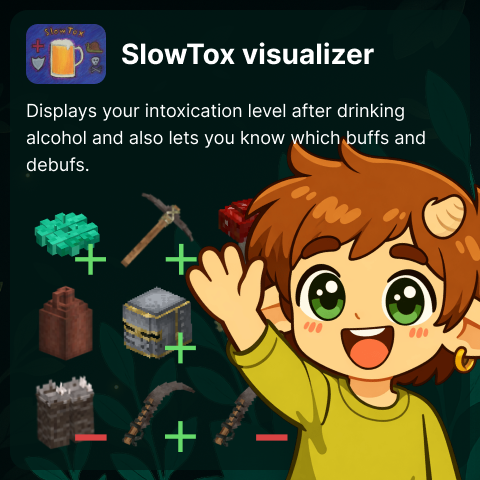
SlowTox visualizer
Visualization of buffs and debuffs applied to the player when drinking alcohol
Description
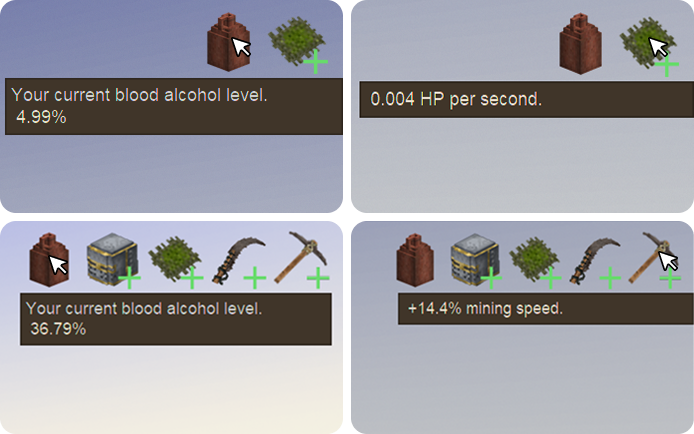
<p> </p> <div style="width: 100%; background: #01241E; color: #f8fbde; font-family: Segoe UI,Roboto,Arial,sans-serif; font-size: 15px; line-height: 1.55;"> <div style="max-width: 700px; margin: 0 auto; padding: 24px 16px 32px;"> <h1 style="margin: 0; font-size: 28px; font-weight: bold; color: #e4f265; line-height: 1.2;">SlowTox Visualized</h1> <p style="margin: 6px 0 12px; font-size: 14px; opacity: .92;">Clear intoxication and effect statuses for SlowTox.</p> <p style="margin: 0 0 12px; font-size: 12px; color: #e4f265; opacity: .95; font-weight: bold;">Public release stack: SlowTox Visualized 1.1.7 + Player Status HUD 1.2.0+</p> <div style="background: rgba(154,31,31,.28); border: 1px solid rgba(255,140,140,.5); border-left: 4px solid #ff8a8a; border-radius: 10px; padding: 10px 12px; margin: 0 0 12px;"><strong style="color: #ffd2d2;">Required dependencies:</strong> <a style="color: #e4f265; text-decoration: none;" href="https://mods.vintagestory.at/slowtox">SlowTox</a> + <a style="color: #e4f265; text-decoration: none;" href="https://mods.vintagestory.at/playerstatushud">Player Status HUD</a>. Without both, this mod will not work.</div> <div style="background: #03332B; border: 1px solid rgba(228,242,101,.18); border-radius: 12px; padding: 14px 16px; margin: 0 0 12px;"> <div style="font-size: 11px; text-transform: uppercase; letter-spacing: .08em; color: #e4f265; font-weight: bold; margin: 0 0 6px;">What this mod adds</div> <ul style="margin: 0; padding-left: 18px;"> <li style="margin: 0 0 6px;">Shows intoxication as a readable status icon (hidden at zero value).</li> <li style="margin: 0 0 6px;">Publishes active SlowTox effects as hoverable status icons with tooltips.</li> <li style="margin: 0;">Uses Player Status HUD rendering so all status mods share one strip.</li> </ul> </div> <div style="background: #03332B; border: 1px solid rgba(228,242,101,.18); border-radius: 12px; padding: 14px 16px; margin: 0 0 12px;"> <div style="font-size: 11px; text-transform: uppercase; letter-spacing: .08em; color: #e4f265; font-weight: bold; margin: 0 0 6px;">At a glance</div> <img style="display: block; width: 640px; max-width: 100%; height: 400px; object-fit: contain; border-radius: 10px;" src="https://i.ibb.co/4DjhDdd/example.png" alt="In-game example screenshot for SlowTox Visualized" /> <img style="display: block; width: 694px; max-width: 100%; height: auto; object-fit: contain; border-radius: 16px; margin-top: 10px;" src="https://i.ibb.co/B5NptwYb/example-hud-ezgif-com-video-to-gif-converter.gif" alt="Animated HUD preview for SlowTox Visualized" /> <p style="margin: 8px 0 0; font-size: 12px; opacity: .8;">In-game example screenshot.</p> </div> <div style="background: #03332B; border: 1px solid rgba(228,242,101,.18); border-radius: 12px; padding: 14px 16px; margin: 0 0 12px;"> <div style="font-size: 11px; text-transform: uppercase; letter-spacing: .08em; color: #e4f265; font-weight: bold; margin: 0 0 8px;">FAQ</div> <p style="margin: 0 0 4px; color: #e4f265; font-weight: bold;">Why is nothing visible after install?</p> <p style="margin: 0 0 10px;">Most often one required dependency is missing. Install/enable both SlowTox and <a style="color: #e4f265; text-decoration: none;" href="https://mods.vintagestory.at/playerstatusstrip">Player Status HUD</a>.</p> <p style="margin: 0 0 4px; color: #e4f265; font-weight: bold;">Why does intoxication icon disappear?</p> <p style="margin: 0 0 10px;">It is shown only when intoxication is above zero. At zero it is hidden by design.</p> <p style="margin: 0 0 4px; color: #e4f265; font-weight: bold;">Can I customize layout?</p> <p style="margin: 0 0 10px;">Yes, edit <span style="background: rgba(248,251,222,.12); padding: 2px 6px; border-radius: 4px; color: #f8fbde;">VintagestoryData/ModConfig/slowtoxvisualized-hudlayout.json</span>. Use the HUD wizard via <strong style="color: #e4f265;">Ctrl+F8</strong> for visual positioning.</p> <p style="margin: 0 0 4px; color: #e4f265; font-weight: bold;">Does this replace Player Status HUD?</p> <p style="margin: 0;">No. SlowTox Visualized provides status data; Player Status HUD renders the strip.</p> </div> <div style="background: #03332B; border: 1px solid rgba(228,242,101,.18); border-radius: 12px; padding: 14px 16px; margin: 0 0 12px;"> <div style="font-size: 11px; text-transform: uppercase; letter-spacing: .08em; color: #e4f265; font-weight: bold; margin: 0 0 6px;">Troubleshooting in 10 seconds</div> <ul style="margin: 0; padding-left: 18px;"> <li style="margin: 0 0 6px;">No icons: check 3 enabled mods (SlowTox + Player Status HUD + SlowTox Visualized).</li> <li style="margin: 0 0 6px;">Wrong position: open wizard with <strong style="color: #e4f265;">Ctrl+F8</strong> and save layout.</li> <li style="margin: 0 0 6px;">Weird/old assets: re-copy latest mod files.</li> <li style="margin: 0;">After lang/assets updates: do a full client restart.</li> </ul> </div> <div style="background: #0E2E27; border: 1px solid rgba(228,242,101,.42); border-radius: 14px; padding: 16px 18px;"> <p style="margin: 0 0 6px; font-size: 11px; text-transform: uppercase; letter-spacing: .09em; color: #e4f265; font-weight: bold;">Official server</p> <p style="margin: 0 0 8px; font-size: 20px; line-height: 1.2; color: #f8fbde; font-weight: bold;">Teotale Vintage Story Server</p> <p style="margin: 0 0 12px; opacity: .95;">SlowTox Visualized was built for the Teotale server ecosystem, where these status mechanics are part of core gameplay.</p> <p style="margin: 0 0 12px;">Join the community, read server rules, and start your next long-term world at <a style="color: #e4f265; text-decoration: none; font-weight: bold; border-bottom: 1px solid rgba(228,242,101,.55);" href="https://www.teotale.com">www.teotale.com</a>.</p> <div style="display: inline-block; background: rgba(228,242,101,.14); border: 1px solid rgba(228,242,101,.45); padding: 6px 10px; border-radius: 999px; font-size: 12px; color: #e4f265; font-weight: bold;">Made for Teotale • Tested on T
Ratings & reviews
Sign in to leave a rating or comment.



