
Description
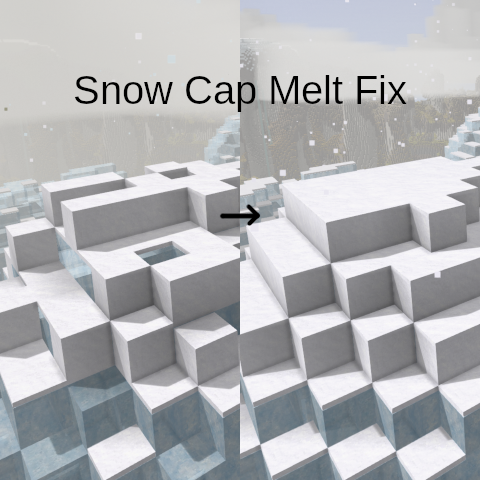
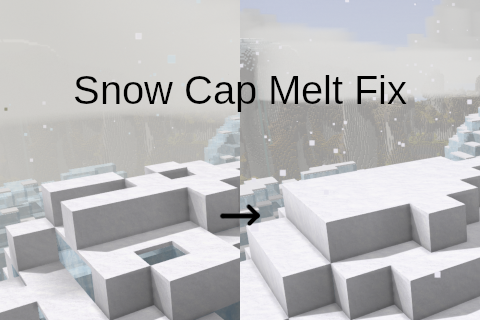
<h3>Tired of your mountains' snow caps being destroyed in 1.22? This mod is for you.</h3> <p> </p> <p>1.22 introduced a bug (<a href="https://github.com/anegostudios/VintageStory-Issues/issues/9539" target="_blank" rel="noopener">#9539</a>) that causes full snow blocks to melt. This mod is a fix for that issue until it is resolved by the developers.</p> <p><strong>This mod will not restore snow blocks that have already been removed, it will only prevent surviving ones from being deleted.</strong></p> <p>This mod also gives you the option to increase the vertical resolution of the snow accumulation system via the config option "SnowAccumVerticalResolution". This makes it so you can make snow accumulation more accurate to temperature changes at higher altitudes. The default value is 2, which is the same as vanilla. I recommend setting it to around 5 or 7. As long as you don't set it above 10 or so, the performance impact should be quite minimal, and going above 10 won't provide much benefit anyway.</p> <p><strong>Note that if you want to remove the mod and you have changed the snow accumulation vertical resolution, you MUST reset that value to 2 and load any worlds that you have used this mod with BEFORE removing the mod.</strong> You can remove the mod once you have loaded your worlds with the default mod config values. If you don't do this, the game will crash when loading your world (which can be fixed by re-enabling the mod and following the proper mod removal process). This is because the structure of snow accumulation data is edited by the mod and saved on world exit, and the unmodified game isn't set up to gracefully handle loading save data that doesn't fit the expected structure.</p> <p>As of v1.0.1, you can now tweak the game's altitude temperature adjustment mechanic. In the base game, temperature decreases at a rate of 1 °C every 6.375 blocks above sea level. The config options "ScaleAltitudeTemperatureAdjustment" and "AltitudeTemperatureAdjustmentRate" allow this to be modified. The first option controls whether the altitude temperature adjustment rate is scaled according to how much taller/shorter the world is compared to the default world parameters (max height 256, sea level 110). The height of the world above the sea level is used to determine scaling than the total world height. The second option allows the base altitude temperature adjustment rate to be changed, which can make the temperature slope much sharper or gentler. <em>Note that higher values will make the altitude temperature effect weaker, as the option is measured in blocks per °C (a value of 2 would be 2 blocks per degree, which is a much stronger effect than a value of 8 for 8 blocks per degree).</em> You can even set it to a (very unrealistic) negative value if you like the idea of mountains being warmer than sea level, and do a playthrough where you live on warm mountaintops amid a sea of arctic.</p> <p>The main purpose of the first option is to make taller (or shorter) worlds follow the same temperature distribution as the default world settings. It is fully compatible with mods like the <a href="https://mods.vintagestory.at/show/mod/46611" target="_blank" rel="noopener">Wilderlands Custom Sea Level mod</a>. The second option allows the height at which snow caps form to be changed. If you want snow caps to form at a specific height, first make a world with the world parameters you intend to use and note down what the temperature is at sea level (usually around 8-12 °C at the default latitude) as well as the y value of the sea level. Then subtract the y value of the sea level from the y value you want snow caps to form at, which gives us a value we can call the snow cap altitude. Snow caps form at around -10 °C, so we want an altitude temperature adjustment rate that will cause the temperature to be -10 °C at the snow cap altitude. To find this, we first need to subtract the snow cap temperature (-10) from the sea level temperature to get our temperature delta. We can then divide our snow cap altitude by our temperature delta to get the value for the altitude temperature adjustment rate option. Note that if you have the option to scale the adjustment rate on, you will need to figure out what the scale is for your world settings [(world height - sea level) / (256 - 110)] and divide the adjustment rate by that value, or disable adjustment rate scaling. You can also just mess with the adjustment rate until you get something you like the look of.</p> <p><strong>Once a world has been generated, the altitude temperature adjustment options cannot be changed for that world. Worlds generated before this mod will be locked to the vanilla values. If you remove this mod and load a world that was generated with non-default altitude temperature adjustment options, your world will revert to the vanilla values, which will cause sudden seams between old chunks (generated with the mod) and new chunks (generated without the mod).</strong></p> <p>Version 1.0.1 also makes the mod able to run on the client and introduced a patch to a particular shader that interacts with the altitude temperature adjustment mechanic. If you run into any issues using this mod with shader mods, try disabling "PatchColormapShader" in the client config. Clients still don't need to mod to join a server that has it, and a client with the mod can join a server that doesn't have it.</p> <p> </p> <div class="spoiler"> <div class="spoiler-toggle">Technical details</div> <div class="spoiler-text"> <p>The issue is caused by an interaction between the snow accumulation system and the snow block class. The snow accumulation system, when setting (placing or removing) snow layers, asks each surface block for a snow covered variant. If the block has one, the block is replaced by the appropriate variant, otherwise a snow layer is added on top of the block. 1.22 made the snow block class provide snow layers as its snow covered va
Ratings & reviews
Sign in to leave a rating or comment.



