
Trait Tailor
Remove or add and customize individual attributes to player's class
Description
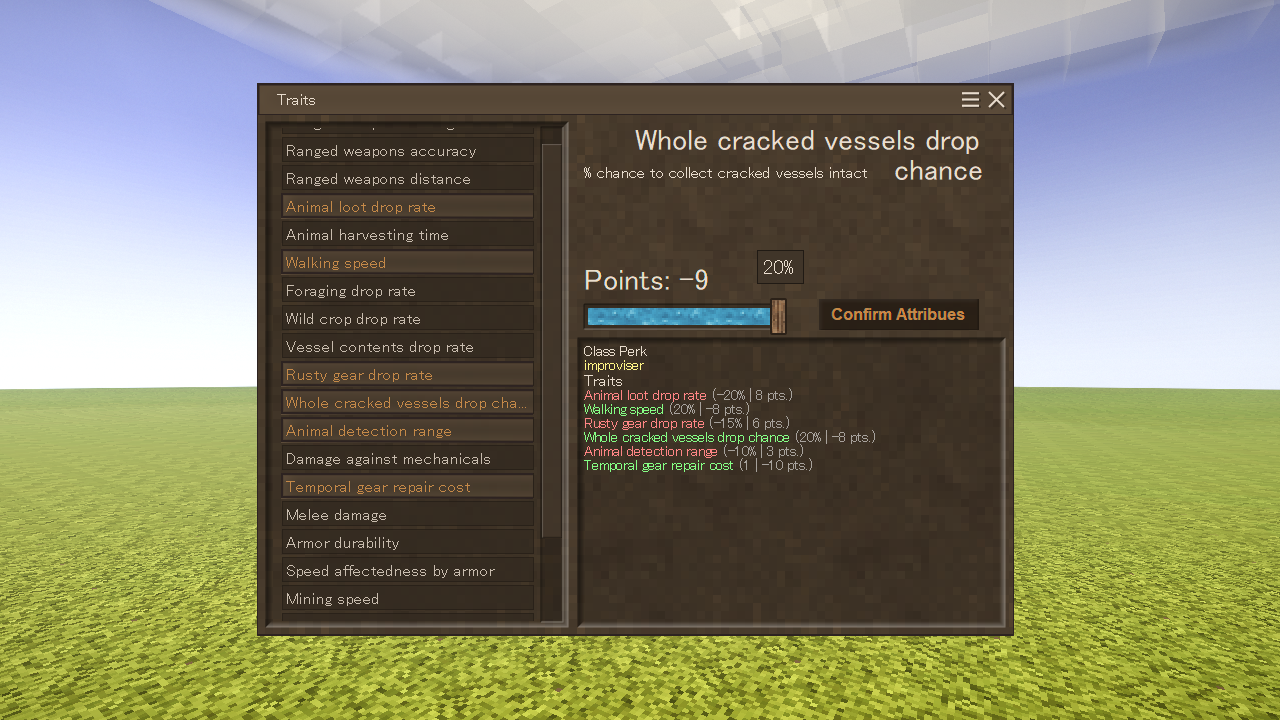
<p>Change the attributes that come pre-selected with each class.<br /><span style="color: #3598db;"><em>Comes with a server-side config for balancing the user experience.</em></span><br /><br />Adds a command <code>.ttailor</code> that allows players for one time customization of class attributes.<br />Admins can use <code>/player <playername> atto</code> to allow the player to customize thier attributes one more time.<br /><br /><strong><span style="color: #e74c3c;">Important!</span></strong> Current workaround for showing selected attributes is using a command <code><span style="text-decoration: underline;">.ttailor show</span></code><br /><br /></p> <div class="spoiler"> <div class="spoiler-toggle">Config explanation</div> <div class="spoiler-text"> <p>With these config settings you can limit which attributes is the player able to choose<br />and how much big of a bonus or penalty is the player able to apply.<strong><br /><br />Inside ModConfig\TraitTailorConfig.json</strong></p> <ul> <li><strong>classPerks</strong></li> </ul> <p>First value(<em>key</em>) is the ingame code name of the class.<br />Second value(<em>value</em>) is the ingame code name of the attribute.</p> <p>In the current version of the mod the default configuration assigns unique class attribute<a href="#class_unique-att"><sup>[1]</sup></a> based on the selected class by the player. (exluding commoner)<br />Currently you can only assign one free attribute to class and it's <em>valHundredths</em> will be 1.</p> <ul> <li><strong>attributeValues</strong></li> </ul> <p>By default attributeValues is a list composed of all vanilla attributes.</p> <ul> <li>Names <ul> <li>Code: The ingame code name<a href="#code_name"><sup>[2]</sup></a> of the attribute</li> <li>Name: Easier to read name of the attribute that will be shown to the player</li> </ul> </li> <li>Bools (<em>true or false</em>) <ul> <li>positiveValue: Only put false if the attribute being negative is actaully positive for the player<br />(e.g. attribute <em>armorWalkSpeedAffectedness </em>being negative is actually slowing the player <strong>less</strong> while wearing armor if its negative)<br /><br /></li> <li>percentileValue: Only false if the attribute affects the player stats by a rational number (e.g. 5, 1.5, 0.75) instead of %<br />(e.g. attribute maxhealthExtraPoints adds or removes set number from the deafult player health value so its <em>percentileValue</em> is false)<br /><br /></li> </ul> </li> <li>Attribute value <ul> <li>valHundredths: If the <em>percentileValue</em> is:<br /><strong>true</strong>: 0.01 will be 1% and 0.15 will be 15%<br /><strong>false</strong>: is for attributes that read values as rational number or integer, 1 will be 1, 2.5 will be 2.5<br /><br /></li> </ul> </li> <li>Slider values<br /> <ul> <li>stepRangeNeg: how many times can the player move the slider under the value of 0</li> <li>stepRangePos: how many times can the player move the slider over the value of 0<br />Both accept only full positive numbers (To set only positive or negative range set the other value to 0)<br />(e.g. for attribute maxhealthExtraPoints <em>valHundredths</em>=0.5, <em>stepRangeNeg</em>=<strong>3</strong>, <em>stepRangePos</em>=<strong>8</strong><br />With those settings the slider for this attribute can be moved maximally <strong>3</strong> times from 0 to the left <br />resulting in possible range of attribute values being -0.5*1=<span style="text-decoration: underline;">-0.5</span>, -0.5*2=<span style="text-decoration: underline;">-1</span> and finally -0.5*<strong>3</strong>=<span style="text-decoration: underline;">-1.5</span><br />or <strong>8</strong> times to the right resulting in maximal possible value being 0.5*<strong>8</strong>=<span style="text-decoration: underline;">4</span>)<br /><br /></li> <li>pointValue: Accepts only positive integers.<br />This point value is multiplied by each "step" of selected attribute.<br />(For each "step" to the left on the slider, the points will be multiplied by -<em>n</em> "steps" to the left or by +n when moving to the right<br />unless <em>positiveValue </em>is set to <strong>false</strong>)<br /><br />In order for the player to finalize his selection, the sum of points must be 0 or higher<br /><br /></li> <li>stepSetVal: leave at 0, it is set to the multiplied <em>valHundredths </em>when using the slider</li> </ul> </li> <li><strong>Vanilla attributes table<br /></strong>You can safely remove any whole <strong>{} </strong>from inside <strong>attributeValues </strong>list[].<br />In case you want to re-add any attribute or just change default values remeber <br />to set <em>positiveValue </em>and <em>percentileValue </em>according to the table below </li> </ul> <table style="border-collapse: collapse; width: 41.7163%; height: 374px;" border="1"> <tbody> <tr style="height: 17px;"> <td id="code_name" style="width: 25%; height: 17px; text-align: center;"><strong>Code</strong></td> <td style="width: 16%; height: 17px; text-align: center;"><strong>positiveValue</strong></td> <td style="width: 17.5714%; height: 17px; text-align: center;"><strong>percentileValue</strong></td> <td style="width: 41.4286%; height: 17px; text-align: center;"><strong>additional info</strong></td> </tr> <tr style="height: 17px; background-color: #bdc3c7;"> <td style="width: 25%; height: 17px;">rangedWeaponsDamage</td> <td style="width: 16%; height: 17px;">true</td> <td style="width: 17.5714%; height: 17px;">true</td> <td style="width: 41.4286%; height: 17px;"> </td> </tr> <tr style="height: 17px;"> <td style="width: 25%; height: 17px;">rangedWeaponsAcc</td> <td style="width: 16%; height: 17px;">true</td> <td style="width: 17.5714%; height: 17px;">true</td> <td style="width: 41.4286%; height: 17px;"> </td> </tr> <tr style="height: 17px; background-color: #bdc3c7;"> <td style="width: 25%; height: 17px;">bowDrawingStrength</td> <td style="width: 16%; height: 17px;">true</td> <td styl
Download
No download link is available for this entry right now.
Ratings & reviews
Sign in to leave a rating or comment.



