About Vanity
From Vintage Story ModDBMake your gear invisible to show off your style!—or just run around naked, I guess?
Make your gear invisible to show off your style!—or just run around naked, I guess?
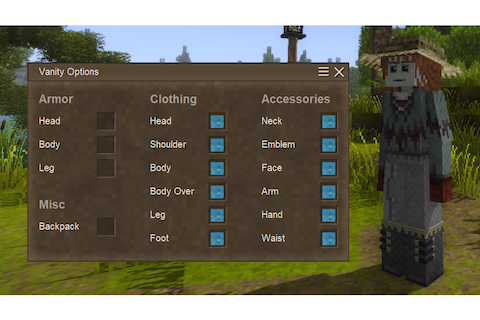
Press V to open the Vanity Options menu, where you can individually hide your armor, clothing, accessories, and backpack. Vanity is required on the server for these visibility settings to update between players.
Alternatively, Vanity options can be modified with the following command:
.vanity <show/hide/toggle> <slot>
Server Configuration
Wearable hiding can be restricted by modifying ModConfig/Vanity-Server.json. By default, all values are set to true, allowing all wearables to be hidden.
Highlights
From source dataGame versions
Built for Vintage Story 1.18.8.
Footprint
Rated a light load on a server.
Vanity on Nxeon
From our catalogue- One-click install
- Supported on Nxeon Vintage Story servers. We download it from Vintage Story ModDB, place it, and restart the server.
- Server side
- Required on the server
- Server load
- light
- Smallest plan we suggest
- Vintage Story — 1 GB (1 GB RAM). This follows our own load rating above, not a benchmark.
Run Vanity on a Vintage Story server
Pick a server or deploy a new one above; it is installed in one click.
What kind of mod it is
From the catalogCosmetics, visuals & audio
Skins, textures, shaders, models and sound — how the game looks and sounds.
Runs on your server
From source side supportVintage Story ModDB lists Vanity as required on the server. Check its Vintage Story ModDB page to see whether players need it too.
Compatibility
- Game
- Vintage Story
- Runs on
- Serverrequired on the server
- Game versions
- 1.18.8
Verified at the source
- ✓Vintage Story ModDBOfficial listing, checked 2026-09-24Open ↗
- ✓AuthorDarkbrook, as published on Vintage Story ModDB
- ✓LicenseNot published by the sourceFree