
VSPaint (No longer maintained)
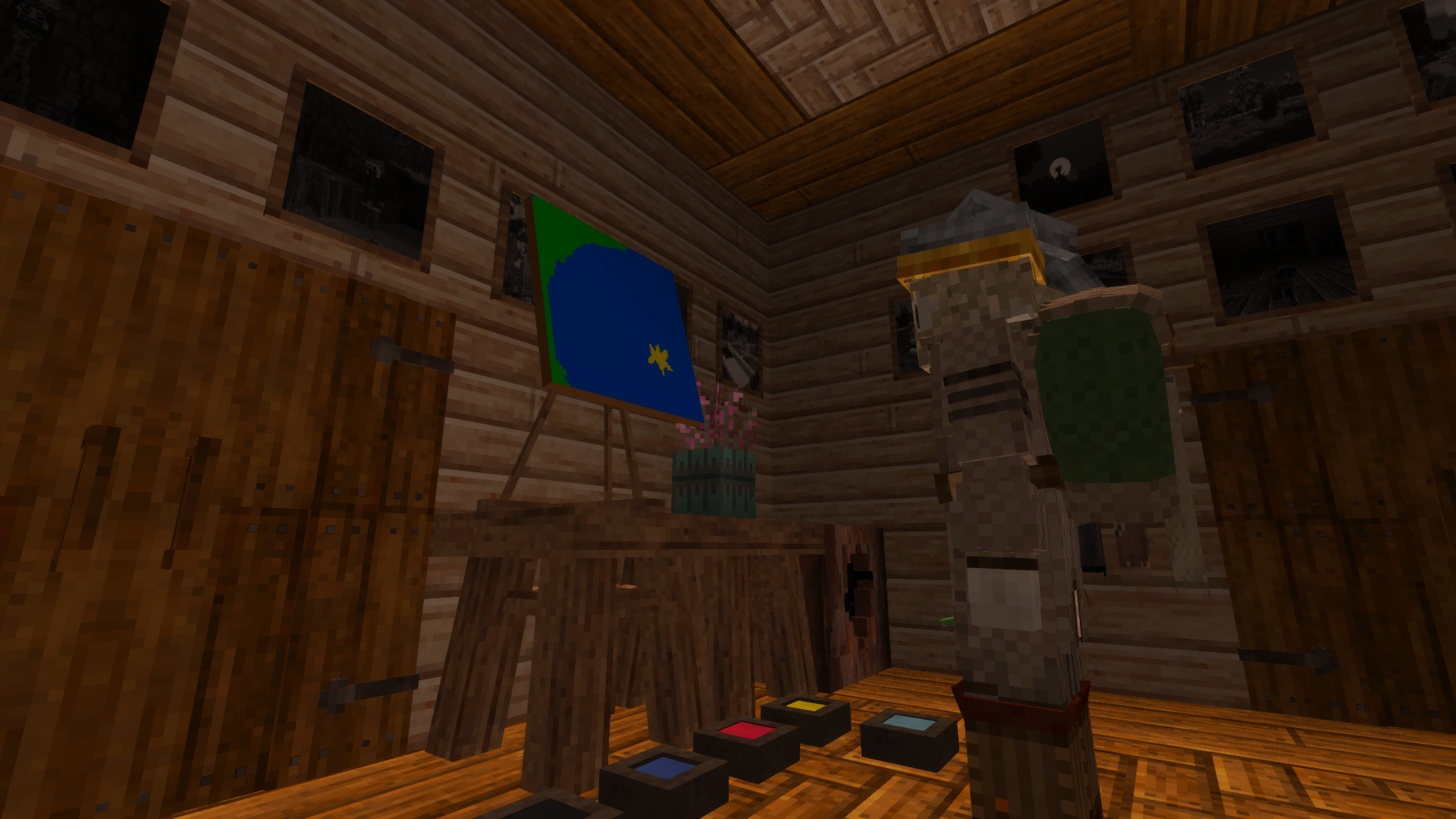
Adds a painting easel and brushes that lets you make custom paintings that show in game!
Description
<h1 style="text-align: center;"><strong class="font-semibold">MOD IS NO LONGER MAINTAINED!!</strong></h1> <h2 style="text-align: center;"><strong class="font-semibold">Really, you all should go and use <a href="https://mods.vintagestory.at/vintagecanvas">Vintage Canvas!</a></strong></h2> <p> </p> <p><strong class="font-semibold">Summary: </strong>VSpaint adds a fully functional painting system to Vintage Story, letting you create original artwork and display it in the world.</p> <p>Craft an easel, set up your canvas, and open the painting interface to draw pixel-by-pixel using a palette of paints you mix yourself. When you're happy with your work, finish the painting and hang it on the wall!</p> <p><strong class="font-semibold">Features:</strong></p> <ul class="list-disc list-outside space-y-1 ml-6"> <li>Pixel art painting interface with a full color palette</li> <li>Color Palette is 'accessed' by crafted paintbrushes dipped in dye (You can hold multiple ones to access more colors at a given time)</li> <li>Textures you paint display in the world.</li> <li>Paintings persist across sessions and sync in multiplayer</li> <li>Recipes for alternate dyes for the primary colors and shades so you can get started faster, with optional A Culinary Artillery integration for egg yolk-based binders (just like they used back in the middle-ages!)</li> <li>Handbook entries to get you started</li> </ul> <p> </p> <p><strong class="font-semibold">How it works:</strong></p> <p>To get started you will need to craft a Easel, a Blank Canvas, and at least one Paintbrush....you will also need some dyes to dip your brushes in.<br /><br />Once you have everything, place your easel and then add your blank canvas to it. Dip your paintbrush into some dye to get started (without this, you can't paint!) and then right click to open the GUI.<br />You can have multiple brushes with different colors in your hotbar for ease of access.<br />The color selection pallet will automatically select the color on the brush in your active slot and allow you to select any other colors on other brushes on your hotbar while the GUI is open.<br /><br />When you want a different color, you can dip your brush in water to wash out the current color and pick a different one.<br /><br />While painting you can click "save" to update what displays on the canvas as you go for others to see. The display will also update when you close the GUI.<br /><br />When you are done you can press finish and then take the painting off the easel and hang it up on a wall for all to see.<br /><br /><strong>Paint Mixing: </strong></p> <p>This mod makes use of existing vanilla dyes as the basis for its color pallet, but you can dip your brush into multiple dyes to get different colors.</p> <p>This allows you to mix primary colors into secondary colors (red, blue, yellow into green, purple, and orange), and then mixing further makes brown. Blue and green makes cyan (yes, that's a stretch but....we needed something). You can dip some colors in black to get a darker version of the color (red to dark red). You can also dip some colors in white to either revert from the dark version to normal or, in the case of red, make pink.</p> <p> </p> <p><strong>Config:</strong></p> <p>Within the modconfigs folder you will find vspaint.json, inside you will find two new options:</p> <p><code>{</code><br /><code>"EnableDryingMechanics": false,</code><br /><code>"DryAfterHours": 3.0</code><br /><code>}</code></p> <p><br />If you are having issues with the drying mechanics or just don't want them, you can turn them off. You can also tweak them instead.</p> <p><strong>Roadmap:</strong></p> <ul> <li>Pastel colors: I'll try to add either pastel or other variations on the current pallet if possible. The trick right now is keeping the colors and resolution in balance so the texture size is as optimized as possible, but I expanding the color options is on my mind.</li> <li>Frames: The whole time I was working on this, I was thinking about adding in frames. Just need to make some in the modeler and work that <p>tessellation magic. Can't promise when these will be introduced, but soon.</p> </li> <li>Different size Canvas: right now, the one size is all we have, but I do have the intention (now that someone mentioned it on redit) to make different sizes. These will probably be smaller with the current being the largest, but I will try to make it mosaic friendly (so you can kinda choose where the painting displays on a given block-face....so you can use smaller ones to make larger overall paintings).</li> <li>Different mediums: Charcoal pencils for black, wax crayons for a longer-lasting color instead of having to dip dyes (actually....this is....not that hard to make. I'll probably knock this out soon lol), and stuff like that.</li> <li>Saving textures externally and making transferring those textures or even importing some easy as can be. This is pretty high priority on my list. Right now, the texture stuff is functioning by indexing the pixel data into save serialization...so a maybe a secondary export function will be needed.</li> </ul> <p><strong><br />Notes: </strong>This mod has been on the build for me for a while, since I found inspiration from <a href="https://mods.vintagestory.at/show/mod/42149">Wanderer's Sketchbook</a> and <a href="https://mods.vintagestory.at/collodion">Collodion</a>. Those showed me that we could have a drawing interface in the game, and that custom textures could be displayed even in a multiplayer game. From there it was digging around and breaking things until I got the code working to get the drawing stuff over to the displaying textures stuff. After many hours of work, two instances of crashing the whole block-gen system with a bloated log that recycle bin was like "nah, get that out of here", and a lot of "why isn't this facing working? every other block does this fine, why am I not getting this?" until finally it worked.....and then a s
Download
No download link is available for this entry right now.
Ratings & reviews
Sign in to leave a rating or comment.



