
VSVanillaPlus
Quality of life improvements that enhance Vintage Story while keeping the core experience.
Description
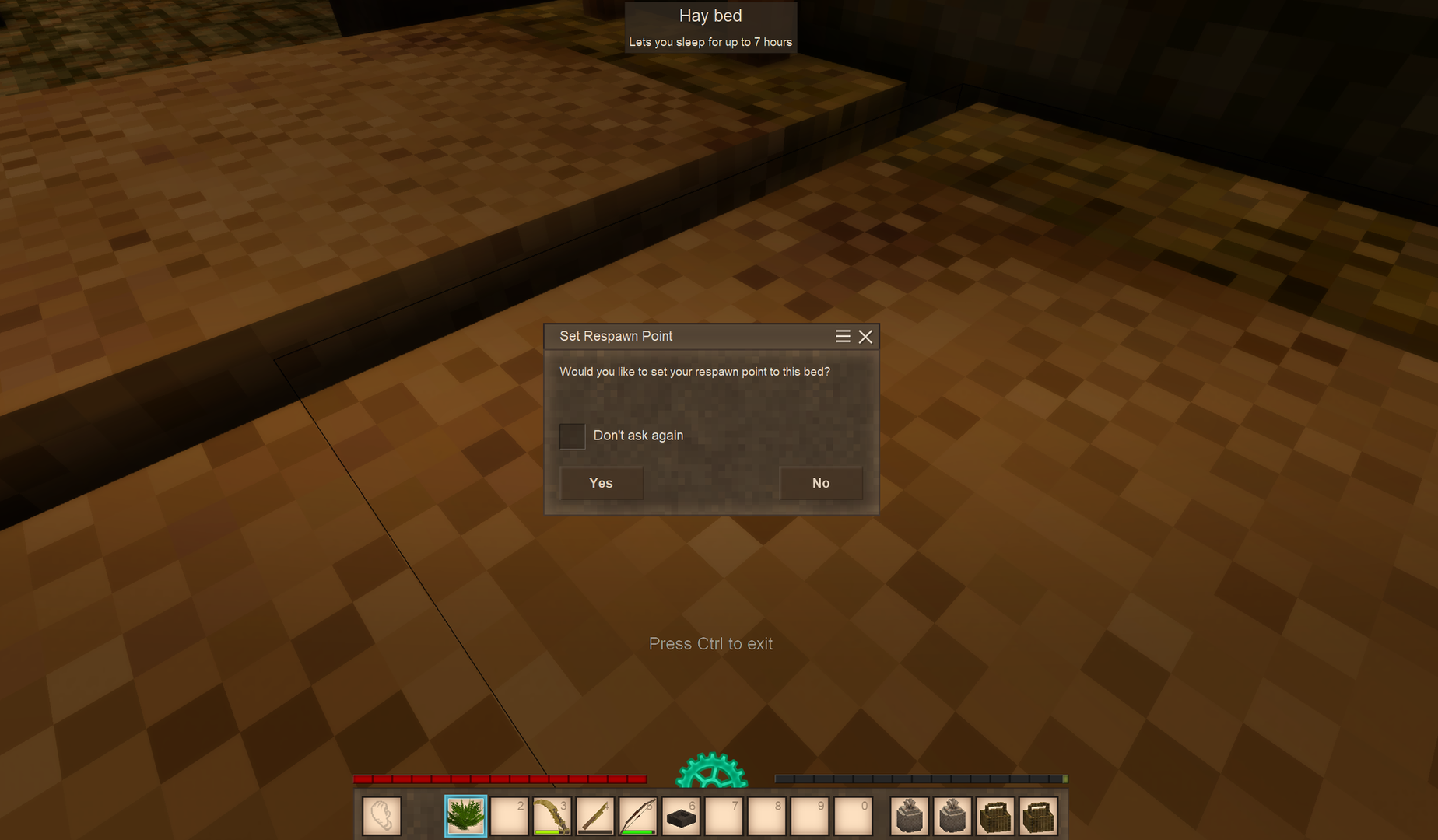
<p>VSVanillaPlus provides a series of quality of life improvements to Vintage Story, with a focus on keeping the game as close to the core experience as possible while improving general gameplay. The mod is designed with an extensible architecture that makes it easy to add new features without requiring major changes to the core system.</p> <p> </p> <p>This will be an ongoing project, adding a series of QoL improvements to the game. The specific goal being to smooth out some of the rough edges.</p> <h2>In Development</h2> <p><em><strong><span style="color: #e74c3c;">IMPORTANT NOTE:</span> Always backup you save files, when upgrading or testing a new version of a plugin.</strong></em></p> <hr /> <p> </p> <p>To Be Determined</p> <h1>Current Features</h1> <hr /> <h3>Discord Integration</h3> <p><strong>Status:</strong> ✅ Available<br /><strong>Category:</strong> Server Administration & Communication<br /><strong>Documentation:</strong> <a href="https://github.com/DarkMatterProductions/VSVanillaPlus-Public/wiki/Discord-Integration">Documentation Wiki</a></p> <h3>Description</h3> <p>A Discord bot integration that bridges Vintage Story server activity with a Discord Server. Provides bidirectional chat relay, rich event notifications, player account linking, and Discord slash commands for server management — all configurable from an in-game admin panel.</p> <h3>Implemented Features</h3> <ul> <li><strong>Bidirectional Chat Relay:</strong> <ul> <li>VS global chat messages are relayed to a designated Discord channel</li> <li>Discord channel messages appear in VS global chat</li> <li>Identity-preserving relay — linked players' VS messages appear in Discord under their own Discord display name and avatar via webhooks</li> </ul> </li> <li><strong>Player Group Channel Integration:</strong> <ul> <li>Link any VS player group to a dedicated private Discord channel with <code>/dcchannel connect</code></li> <li>Automatically provisions a General role, a Manager role, and a private text channel</li> <li>Group chat is relayed bidirectionally between the VS group and its Discord channel</li> <li>Custom message color per group; optional auto-deletion of Discord resources on disconnect</li> </ul> </li> <li><strong>System Event Notifications:</strong> <ul> <li>Server start, server ready, server shutdown</li> <li>New player first-join, player join, player leave, gamemode change</li> <li>Each event type independently toggled in the Events sub-dialog</li> </ul> </li> <li><strong>Game Event Notifications:</strong> <ul> <li>Player deaths with damage source and creature name</li> <li>Player respawns</li> <li>Temporal storm warnings (approaching, imminent, waning) across all storm severity levels</li> </ul> </li> <li><strong>Discord Slash Commands:</strong> <ul> <li><code>/players</code> — list online players with optional ping</li> <li><code>/date</code> — show the current in-game calendar date</li> <li><code>/serverinfo</code> — show VS version and loaded mods</li> <li><code>/announce</code> — broadcast a colored message to all in-game players (moderation required)</li> <li><code>/shutdown</code> — shut down the server with a confirmation button (moderation required)</li> <li><code>/setchannel</code> — change the chat relay channel (admin only)</li> <li><code>/auth connect|disconnect</code> — link or unlink a Discord account to a VS player account</li> <li><code>/dcmanage</code> — manage group roles and promote players to group manager</li> </ul> </li> <li><strong>Account Linking:</strong> <ul> <li><code>/dclink <token></code> in-game and <code>/auth connect</code> in Discord to link accounts</li> <li><code>/dcunlink</code> to remove the link</li> <li>Linked accounts enable identity-preserving relay and group manager role assignment</li> </ul> </li> <li><strong>Admin Settings Panel:</strong> <ul> <li>In-game multi-panel dialog (requires <code>controlserver</code> privilege)</li> <li>Main panel: chat relay toggle, chat color, bot connect/disconnect, command registration</li> <li>Server Settings sub-dialog: bot token, channel IDs, guild ID, webhook settings, server address</li> <li>Events sub-dialog: per-event toggle switches for system and game notifications</li> <li>Roles sub-dialog: admin role ID and bot role ID configuration</li> </ul> </li> <li><strong>Single-Player Support:</strong> <ul> <li>All admin panel actions work in single-player by bypassing the suspended server loop</li> </ul> </li> </ul> <p> </p> <hr /> <h3>Core Framework</h3> <p><strong>Status:</strong> ✅ Available<br /><strong>Category:</strong> Library</p> <div class="markdown-heading"> <h3 class="heading-element">Overview</h3> </div> <p>The core framework is designed to simplify the onboarding of new features within VSVanillaPlus. It standardizes the process of loading features and managing configuration as well as state changes. </p> <hr /> <h3>Feature Toggle</h3> <div class="markdown-heading"> <p><strong>Status:</strong> ✅ Available<br /><strong>Category:</strong> Control</p> <div class="markdown-heading"> <h3 class="heading-element">Overview</h3> </div> <p>Grants the ability to select which feature to have running on the server. This allows a more customizable environment for server administrators. Ability to Enable/Disable features is granted off the "<strong>controlserver</strong>" permission.</p> <hr /> <h3>Bed Respawn</h3> </div> <p><strong>Status:</strong> ✅ Available<br /><strong>Category:</strong> Quality of Life</p> <div class="markdown-heading"> <h3 class="heading-element">Overview</h3> <a id="user-content-overview" class="anchor" href="https://github.com/DarkMatterProductions/VSVanillaPlus/wiki/Available-Features#overview" aria-label="Permalink: Overview"></a></div> <p>The Bed Respawn feature addresses the inconvenience of having a static respawn loca
Ratings & reviews
Sign in to leave a rating or comment.



