
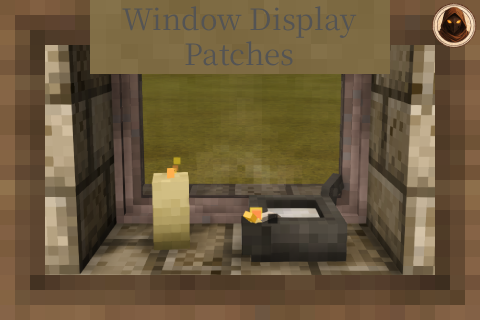
Window Display - Patches
Used to add custom transforms and to enable the particles of items on display
Description
<div style="background-color: #1e1e1e; color: #f0f0f0; font-family: 'Noto Serif HK', Georgia, serif; padding: 20px; line-height: 1.6; max-width: 1000px; margin: 20px auto;"><div style="border-bottom: 3px solid #b5893d; padding-bottom: 20px; margin-bottom: 30px; text-align: center;"><h1 style="color: #b5893d; font-size: 2.5rem; margin: 0 0 10px 0; text-transform: uppercase; letter-spacing: 2px;">Window Display - Patches</h1> <p style="color: #b0b0b0; margin: 0 0 12px 0;">Makes items sit properly on a window sill, gives candles their flame,<br>and converts your old windows across</p> <p style="color: #b0b0b0; margin: 0;">To see what has been patched, check the changelog</p> </div> <div style="background-color: rgba(200,90,60,0.12); border-left: 4px solid #c85a3c; padding: 15px; margin: 0 0 25px 0; border-radius: 0 6px 6px 0;"><strong style="color: #e08a63;">The library has been renamed - read before updating.</strong> This mod is unchanged in what it does, but the library it needs is now <strong>Universal Display Lib</strong>, and its mod id has changed from <code style="background: #2a2a2a; padding: 1px 4px; border-radius: 3px; color: #d1a457;">windowdisplaylib</code> to <code style="background: #2a2a2a; padding: 1px 4px; border-radius: 3px; color: #d1a457;">universaldisplaylib</code>.<br><br><strong style="color: #e08a63;">Delete the old <code style="background: #2a2a2a; padding: 1px 4px; border-radius: 3px; color: #d1a457;">windowdisplaylib</code> zip</strong> and install Universal Display Lib in its place. Do not keep both - two libraries claiming the same block classes means neither will load. Update this mod and Window Display at the same time, since both now ask for the new id.<br><br>Server owners: the library is needed on client and server alike, so everyone connecting has to update too. Anything that fetches mods by id wants <code style="background: #2a2a2a; padding: 1px 4px; border-radius: 3px; color: #d1a457;">universaldisplaylib</code> from now on.<br><br><strong style="color: #d1a457;">Your worlds are safe.</strong> No block codes changed and no recipes changed - including the conversion recipes below. Everything you have placed comes back exactly as you left it.</div> <div style="background-color: #2a2a2a; border: 1px solid #7a5c28; padding: 20px; margin-bottom: 30px; border-radius: 6px;"> <h2 style="color: #b5893d; margin: 0 0 20px 0; font-size: 1.5rem; text-transform: uppercase; font-weight: bold; text-decoration: underline;">Required Mods</h2> <p style="color: #b0b0b0; font-size: 0.85rem; text-transform: uppercase; letter-spacing: 1px; margin: 0 0 10px 0;">Required</p> <div style="margin-bottom: 20px;"><a style="display: inline-block; background-color: #3a3a3a; border: 1px solid #b5893d; color: #d1a457; padding: 8px 14px; margin-right: 10px; margin-bottom: 10px; text-decoration: none; font-weight: bold; border-radius: 4px; font-size: 0.95rem;" href="https://mods.vintagestory.at/universaldisplaylib" target="_blank" rel="noopener">Universal Display Lib</a></div> <p style="color: #b0b0b0; font-size: 0.85rem; text-transform: uppercase; letter-spacing: 1px; margin: 0 0 10px 0;">You will want</p> <div style="margin-bottom: 10px;"><a style="display: inline-block; background-color: #3a3a3a; border: 1px solid #7a5c28; color: #d1a457; padding: 8px 14px; margin-right: 10px; margin-bottom: 10px; text-decoration: none; font-weight: bold; border-radius: 4px; font-size: 0.95rem;" href="https://mods.vintagestory.at/windowdisplay" target="_blank" rel="noopener">Window Display</a></div> <p style="color: #b0b0b0; font-size: 0.9rem; margin: 0;">This mod only supplies data. Window Display is what gives you the windows to put it on.</p> </div> <div style="margin-bottom: 30px;"> <h2 style="color: #b5893d; margin-top: 40px; margin-bottom: 20px; font-size: 1.5rem; text-transform: uppercase; font-weight: bold; text-decoration: underline;">What It Does</h2> <h3 style="color: #b5893d; font-size: 1.25rem; margin-top: 30px; margin-bottom: 10px; text-transform: uppercase; border: none; font-weight: bold; text-decoration: underline;">Makes items fit</h3> <p>Most things already work on a window without any help. If the game has ever told it how to sit on a shelf, it inherits that and turns up at the right size on its own.</p> <p style="color: #b0b0b0;">This mod is for the ones that do not. Two cases come up:</p> <ul style="list-style-type: none; padding-left: 0; margin: 10px 0;"> <li style="position: relative; padding-left: 25px; margin-bottom: 10px;"><span style="color: #b5893d; font-weight: bold; font-size: 1.2rem; position: absolute; left: 5px; top: -2px;">•</span><strong>Items with no display data at all.</strong> These cannot be put on a window in the first place - the game simply refuses them. A lot of mod items fall in here, since their authors had no reason to think about shelves. A patch is what makes them placeable.</li> <li style="position: relative; padding-left: 25px; margin-bottom: 10px;"><span style="color: #b5893d; font-weight: bold; font-size: 1.2rem; position: absolute; left: 5px; top: -2px;">•</span><strong>Items that are simply too big.</strong> Plenty of things are sized for a shelf or the ground and look ridiculous on a window ledge, or will not fit at all. These get scaled and measured to something that suits a sill.</li> </ul> <p style="color: #b0b0b0;">Sizes are worked out from the actual model and then checked by eye in game, not guessed. Where an item family shares one entry - all the antlers, all the amulets - it is sized off the largest one so nothing overhangs.</p> <h3 style="color: #b5893d; font-size: 1.25rem; margin-top: 30px; margin-bottom: 10px; text-transform: uppercase; border: none; font-weight: bold; text-decoration: underline;">Gives candles their flame</h3> <p>Put a candle or an oil lamp on a sill and it lights the room either way - that part is Universal Display Lib and needs nothing from here. What this mod adds is the <strong>flame and the smoke</strong>: the ac
Ratings & reviews
Sign in to leave a rating or comment.



