
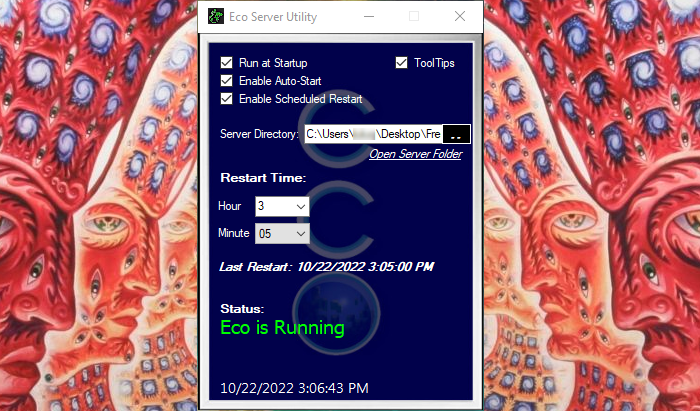

AlteredEco - Server Utility
 By AlteredMinds
3rd party utility designed to run along side the server to auto-restart the server/system, start the server upon system reboot and recover from crashes. (Windows Only)
Description
This utility is designed for server owners who host their own server. It enables you to manage restarting the server and system at scheduled times, recovering from server crashes and starting the server after the system has restarted. (Windows Only)
INSTALLATION:
- Download and open the archive
- Drag/Drop EcoServerUtility.exe into a directory
- Open EcoServerUtility.exe
HOW TO USE:
- Run at Startup - The Utility will start when Windows starts.
- Enable Auto-Start - EcoServer.exe will start if it is not running (Useful for crash recovery and starting the server at startup if you have "Run at Startup" also selected.)
- Enable Scheduled Reboot - Causes the server to shutdown and restart Windows.
- Server Directory - Should be the path to the folder where EcoServer.exe is located. (ex. "C:\Users\AlteredMinds\Desktop\Eco 9.5.4\" )
- Reboot Time - Set the Hour and Minute you want the server to reboot each day.
To use, open utility and leave it running while server is running. For auto-start to work, you must specify your server directory. If you have Scheduled Reboot selected, be sure to specify the time you would like the server to restart. If fully setup and all 3 check boxes are checked, the server will restart on schedule, load the server on reload and restart the server if it crashes.
SUPPORT: BUYMEACOFFEE.COM
Ratings & reviews
Sign in to leave a rating or comment.


