Back to NxLabs
C&N Market
KBy KenigVovan
I just need a mod with currency, trade blocks and without d...
Description
C&N Market
Player markets, warehouses, and item-based trading for Vintage Story.
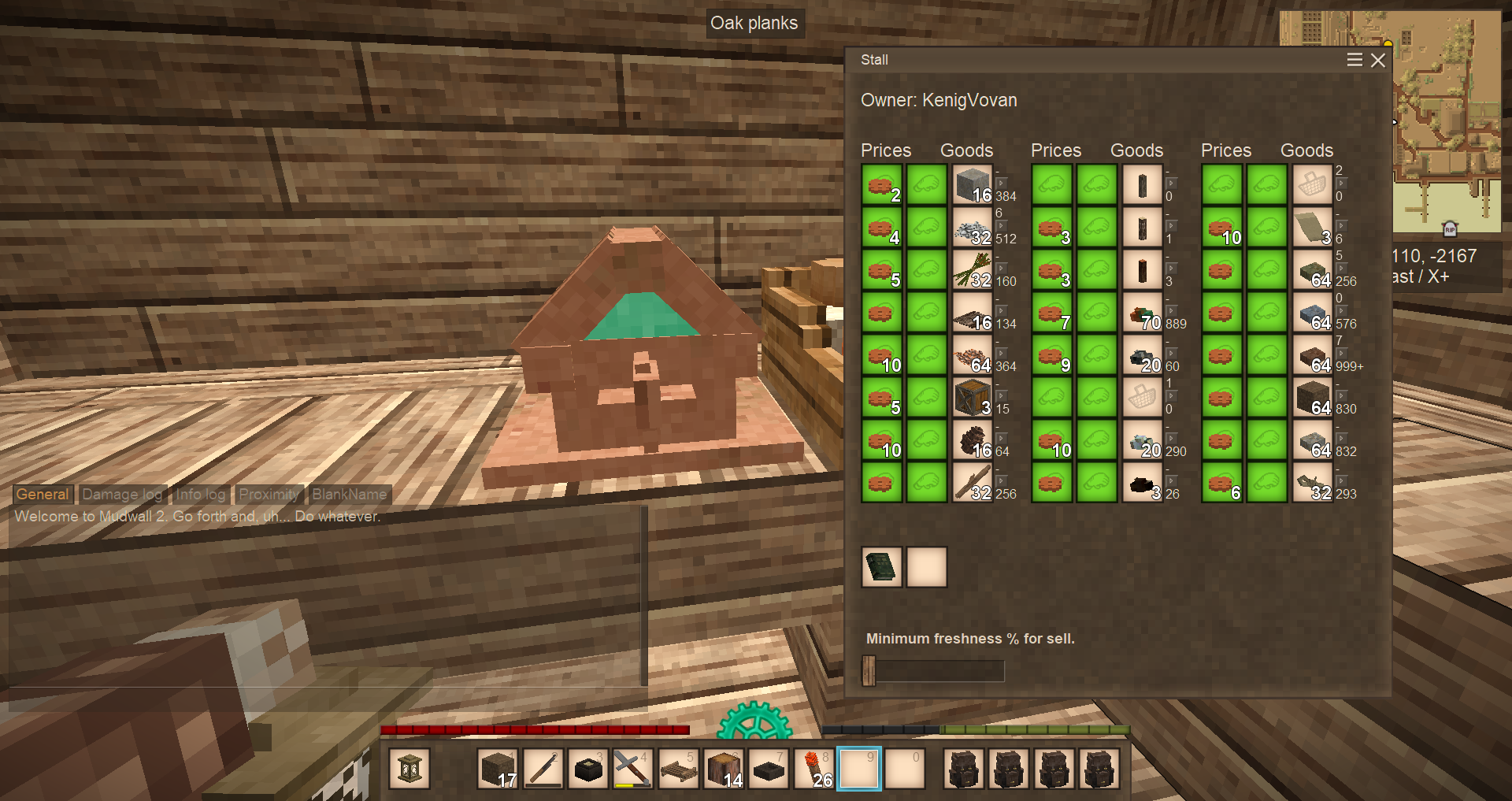
Set up a player-run shop: place a stall, decide what you sell and what you accept in return - any item or block can be the price - and other players can buy from you whether you're online or not. A linked warehouse keeps the stall stocked from your existing chests, and a freshness slider stops spoiled food from going on sale.
<table style="width: 100%; border-collapse: collapse; margin: 12px 0;"> <tbody> <tr> <td style="width: 50%; vertical-align: top; padding: 14px 16px; background: #fff8e7; border-radius: 6px; border: 1px solid #e0cfa6;">Market stalls
<span style="color: #2d2519;">Place a stall, fill in price-to-goods rows, and let buyers shop. Name your shop, owner-only price editing, per-trade max-stock, admin/creative infinite mode.</span></td> <td style="width: 10px;"> </td> <td style="width: 50%; vertical-align: top; padding: 14px 16px; background: #fff8e7; border-radius: 6px; border: 1px solid #e0cfa6;"> Warehouses
<span style="color: #2d2519;">Link a stall to a warehouse via signed book. The stall pulls goods from every chest, crate, display, toolrack, and storage vessel within radius; the stall shows the live link status.</span></td> </tr> <tr> <td style="height: 10px;" colspan="3"> </td> </tr> <tr> <td style="vertical-align: top; padding: 14px 16px; background: #fff8e7; border-radius: 6px; border: 1px solid #e0cfa6;"> Freshness control
<span style="color: #2d2519;">Per-stall freshness slider - spoiled food and aged perishables stay in the warehouse instead of being sold to unlucky buyers.</span></td> <td> </td> <td style="vertical-align: top; padding: 14px 16px; background: #fff8e7; border-radius: 6px; border: 1px solid #e0cfa6;"> Any-item pricing
<span style="color: #2d2519;">Set the price of any trade as any item or block. Three optional gear tiers (copper, silver, gold) ship with the mod for servers that want a token currency.</span></td> </tr> <tr> <td style="height: 10px;" colspan="3"> </td> </tr> <tr> <td style="vertical-align: top; padding: 14px 16px; background: #fff8e7; border-radius: 6px; border: 1px solid #e0cfa6;"> On-chest blocks
<span style="color: #2d2519;">Lighter alternative to a full stall - drop a trade block on top of an existing chest and sell directly from it.</span></td> <td> </td> <td style="vertical-align: top; padding: 14px 16px; background: #fff8e7; border-radius: 6px; border: 1px solid #e0cfa6;"> Land-claim aware
<span style="color: #2d2519;">Warehouses respect land claims - they only pull from containers the owner is authorized to use.</span></td> </tr> <tr> <td style="height: 10px;" colspan="3"> </td> </tr> <tr> <td style="vertical-align: top; padding: 14px 16px; background: #fff8e7; border-radius: 6px; border: 1px solid #e0cfa6;"> Shop management
<span style="color: #2d2519;">Lock editing so a stray click can't wipe a configured trade, hide empty rows from buyers, and disable individual trades while keeping their setup.</span></td> <td> </td> <td style="vertical-align: top; padding: 14px 16px; background: #fff8e7; border-radius: 6px; border: 1px solid #e0cfa6;"> Sales log & alerts
<span style="color: #2d2519;">Put a book in the stall to keep a running sales log, and optionally get a chat notification each time someone buys from your shop.</span></td> </tr> </tbody> </table> Quick start
- Craft and place a market stall (or an on-chest trade block on top of any chest).
- Optionally place a warehouse nearby; sign a warehouse book against it and put the book in the stall.
- Right-click the stall - set price item(s) and goods for each trade row, and give your shop a name.
- Set per-trade limits or pick
Inffor unlimited. - Adjust the freshness slider so spoiled goods are skipped.
- When you're done, flip Lock editing on so the configured slots can't be changed by accident.
What's in the box
Ratings & reviews
No ratings yet
Sign in to leave a rating or comment.