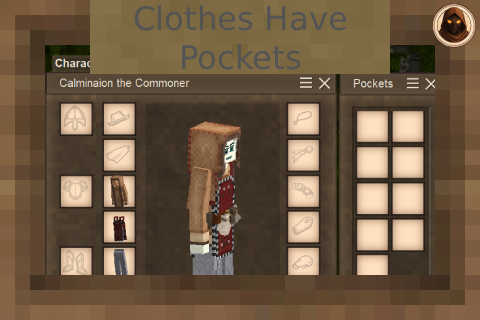
Clothes Have Pockets
Adds pockets (inventory slots) to various clothing items
Description
<div style="background-color: #1e1e1e; color: #f0f0f0; font-family: Georgia, serif; padding: 20px; line-height: 1.6; max-width: 1000px; margin: 20px auto;"><div style="border-bottom: 3px solid #b5893d; padding-bottom: 15px; margin-bottom: 25px;"><h1 style="color: #b5893d; font-size: 2rem; margin: 0 0 8px 0; text-transform: uppercase; letter-spacing: 2px;">Clothes Have Pockets</h1> <p style="color: #b0b0b0; margin: 0;">Wear trousers or a coat, get extra inventory slots</p> </div> <div style="margin-bottom: 30px;"> <h2 style="color: #b5893d; margin-top: 40px; margin-bottom: 20px; font-size: 1.5rem; text-transform: uppercase; font-weight: bold; text-decoration: underline;">How It Works</h2> <p style="margin: 0 0 10px 0;">Wear a garment with pockets and a Pockets panel appears beside your inventory. Fill the slots like any other. How many you get depends on what you are wearing.</p> <p style="margin: 0 0 10px 0;">Take a garment off and its pockets empty out. The contents go into your inventory, or drop at your feet if there is no room. Nothing is ever left hidden inside a coat sitting in a chest.</p> <p style="margin: 0;">Pockets are part of your inventory as far as the game is concerned. Food spoils and freezes in them at the normal rate, and other mods that work on your inventory can reach them.</p> </div> <div style="margin-bottom: 30px;"> <h2 style="color: #b5893d; margin-top: 40px; margin-bottom: 20px; font-size: 1.5rem; text-transform: uppercase; font-weight: bold; text-decoration: underline;">Screenshots & GIFs</h2> <div style="display: flex; flex-wrap: wrap; gap: 14px; margin-bottom: 25px;"> <div style="flex: 1 1 420px;"><img style="max-width: 100%; height: auto; border: 1px solid #7a5c28; border-radius: 6px; margin-bottom: 8px;" src="https://media.giphy.com/media/e7gboyf4PxYlv4MGRN/giphy.gif" alt="The Pockets panel"> <p style="color: #b0b0b0; font-size: 0.9rem; font-style: italic; margin: 0;">The Pockets panel sits beside your inventory.</p> </div> <div style="flex: 1 1 420px;"><img style="max-width: 100%; height: auto; border: 1px solid #7a5c28; border-radius: 6px; margin-bottom: 8px;" src="https://media.giphy.com/media/0Pw1d6mX7xCamsGkme/giphy.gif" alt="Pocket count on the tooltip"> <p style="color: #b0b0b0; font-size: 0.9rem; font-style: italic; margin: 0;">Every garment tells you how many pockets it has.</p> </div> </div> </div> <div style="margin-bottom: 30px;"> <h2 style="color: #b5893d; margin-top: 40px; margin-bottom: 20px; font-size: 1.5rem; text-transform: uppercase; font-weight: bold; text-decoration: underline;">Requirements</h2> <p style="margin: 0 0 10px 0;"><strong>Vintage Story 1.22+. No dependencies.</strong></p> <p style="margin: 0 0 10px 0;">This version does not need Player Inventory Lib. The mod was rebuilt from scratch to stand on its own after that library was put into draft, and it patches no game code, so nothing else has to be installed.</p> <p style="margin: 0;"><strong>Servers must run the same version as clients.</strong></p> </div> <div style="background-color: #2a2a2a; border: 1px solid #7a5c28; border-radius: 8px; padding: 15px; margin-bottom: 30px;"> <p style="margin: 0;"><strong style="color: #d1a457;">Before removing the mod, empty your pockets.</strong> Pocket contents are stored on your character. Uninstalling leaves anything still in them unreachable.</p> </div> <div style="margin-bottom: 30px;"> <h2 style="color: #b5893d; margin-top: 40px; margin-bottom: 20px; font-size: 1.5rem; text-transform: uppercase; font-weight: bold; text-decoration: underline;">Controls & Settings</h2> <p style="margin: 0 0 10px 0;">The panel opens with your inventory. There is also a <strong>Show Pockets</strong> hotkey (O by default, rebindable in Controls) which works either way.</p> <p style="margin: 0 0 10px 0;">Settings live in <em>ModConfig/ClothesHavePockets.json</em>, and can also be changed in game through <strong>Integrated Mod Manager</strong> (type <em>.imm</em> in chat), <strong>ConfigKit</strong> (press P, or <em>Mod settings</em> in the pause menu) or <strong>ConfigLib</strong>. None of them are required, and only one should be installed at a time.</p> <p style="margin: 0 0 10px 0;"><strong>Every setting is yours.</strong> Nothing is decided by the server, and every change applies the moment you save - no relog.</p> <ul style="list-style-type: none; padding-left: 0; margin: 10px 0;"> <li style="position: relative; padding-left: 25px; margin-bottom: 10px;"><span style="color: #b5893d; font-weight: bold; font-size: 1.2rem; position: absolute; left: 5px; top: -2px;">•</span> <strong>OpenWithInventory</strong> - whether the panel appears alongside the inventory screen. Turn it off to use only the hotkey.</li> <li style="position: relative; padding-left: 25px; margin-bottom: 10px;"><span style="color: #b5893d; font-weight: bold; font-size: 1.2rem; position: absolute; left: 5px; top: -2px;">•</span> <strong>UnbindFromInventoryWithImmersiveInventorySlots</strong> - see below.</li> <li style="position: relative; padding-left: 25px; margin-bottom: 10px;"><span style="color: #b5893d; font-weight: bold; font-size: 1.2rem; position: absolute; left: 5px; top: -2px;">•</span> <strong>TryPlayerInventoryBeforeDropping</strong> - when a garment comes off, put its pocket contents into your inventory first and drop only what does not fit. On by default, so changing clothes over water does not cost you anything. Applies to your character alone.</li> </ul> <p style="margin: 0;"><strong>On death</strong>, pockets follow your server's own rule - <em>/worldconfig deathPunishment</em> - exactly like the rest of your inventory: <em>keep</em> keeps them, <em>drop</em> drops them where you fell. There is no separate setting for it.</p> </div> <div style="margin-bottom: 30px;"> <h2 style="color: #b5893d; margin-top: 40px; margin-bottom: 20px; font-size: 1.5rem; text-transform: uppercase; font-weight: bold; text-decoration: underline;">Immersive Inventory Slots</h2> <p style=
Ratings & reviews
Sign in to leave a rating or comment.